Access your Back Office at your fingertips.
Download the app now on Google Play Store.
Scan the QR code
You can also scan QR code with your phone to download the app.
Contacting or messaging your dedicated account manager
Updated
On this page
Accessing your account manager or lender’s support team is essential when you need timely support, clarification on your account, or help resolving issues. The Lendsqr customer app makes this process straightforward by providing a dedicated Support section where you can view your lender’s contact details.
This guide explains how to locate and contact support from your customer app, along with important requirements, limitations, and best practices to ensure a smooth experience.
Before attempting to access support, ensure the following conditions are met:
You have a registered and active account with your lender’s customer app.
You are logged into the application using valid credentials (your registered phone number and password).
Step 1: Log in to your account
Start by accessing your lender’s customer web app through your browser (for example, https://your-lender.lsq.app).
Enter your registered phone number.
Input your password.
Once logged in, you will be redirected to your Home dashboard, where you can access account-related features.
Step 2: Open the profile menu
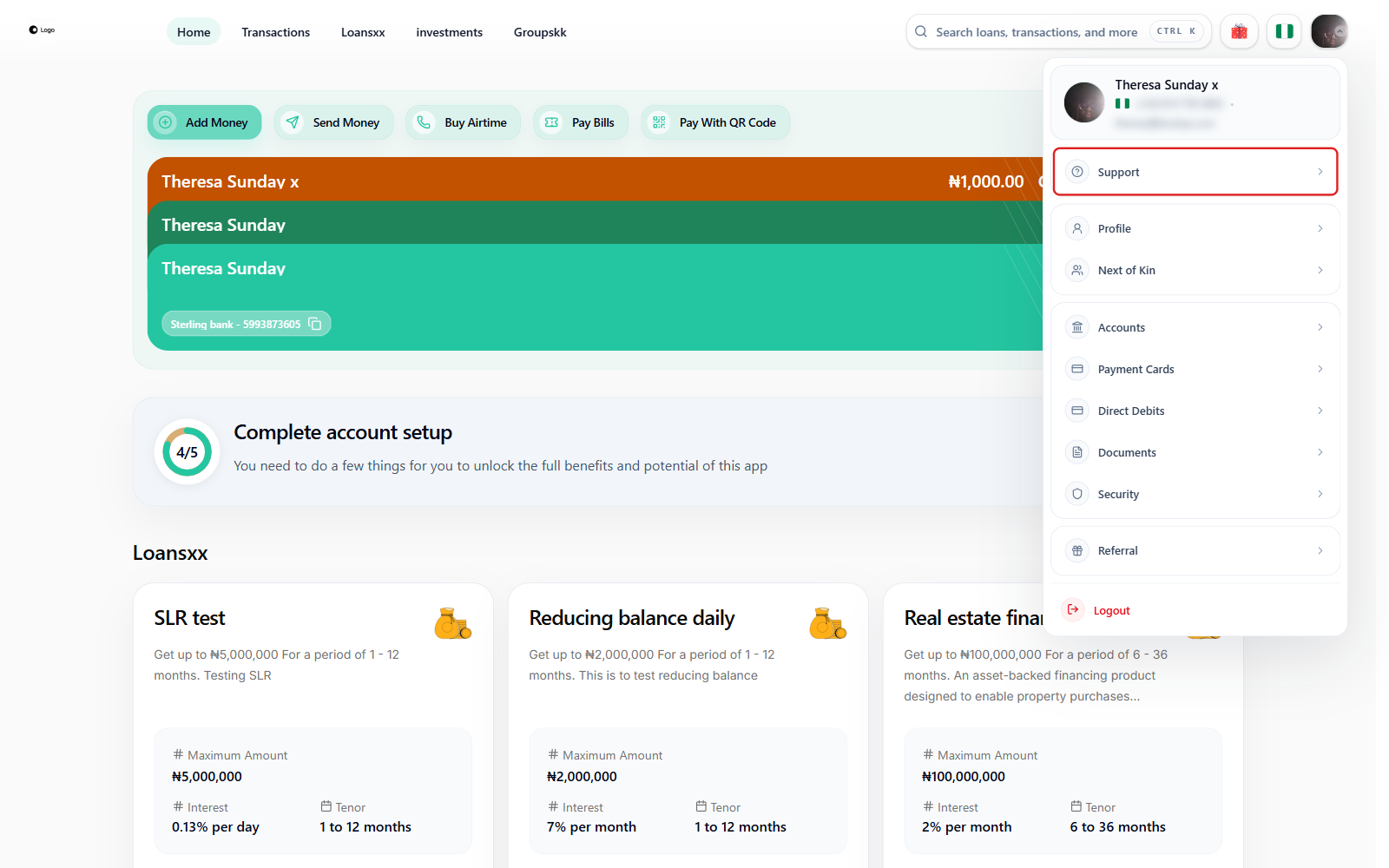
To locate support, open the profile menu from the top navigation.
Look at the top right corner of your screen.
Click on your profile photo/name in the top right corner.
From the menu that opens, select “Support.”
Step 3: View your support contact details and account manager
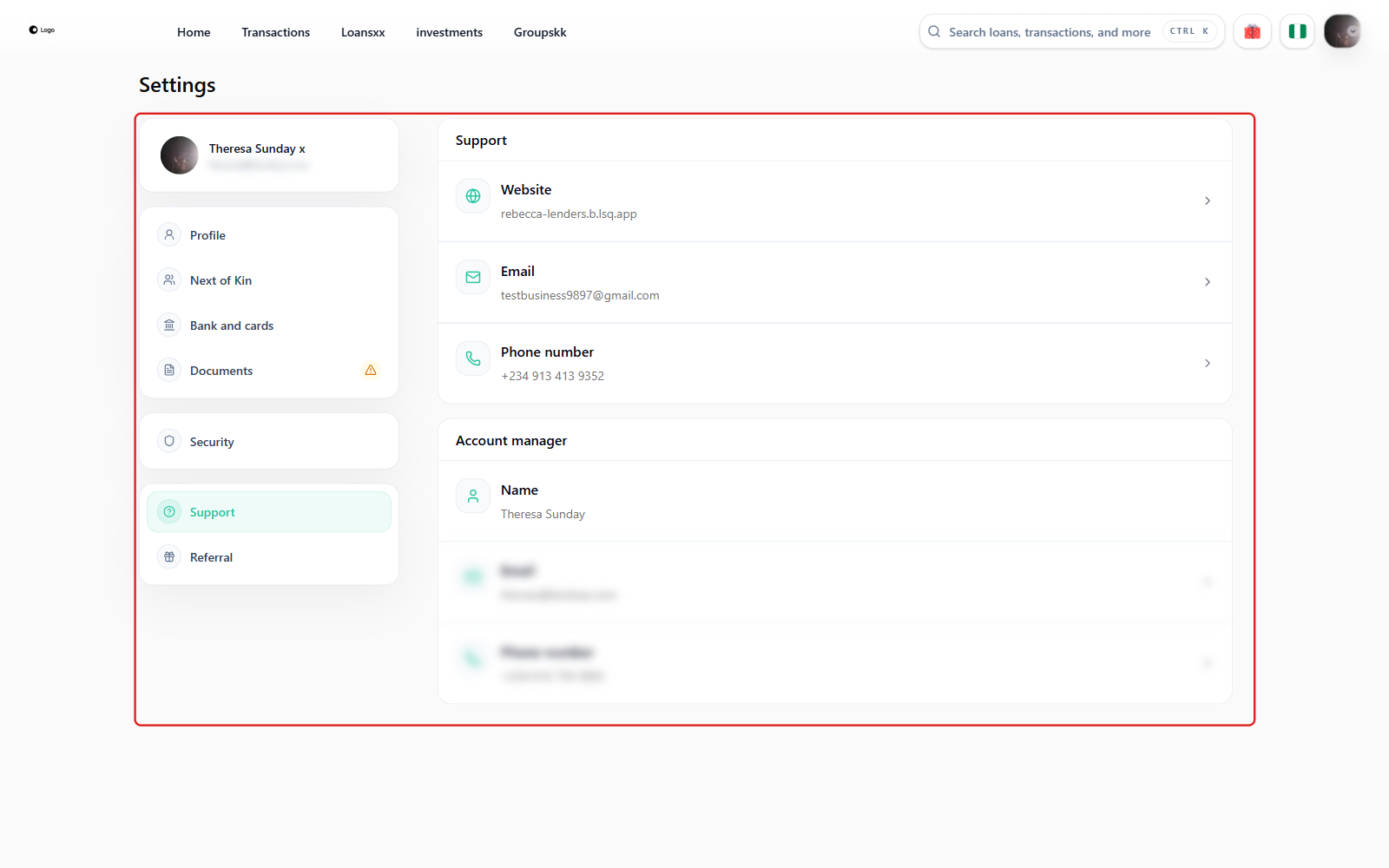
The Support page has two sections. The first, Support, lists the general contact channels your lender has made available to all customers, typically:
Website — your lender’s own web address, for general information.
Email, which you can use for formal communication or detailed inquiries.
Phone number, which allows for quicker, real-time support when urgent issues arise.
Tapping the email or phone row opens your device’s default email or dialer app so you can reach out directly.
Below that, if your lender has assigned you a dedicated account manager, a second Account manager section appears with that person’s Name, Email, and Phone number, so you can reach them directly rather than going through general support. If no account manager has been assigned to your account yet, this section does not appear on the page.
Having direct access to this information reduces delays and ensures that your concerns are handled efficiently. Whether you reach out through the general Support contact or directly through your Account manager card, either is a correct place to start when you need help.
When to contact support
Your lender’s support contacts are your primary point of contact for help and guidance. You should consider reaching out in the following situations:
You are experiencing issues with loan applications or repayments.
You need clarification on account activity or transactions.
You require assistance with platform features or navigation.
You want to escalate a complaint or unresolved issue.
You need guidance on optimizing your use of the platform.
For non-urgent inquiries, email is usually the best option. For time-sensitive matters, calling may provide faster resolution.
Best practices for effective communication
To get the most out of your interaction with support, follow these practical tips:
Be clear and specific about your issue. Include relevant details such as dates, transaction references, or screenshots if applicable.
Use a professional tone, especially when communicating via email.
Consolidate your questions into a single message where possible to avoid fragmented communication.
Allow reasonable response time before following up, especially during non-business hours.
Keep a record of your communication for future reference.
These practices help your lender’s team understand your issue quickly and provide accurate solutions.
Common issues and how to resolve them
You may encounter situations where reaching support is not straightforward. Below are some common issues and suggested solutions:
Incorrect or outdated contact details: report this issue through your lender’s alternative channels so it can be updated.
Delayed responses: follow up politely after a reasonable time or try an alternative contact method such as phone if available.
Login issues: use “Forgot Password?” on the login screen, or contact your lender directly if you cannot access your account at all.
Addressing these issues early can prevent disruptions in communication.