Access your Back Office at your fingertips.
Download the app now on Google Play Store.
Scan the QR code
You can also scan QR code with your phone to download the app.
Introduction to Lendsqr’s configurable services
Updated
On this page
Modern lending increasingly extends beyond traditional loan products. Borrowers today often expect access to additional financial services that support everyday financial needs, improve financial inclusion, and create more personalized lending experiences. As customer expectations evolve, lenders require flexible tools that allow them to offer services beyond credit disbursement while maintaining operational control.
Lendsqr’s configurable services feature addresses this need by allowing lenders to create custom workflows that borrowers can request directly from the app. Rather than limiting borrowers to fixed platform experiences, lenders can define service types, configure approval processes, determine pricing structures, and customize the borrower journey according to operational goals.
These configurable services may include rent reporting, utility bill payments, insurance requests, subscription-based offerings, or other lender-defined workflows. Because lenders maintain control over how services are structured, this feature creates opportunities to design flexible financial experiences tailored to borrower needs.
Additionally, configurable services can be customized to align with organizational preferences using structured workflows that determine how borrowers interact with services, what information is collected, when charges apply, and how approvals are handled.
Configurable services are workflows defined by lenders that allow borrowers to request specific services directly within the application.
Unlike standard lending operations, which generally revolve around loan applications and repayments, configurable services expand the lender-borrower relationship by introducing additional service offerings. These services are fully customizable and may be adapted to fit unique operational requirements.
For example, a lender focused on housing finance may offer rent reporting services that help borrowers build stronger financial profiles. Another lender may create utility bill payment support services that allow borrowers to request assistance with recurring expenses. Insurance providers working with lending organizations may also build workflows for policy requests or premium-related support.
The flexibility of configurable services means lenders are not restricted to predefined templates. Instead, organizations define service workflows, approval requirements, subscription settings, pricing structures, communication flows, and data collection requirements according to business needs.
At a practical level, this enables lenders to create more personalized borrower experiences while maintaining operational efficiency and oversight.
Why configurable services matter
Borrowers increasingly expect lenders to provide more than access to credit. Competitive financial institutions now focus on creating broader ecosystems that support customer needs across multiple financial touchpoints.
Configurable services help lenders diversify offerings without requiring entirely new infrastructure or separate applications.
For example, a lender may notice that many borrowers struggle with utility bill consistency. Instead of responding only through loans, the organization may create a structured utility payment request service that borrowers can access directly from the app.
Similarly, subscription-based rent reporting services may help borrowers improve financial standing over time while strengthening long-term engagement between lenders and customers.
Operational flexibility is another major benefit. Because workflows are structured and customizable, lenders can define exactly how services should function, what approvals are required, what fees apply, and what borrower information should be collected.
This adaptability allows lenders to experiment with new service models while maintaining full operational control.
Where to find configurable services
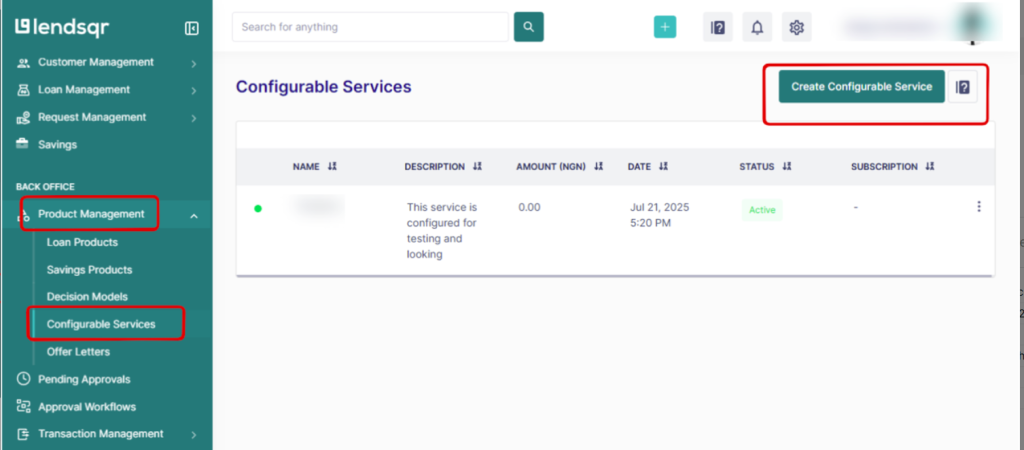
The configurable services feature is located within the Product Management section of the Lendsqr admin console.
To access this feature, navigate to the admin console menu and locate Product Management. Under this section, click Configurable Services.
After opening the page, select Create Configurable Service to begin defining a new borrower workflow.
This section serves as the operational hub for creating, reviewing, and managing lender-defined services.
Key components of a configurable service
Before creating a configurable service, it is important to understand the various elements that determine how the workflow behaves.
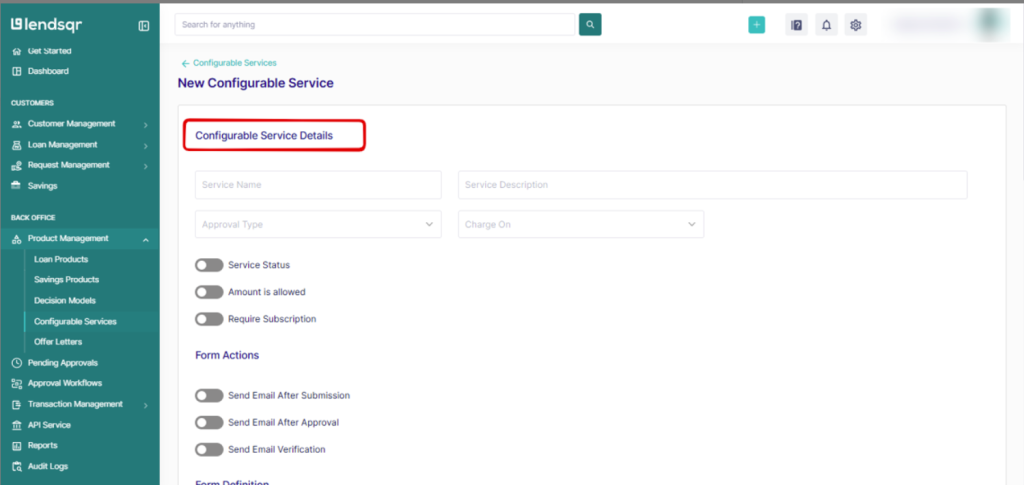
Configurable service details
The first section involves foundational service information.
Name
The service name identifies the offering visible to borrowers. A clear and descriptive title improves understanding and reduces confusion.
For example, names such as “Rent Reporting Support” or “Utility Bill Assistance” provide borrowers with immediate clarity regarding service purpose.
Description
The description provides a short explanation of the service and its intended use.
Strong descriptions help borrowers understand eligibility expectations, required information, and service outcomes. Clear communication at this stage can reduce customer support inquiries and improve request completion rates.
Approval type
Approval type determines how service requests are processed once submitted.
Depending on lender preferences, requests may trigger either manual approval or automatic approval workflows. Manual approvals allow organizations to maintain additional oversight for sensitive requests, while automatic approvals support faster service delivery for lower-risk offerings.
This flexibility ensures lenders maintain the right level of operational control for each service type.
Charge on
This setting determines when borrowers are charged service fees.
Lenders can choose to charge immediately after submission or only after approval. The right option often depends on service complexity and operational requirements.
For example, lenders offering verification-intensive services may prefer approval-based charging to avoid billing borrowers before eligibility confirmation.
Service status
Service status controls visibility within the borrower-facing web application.
When active, borrowers can view and interact with the service. When inactive, the service remains hidden and unavailable to users.
This setting provides operational flexibility, particularly during testing, maintenance, or temporary service suspensions.
Understanding subscription details
Configurable services can also support subscription-based pricing models.
This functionality enables lenders to collect recurring fees for services requiring continued access or ongoing engagement.
Require subscription
Enabling the Require Subscription option activates subscription functionality for the service.
Once enabled, lenders must configure additional subscription details to define pricing and usage limitations.
Subscription tenor
Subscription tenor specifies the duration of the subscription period.
This setting determines how long a borrower maintains access to the service before renewal becomes necessary. Subscription periods may vary depending on service objectives and pricing strategies.
Maximum subscriptions
Maximum subscriptions determine how many times a borrower may be charged for the subscription.
This feature helps lenders maintain better control over recurring billing structures while avoiding unintended overcharging scenarios.
Amount
The amount field defines the subscription fee collected in the lender’s local currency.
Pricing should align with the perceived value of the service and remain transparent to borrowers to maintain trust.
Form actions and communication settings
Form actions determine what happens after a borrower submits a service request.
Lenders can configure additional workflow details and define when verification emails are sent. Depending on operational requirements, email notifications may be triggered immediately after submission or only after approval.
For example, submission emails may reassure borrowers that requests have been received, while approval notifications may communicate next steps or additional requirements.
Automated communication improves borrower experience while reducing operational workload for support teams.
Understanding form data and JSON logic configuration
Form data refers to the configurable service form borrowers complete when requesting a service.
This form collects responses from customers, which are then reviewed and processed as part of the service request workflow.
Because every service may require different information, configurable forms support customization through JSON logic. This structure allows lenders to define how data is collected and organized according to service-specific requirements.
For example, a utility payment request may require billing account details, while an insurance request may require policy information and supporting documentation.
Thoughtful form design improves efficiency by ensuring organizations collect relevant information upfront.
For additional support regarding form data configuration, contact [email protected].
The fees feature allows lenders to configure and manage extra charges associated with configurable services.
When enabled, lenders can define additional fees that apply when borrowers request a service. This creates better pricing transparency while giving organizations more flexibility over how services are monetized.
For example, a lender offering expedited processing for rent reporting may apply additional administrative charges depending on service conditions.
Clearly communicating fees to borrowers helps improve trust and reduce misunderstandings during service requests.
How to create a configurable service
Creating a configurable service within Lendsqr follows a structured process.
Step 1: Navigate to configurable services
Log into the admin console and open Product Management from the side navigation menu. Select Configurable Services to access the service management page.
Step 2: Create a new service
Click Create Configurable Service to begin setup.
Step 3: Configure service information
Enter service details including name, description, approval type, charging rules, and service status.
Step 4: Configure subscriptions and fees
If required, enable subscription functionality and define tenor, pricing, and maximum subscription settings. Configure additional fees where applicable.
Step 5: Build form actions and form data
Set communication rules and design the borrower-facing form using JSON logic configuration.
Step 6: Review and publish
Review all settings carefully before activating the service. Once enabled, borrowers can begin submitting requests through the app.
As borrower expectations continue to evolve, configurable services provide lenders with the flexibility to build more personalized, scalable, and value-driven experiences. By combining structured workflows, subscription models, approval systems, and customizable forms, lenders can create tailored service offerings that strengthen customer engagement while maintaining operational control.