Access your Back Office at your fingertips.
Download the app now on Google Play Store.
Scan the QR code
You can also scan QR code with your phone to download the app.
Security checks when onboarding customers
Updated
On this page
Every new borrower who signs up on your lending platform is a risk decision. Some are genuine applicants. Others attempt to sign up with stolen identities, fake documents, or another person’s photo. Without the right checks at onboarding, a fraudulent borrower can create an account, apply for a loan, and disappear before your team notices anything wrong.
Lendsqr builds three security checks directly into the customer onboarding flow: liveness detection, selfie comparison, and document verification. These checks run automatically during account creation. They reduce fraud before any loan request reaches your team.
This guide explains what each check does, how it affects the onboarding experience, and when lenders should enable stricter verification based on their product risk level.
Why onboarding is the most important point for fraud prevention
Fraud in digital lending rarely starts at the loan approval stage. It starts at account creation. A fraudster who successfully creates an account with someone else’s identity can then apply for loans, exploit your credit criteria, and leave the real person with debt they did not incur.
Catching fraud at onboarding is significantly cheaper than catching it after disbursement. A failed liveness check costs nothing beyond the rejection. A fraudulent disbursement costs you the loan amount, the recovery effort, and potentially a regulatory inquiry.
The security checks on Lendsqr create friction for bad actors while keeping the experience smooth for legitimate borrowers. A real person completing a genuine registration moves through these checks in seconds. A fraudster using a stolen photo or pre-recorded video does not pass.
The three onboarding security checks on Lendsqr
Liveness detection at registration
Liveness detection confirms that the person registering on your platform is physically present during onboarding. Lendsqr prompts the user to complete a real-time action, such as a movement or facial expression, that a static photo or pre-recorded video cannot replicate.
This check runs by default on Lendsqr web apps and selected mobile apps for all lenders. You do not need to configure it separately to get basic liveness protection.
Liveness detection matters most for lenders serving large or anonymous borrower populations. Consider a fintech offering personal loans through a self-service web app. Without liveness checks, a fraudster with a stolen NIN and a high-resolution selfie photo can attempt registration. With liveness checks, that attempt fails at the first verification step.
After a borrower completes initial registration, Lendsqr stores their verified selfie and links it to their identity record. If that borrower later tries to update their selfie, Lendsqr compares the new image to the original verified ID photo already on file, such as a BVN photo.
If the new selfie does not match the existing record, the system blocks the update. The borrower cannot swap their profile photo to a different person’s face.
This check addresses a specific fraud pattern called profile takeover. In this scenario, a fraudster gains access to a legitimate borrower’s account and tries to replace the selfie with their own photo to continue operating the account. Lendsqr’s image comparison check catches this attempt before the update goes through.
For lenders who see unusually high numbers of selfie update attempts on their platform, this check provides an automated control without requiring your team to review each request manually.
Document verification at the loan application
When a borrower uploads an identity document during a loan application, Lendsqr runs two checks. First, it verifies the document format to confirm it matches a recognized ID type. Second, it compares the photo on the document to the borrower’s existing profile photo.
If the document format does not match or the photo on the document belongs to a different person, the system rejects the upload immediately. The borrower must resubmit a valid document before the application can proceed.
This check stops a common fraud tactic where a borrower submits a legitimate application using their own account but uploads someone else’s identity document to try to pass verification steps. The mismatch triggers an automatic rejection without requiring manual intervention from your team.
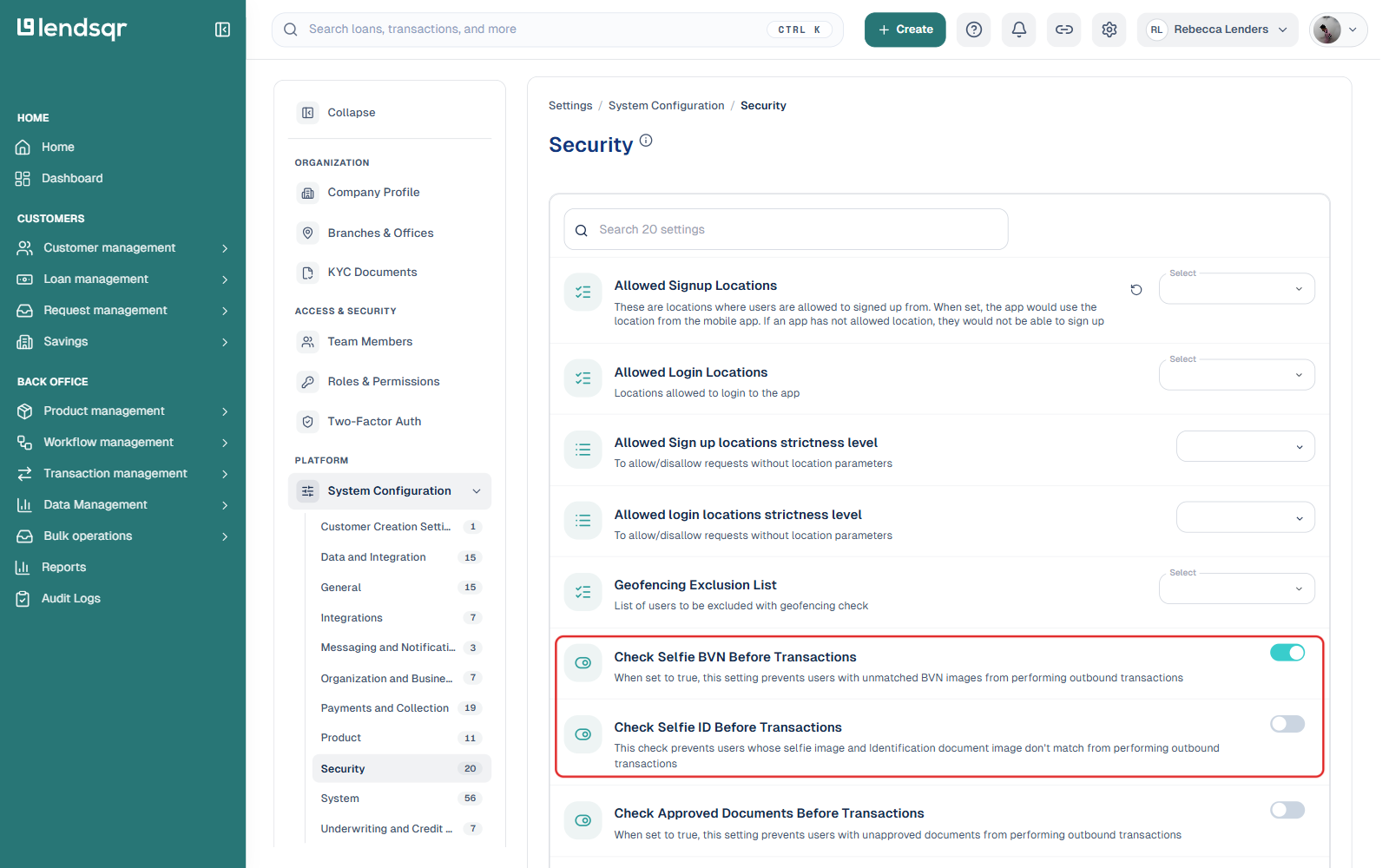
Other security checks and settings can be found within the Security category, under Settings > System Configuration in the admin console. This is also where the related “Check Selfie BVN Before Transactions” and “Check Selfie ID Before Transactions” toggles live, which apply the same identity-matching logic described above to outbound transactions rather than onboarding or document upload.
Practical onboarding scenarios by lender type
A consumer lender with a fully digital product and no agent network: Every borrower registers without any human oversight. This creates the highest fraud exposure. Enable all three checks. Require liveness at registration, image comparison for any profile changes, and document verification for every loan application. The automated controls act as your first line of defence.
A lender running payroll-backed loans for salaried employees: Your borrowers share a known employer, which reduces anonymity risk. Document verification still matters here because stolen employee credentials are a real threat in closed lending environments. Enable document verification. Consider liveness optional if your employer partner verifies employee identity during enrollment. Use How to use tiers to manage customer KYC to apply different verification requirements to different borrower groups.
A microfinance lender with field agents who onboard customers in person: Your agents physically meet borrowers, which provides some natural fraud deterrence. Still, identity swapping after initial onboarding is possible. Enable image comparison to prevent profile takeovers. Enable document verification for loan applications. You may reduce liveness requirements for agent-assisted onboarding where a human is already present. See How to customize NIN verification for your customers for further configuration options.
A lender launching a new product with a high loan ceiling: Higher loan amounts attract more sophisticated fraud attempts. Apply all three checks without exception. Also consider adding extra KYC document requirements and enabling transaction security controls. See Security conditions for transfer and other outbound transactions on Lendsqr for how to secure disbursement and withdrawal flows on top of onboarding checks.
How onboarding checks connect to your broader risk controls
Onboarding security checks are the first layer of your fraud prevention strategy, not the only one. A borrower who passes all three checks is verified. They are not automatically low risk for credit purposes.
After onboarding, your credit risk rule applies credit and behavioural checks to each loan application. See What are credit risk rules on Lendsqr? to understand how these work.
Lendsqr also checks new borrowers against the Karma database, which flags individuals previously identified as bad actors across the Lendsqr ecosystem. A borrower who passes your onboarding checks but appears in Karma can still trigger a loan decline. See What is Karma on the Lendsqr admin console? for details.