Access your Back Office at your fingertips.
Download the app now on Google Play Store.
Scan the QR code
You can also scan QR code with your phone to download the app.
How to withdraw from your disbursement account
Updated
On this page
A disbursement account is the account that lenders use to manage the distribution of funds to their borrowers. When you approve a loan on Lendsqr, the system draws from your disbursement account to credit the borrower’s bank account or wallet. This account sits at the centre of your lending operation: it holds the capital you deploy, and it receives repayments as borrowers pay back their loans.
From time to time, you may need to move funds out of your disbursement account and back to your nominated settlement account or another bank account. This could be to rebalance your available capital, manage your liquidity, cover operational expenses, or simply reconcile your accounts at the end of a business cycle.
Lendsqr requires Two-Factor Authentication (2FA) to be active on your administrator account before you can initiate any withdrawal from your disbursement account. This security measure protects your funds by ensuring that only verified administrators can authorise outbound transfers.
This guide explains how the disbursement account works, why 2FA is required, how to set it up if you have not done so already, and how to complete the full withdrawal process step by step.
What is a disbursement account?
Your disbursement account is a dedicated financial account within the Lendsqr ecosystem that holds the funds you use to disburse loans to your borrowers. When you fund your disbursement account and approve a loan, the system automatically debits the disbursement account and credits the borrower’s account.
The disbursement account also serves as the receiving account for repayments that borrowers make. As borrowers repay their loans, the repayment amounts flow back into the disbursement account, which builds up your balance over time and makes those funds available for disbursing new loans or for withdrawal.
Because the disbursement account holds your active lending capital, managing it carefully is important. You need enough balance to fund new loans as they are approved, but you may also want to periodically withdraw surplus funds or rebalance your accounts as part of your financial management routine.
You can view your disbursement account balance, transaction history, and recent activity at any time through the disbursement dashboard on the admin console.
Why Two-Factor Authentication is required for withdrawals
Two-Factor Authentication (2FA) is a security layer that requires you to verify your identity using two separate methods before completing a sensitive action. On Lendsqr, withdrawals from your disbursement account are considered sensitive outbound transactions, and 2FA is mandatory for all of them.
The requirement exists for practical reasons:
It protects against unauthorised withdrawals. If your admin account credentials were ever compromised, 2FA prevents a bad actor from draining your disbursement account. Even with your email and password, they would not be able to complete the withdrawal without access to your 2FA device.
It ensures the person authorising the transfer is verified. Because disbursements involve real money leaving your account, Lendsqr adds an extra step to confirm that the person making the request is a legitimate, verified administrator and not someone acting without authority.
It creates an auditable security record. Each withdrawal attempt with 2FA generates a log that ties the transaction to a verified authentication event. This supports your internal audit trail and can be useful during financial reviews or investigations.
Before you begin the withdrawal process, confirm that 2FA is active on your administrator account. If you have not set it up yet, complete that setup first. The next section explains how.
How to set up Two-Factor Authentication before withdrawing
If 2FA is not yet active on your account, you must set it up before you can proceed with any withdrawal. Follow the steps below to activate it.
Step 1: Open the Settings page
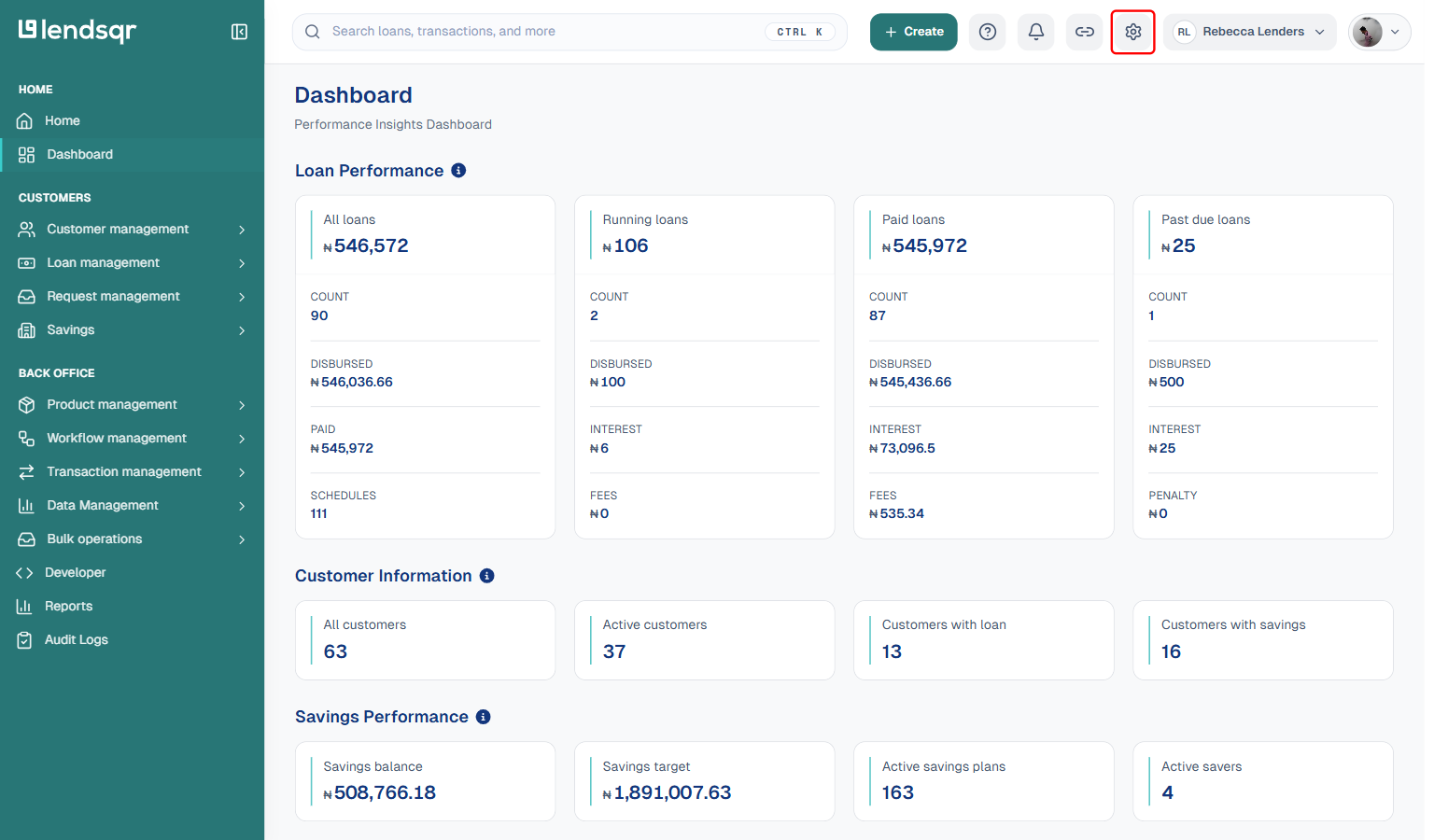
Log in to the Lendsqr admin console at app.lendsqr.com. Once you are on the dashboard, locate and click the Settings icon at the top of the page. The Settings page loads with a list of account and security options.
Step 2: Navigate to Two-Factor Authentication
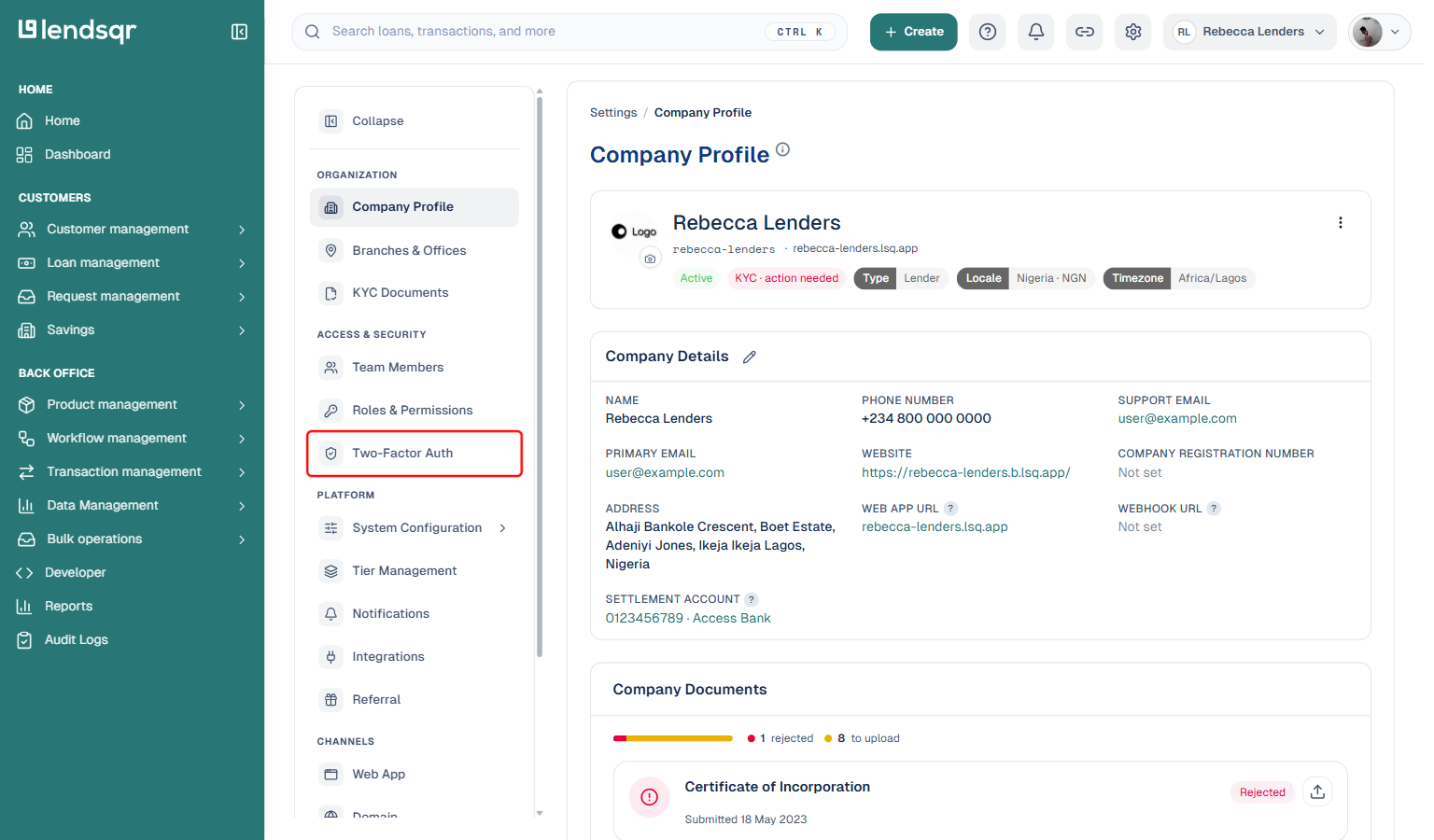
On the Settings page, look under the Access & Security section for the option labelled “Two-Factor Auth”. Click on it. This opens the 2FA setup screen, which walks you through the process of activating the feature on your account.
Step 3: Complete the 2FA activation process
Follow the on-screen instructions to link your preferred 2FA method to your account. Once activated, you will receive an authentication code each time you initiate a withdrawal or another sensitive action, and you will need to enter that code to complete the transaction.
How to withdraw from your disbursement account
Step 1: Verify that you have Two-Factor Authentication (2FA) set up for your account.
If you haven’t already done so, you can set it up by following these steps:
Click on the Settings Icon
Under Access & Security, find the “Two-Factor Auth” option and select it to activate 2FA.
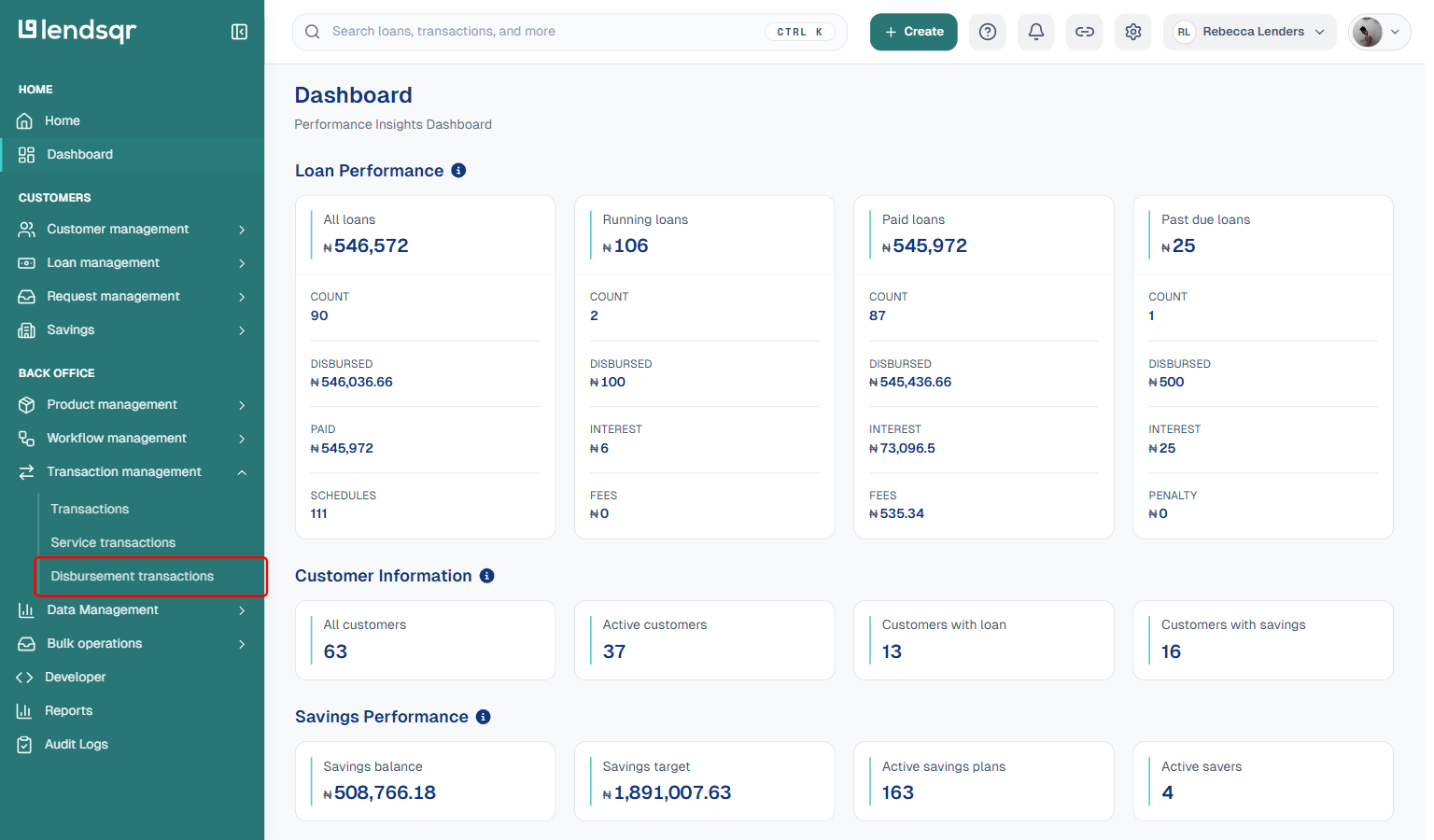
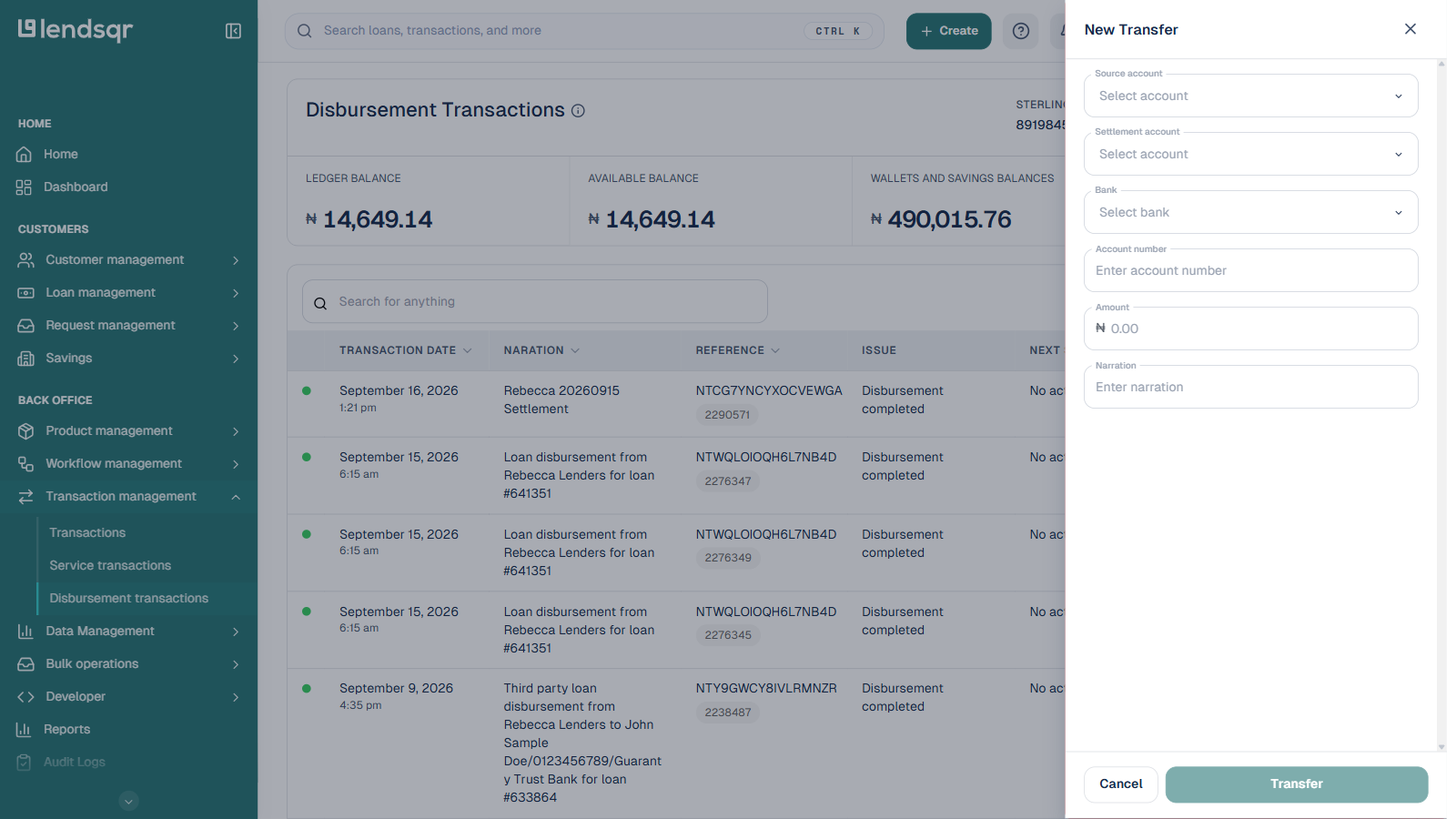
Step 2: Go to the “Transactions Management” grouping in the side navigation pane and select “Disbursement Transactions”
Once 2FA is set up, go to the Transactions Management grouping in the side navigation pane and select Disbursement Transactions.
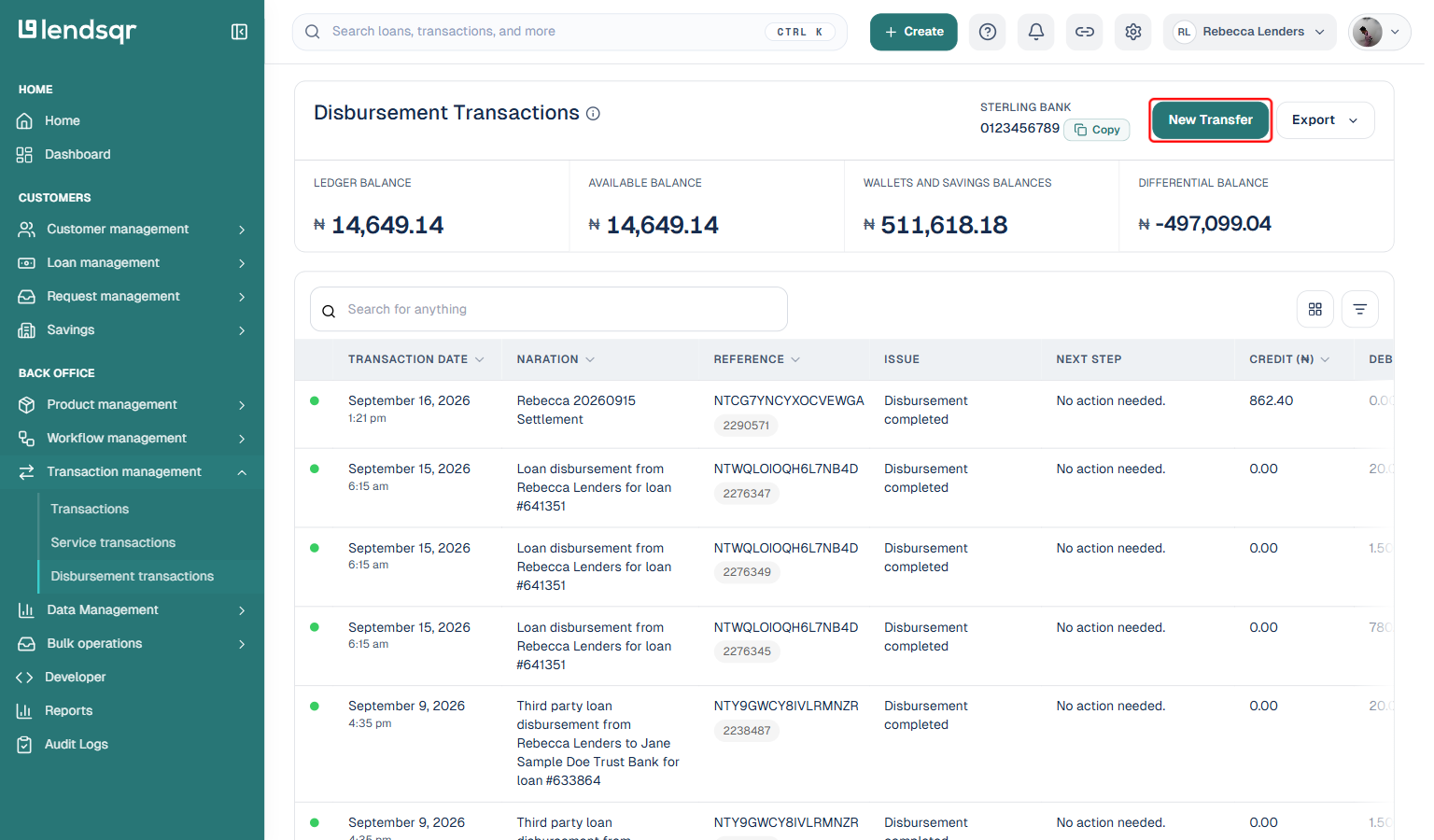
On the Disbursement page, find the New Transfer button and select it.
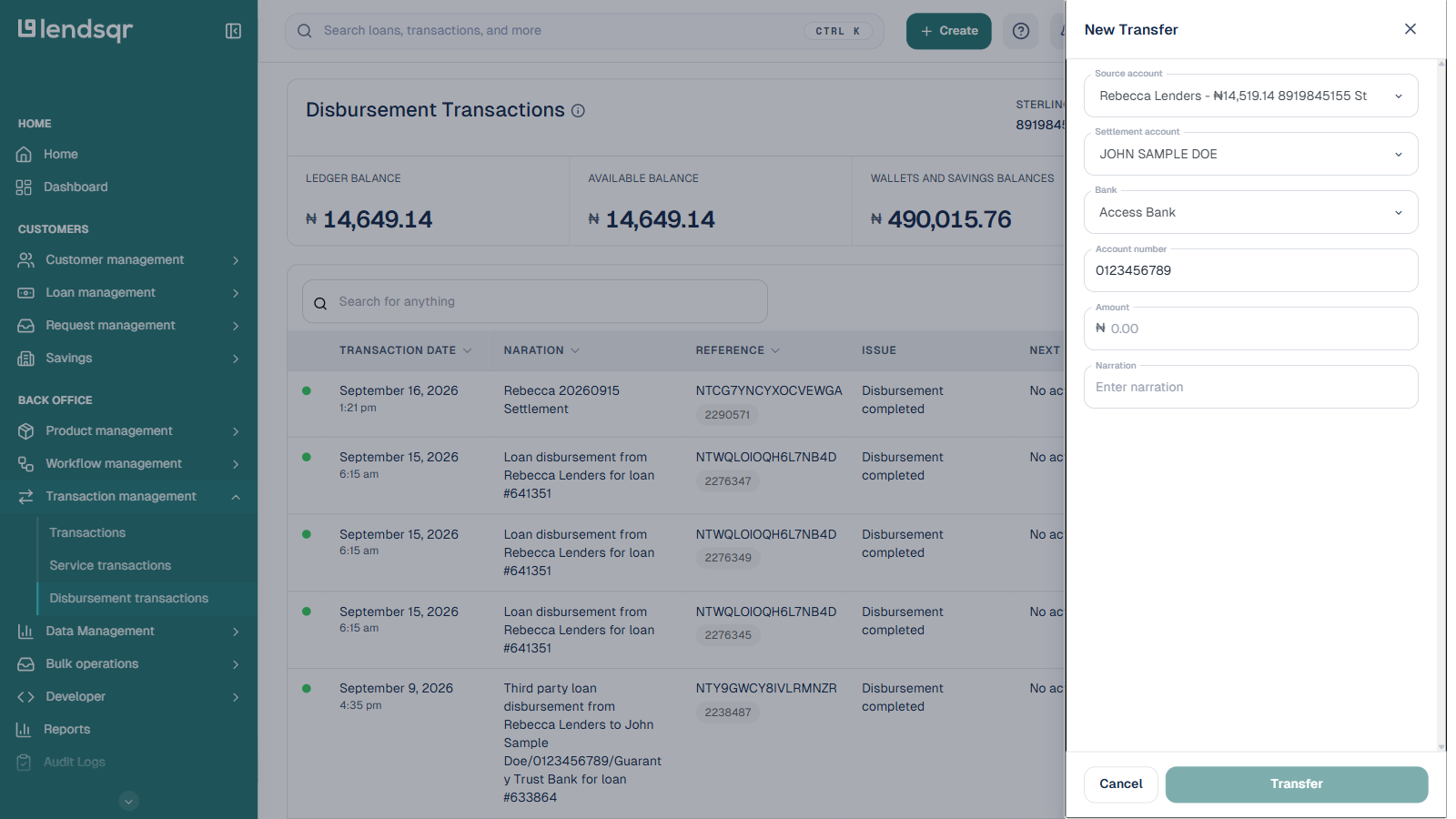
Choose the default source account and the settlement account from the options.
Enter the amount and narration, then click the Transfer button.
You will be prompted to provide an authentication code. Enter this to complete the withdrawal process.
What happens after you complete a withdrawal
Once the withdrawal is successfully processed, the following outcomes apply:
Your disbursement account balance reduces. The amount you withdrew is immediately deducted from your disbursement account balance. You can verify this by checking the account balance on the Disbursement Transactions page.
The transaction appears in your transaction history. The completed withdrawal appears as a record in your disbursement transaction history. You can view it, filter by date or type, and download a transaction statement for your records.
The funds are credited to your settlement account. The withdrawn amount is transferred to the settlement account you selected during the transfer process. The timing of when it reflects in your bank account depends on interbank processing times.
Always verify that the withdrawal appears in your disbursement transaction history after completing the process. If the transaction does not appear within a reasonable period, contact Lendsqr support and provide details of the transfer attempt for investigation.
Common reasons lenders withdraw from their disbursement accounts
Understanding when and why to withdraw helps you manage your disbursement account more strategically. Here are the most common situations that prompt lenders to initiate a withdrawal:
Surplus capital rebalancing. If your disbursement account has accumulated more funds than you need for upcoming loan disbursements, you may want to move the surplus back to your main operating account where it can be used for other business purposes.
End-of-period reconciliation. Many lenders perform periodic reconciliation of their accounts at the end of a week, month, or quarter. Withdrawing and restating the balance as part of this process keeps your financial records clean and accurate.
Operational cash flow management. A lender may need to cover payroll, vendor payments, or other operational costs using funds held in the disbursement account. Withdrawing to an operating account first allows those costs to be met.
Winding down or pausing lending activity. If a lender temporarily pauses their lending operations or is in the process of closing down, withdrawing the remaining balance from the disbursement account ensures all funds are accounted for and returned to the appropriate accounts.
Best practices for managing disbursement account withdrawals
Verify your 2FA setup before you need it urgently. Do not wait until you need to make an urgent withdrawal to find out your 2FA is not set up or has expired. Confirm it is active and working during routine platform access.
Always confirm both account details before submitting the transfer. Check the source account and the destination settlement account carefully. Once a transfer is submitted and authenticated, reversing it may not be straightforward.
Keep your narration descriptions clear and consistent. Descriptive narrations make it much easier to trace and reconcile transactions during audits or when investigating discrepancies. Use a consistent naming convention across all your withdrawals.
Monitor your disbursement balance after every withdrawal. Check that your remaining balance is sufficient to cover any upcoming loan disbursements before processing large withdrawals. Running your disbursement balance to zero can delay pending loan approvals.
Download a disbursement transaction statement regularly. Lendsqr allows you to download a full statement of your disbursement account transactions. Do this periodically and reconcile it against your internal records to catch any discrepancies early.
Frequently asked questions
Can I withdraw to any bank account or only my registered settlement account?
Withdrawals go to the settlement account registered to your organisation on Lendsqr. If you need to change the settlement account, update your account details through the appropriate settings before initiating the withdrawal.
What happens if I enter the wrong 2FA code?
If you enter an incorrect 2FA code, the system will not process the withdrawal. You can try again with the correct code. 2FA codes are time-sensitive, so make sure you use the code that is currently active on your authenticator app or the code from the most recent SMS.
What should I do if my withdrawal does not reflect in my settlement account?
First, confirm that the withdrawal appears in your Disbursement Transactions history on the admin console. If it is recorded there as successful, the delay is likely on the interbank processing side and should resolve within the standard processing window. If the transaction does not appear in your history, contact Lendsqr support with the details of your transfer attempt.
Is there a minimum or maximum withdrawal amount?
The source documentation does not specify a fixed minimum or maximum withdrawal amount. You cannot withdraw more than your current available disbursement account balance. Contact Lendsqr support if you have questions about specific withdrawal limits applicable to your account.
Can team members other than the super admin initiate withdrawals?
The ability to initiate withdrawals depends on the roles and permissions assigned within your organisation on the admin console. Team members need the appropriate Disbursement permissions to access the Disbursement Transactions section and initiate transfers. The super admin controls which team members have these permissions.