Access your Back Office at your fingertips.
Download the app now on Google Play Store.
Scan the QR code
You can also scan QR code with your phone to download the app.
How to use the Bulk collections feature on Lendsqr
Updated
On this page
Chasing loan repayments one borrower at a time is one of the most draining tasks in lending operations. When you have hundreds of active loans, manual collection is not just slow. It is a direct threat to your recovery rate. The longer it takes to collect, the higher the risk of defaults piling up undetected.
Bulk collections let you trigger repayment charges for multiple borrowers in a single action. Instead of opening each loan record individually, you prepare a spreadsheet listing every borrower due for repayment and upload it to Lendsqr. The system then processes each collection automatically, pulling funds from the borrower’s saved payment method. As a result, what would take your team hours of manual work is done in minutes.
This guide explains how bulk collections fit into a strong repayment strategy, how to use the feature on Lendsqr, and what to do when collections fail or partially succeed.
How bulk collections strengthen your repayment strategy
Repayment rates are one of the clearest indicators of a healthy loan portfolio. Lenders who collect consistently and on time maintain better cash flow, lower default rates, and stronger relationships with borrowers. Those who rely heavily on manual follow-up, on the other hand, tend to see repayments slip through the cracks.
Consider a microfinance institution that disburses consumer loans to three hundred borrowers every month. Each loan has a fixed repayment date. Without a bulk tool, a credit officer has to trigger collections individually for each borrower on that date. In practice, this rarely happens as scheduled. Some borrowers are missed, some entries have errors, and by the time the team finishes, the repayment window for certain borrowers has passed.
With bulk collections, that same credit officer uploads a single file at the start of the repayment cycle. The system handles every charge simultaneously. Furthermore, because collections are triggered from the borrower’s existing payment method, there is no need for borrowers to take any manual action on their end, either.
This is why bulk collections are not just a convenience feature. They are a core part of how high-volume lenders protect their portfolios at scale.
How bulk collections interact with borrower payment methods
When you upload a bulk collections file, Lendsqr attempts to collect from each borrower’s saved payment method. This is the payment method the borrower registered when they set up their account or activated a loan.
If a borrower has a valid payment method on file and sufficient funds available, the collection succeeds and the repayment is recorded. If the borrower’s account does not have sufficient funds, or if their payment method has expired, the individual collection for that borrower fails while the rest of the batch continues processing.
This is an important distinction. A failed collection for one borrower does not stop the rest of the batch. Instead, the system logs that specific failure and marks it as failed in your dashboard. As a result, you can identify exactly which borrowers did not pay and follow up with them separately, rather than rerunning the entire batch.
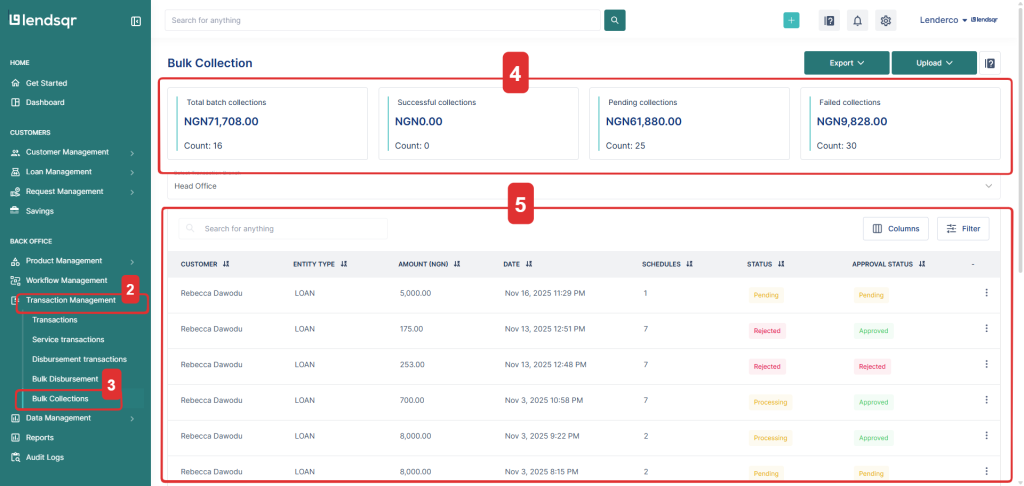
Navigate to Transaction management on the sidebar.
Click Bulk Collections.
You’ll see a summary section showing:
Total batch collections
Successful collections
Pending collections
Failed collections
Below the summary, you’ll find a list of all your uploaded entities along with their amounts, schedules and statuses.
How to upload entities for collection
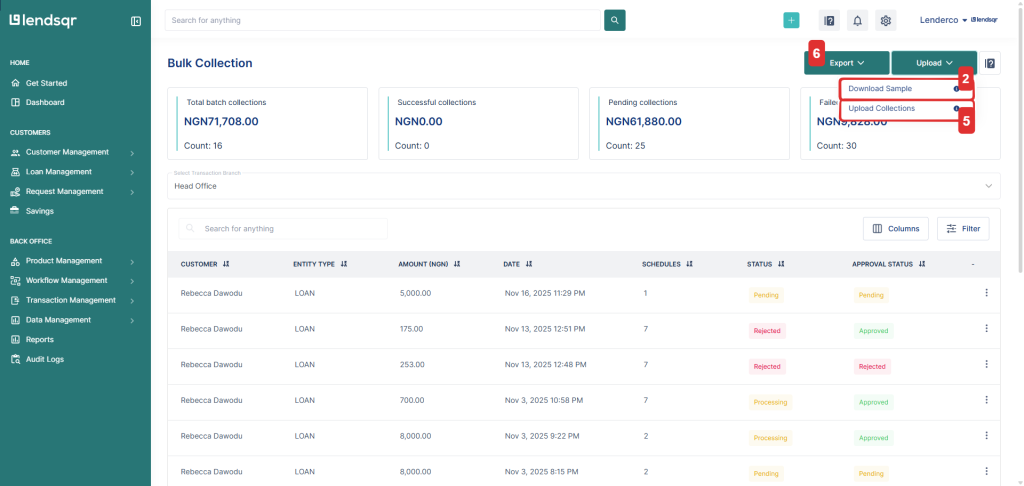
Click the upload button on the top right.
Download the sample template to view the required column structure.
Fill in your collection records following the template format.
Save the file as an Excel (.xlsx) format.
Upload the completed file.
You can also export bulk collections data at any time for record-keeping, reconciliation, or audit purposes.
If your organization uses an approval workflow, the collections will go through every approval step required before the collection is initiated.
If your organization does not use an approval workflow, the collection is initiated immediately from the user’s saved payment methods once the file is uploaded.
Bulk collections template fields
Your file must contain the following columns:
Field name
Description
external_entity_id
The ID of the specific savings or loan entity you want to collect from.
due_date
The due date for the collection.
external_entity_collection_id
A unique reference ID for the collection batch.
entity_type
The type of entity you are collecting from, for example: loan or savings.
user_id
The platform user ID associated with the customer.
amount
The amount to collect from the user.
description
A short note describing the collection.
Tips for a successful bulk collection upload
Make sure all required columns are included and properly filled.
Use unique collection IDs to avoid duplication errors.
Confirm that user IDs and entity IDs exist in your system before upload.
If a collection is rejected, review the error message, correct the data, and re-upload.
Always upload in xlsx (Excel) format to avoid formatting issues.