Access your Back Office at your fingertips.
Download the app now on Google Play Store.
Scan the QR code
You can also scan QR code with your phone to download the app.
What is a service account?
Updated
On this page
A service account on Lendsqr is a dedicated prepaid billing wallet that the system uses to automatically charge and process fees for paid services your organization uses on the platform. Think of it as a credit balance that sits behind the scenes every time a chargeable action occurs on your platform, the associated cost is deducted from this account automatically, without requiring any manual approval or payment step each time.
The service account is separate from your disbursement account. Your disbursement account holds funds used to disburse loans to borrowers. Your service account holds funds used to pay for Lendsqr’s platform services such as identity verification checks, bank statement analysis, and other data services your loan products rely on. It is important to keep both accounts funded to ensure your platform operates without interruption.
When your organization uses any of Lendsqr’s paid data or verification services, the cost is automatically deducted from your service account balance. The types of charges that flow through this account include:
Onboarding and KYC fees: Costs associated with verifying borrower identity during onboarding, such as BVN validation, NIN verification, and liveliness checks. Each verification check that runs against a third-party provider is charged to your service account.
Bank statement analysis fees: When your credit risk rule pulls a borrower’s bank statement through MyBankStatement (MBS) or another integrated provider, the cost of that statement retrieval is deducted from your service account.
Loan processing and decision data fees: Charges applied when your Oraculi credit risk rule calls external data sources to assess a borrower’s creditworthiness, including bureau checks and scoring services.
Transaction and platform usage fees: Ongoing charges for certain platform actions configured on your account, depending on your plan and usage level.
Each service type has its own per-unit cost. You can view a breakdown of charges applied to your service account in the service account activity log.
How the service account is funded
When your organization is onboarded to Lendsqr, a dedicated virtual account is automatically created and linked to your service account. This virtual account has a unique bank account number assigned specifically to your organization.
To fund your service account, you simply transfer money to this virtual account number via a standard bank transfer. Once the transfer is received, the funds are automatically credited to your service account balance and become available immediately for service charges.
The funding process works as follows:
1. Log into the admin console
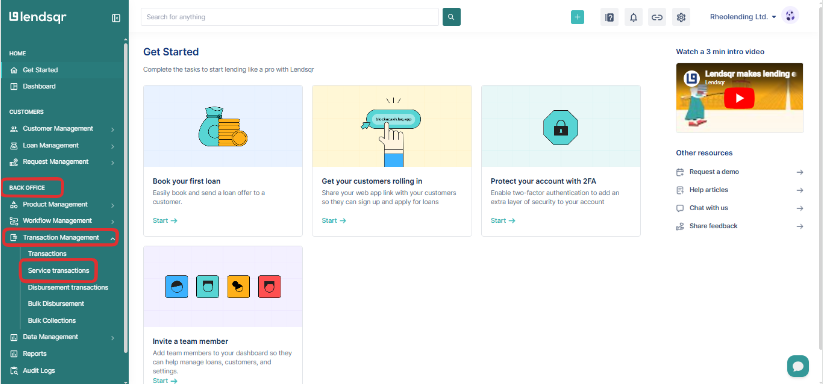
2. Using the left navigation panel, select “Back office → Transaction Management → Service Transactions“
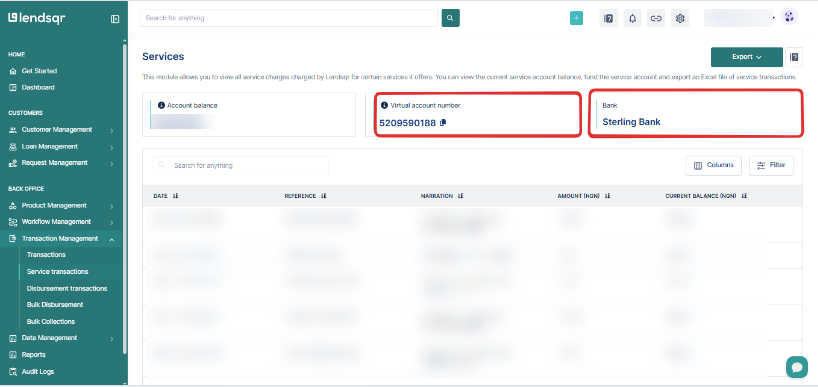
3. In the service transactions page, you will find your virtual service account number at the top of the page.
4. Initiate a bank transfer to that account number from any bank
5. The system automatically detects the inflow and credits your service account balance
6. Your paid services continue running without interruption
There is no minimum funding amount, but it is recommended to maintain a buffer above your typical monthly usage to avoid service interruptions.
What happens when your service account balance is low or empty
If your service account balance falls to zero, any platform actions that require a paid service call will fail. This means borrower verification checks, bank statement pulls, and bureau lookups will not complete which will prevent those borrowers from progressing through your loan application flow.
You will receive a low balance notification before the account reaches zero, giving you time to top up. However, it is good practice to monitor your service account balance regularly, especially during high-volume lending periods when usage spikes.
Who can view and manage the service account
Access to the service account is restricted to users with sufficient administrative permissions. Team members with the Organization Owner or Super Admin role can view the balance, review transaction history, and access the virtual account details for funding. Standard loan officers and team members with limited roles will not see the service account section in their admin console.
If you need to give a finance team member visibility into service charges without full admin access, review your role configuration under Settings → Organization Management → Team Members.
Key benefits
Consequently, the system offers several advantages:
Automated Billing: The system eliminates manual fee processing
Financial Transparency: Users gain clear visibility into all service charges
Centralized Management: You manage all fees through a single account
Real-time Processing: The system applies charges and updates balances instantly
Scalable Pricing: You pay based on actual usage as your business grows
In conclusion, this billing system provides lending institutions with comprehensive, automated billing management while maintaining complete financial transparency and operational efficiency.