Access your Back Office at your fingertips.
Download the app now on Google Play Store.
Scan the QR code
You can also scan QR code with your phone to download the app.
What are the Oraculi decision model settings?
Understanding Oraculi decision models in lendsqr
Oraculi decision models are the foundation of how lending decisions are made within Lendsqr. They define both how a borrower is evaluated and what loan offer is presented if the borrower passes the required checks.
A complete decision model is made up of two primary components. The first is the decision model settings, which control how the entire model behaves. The second is the individual settings within each decision module, which define the specific rules used to evaluate borrowers.
In addition to these, there is also the offer setting, which determines the loan terms presented to the borrower after they successfully pass the decision checks.
All checks performed during decisioning are recorded and displayed under a user’s loan profile as Decision Data. This provides transparency into how each decision was made and allows lenders to review the outcome of each module.
Structure of an oraculi decision model
An Oraculi decision model is structured to separate evaluation logic from outcome configuration.
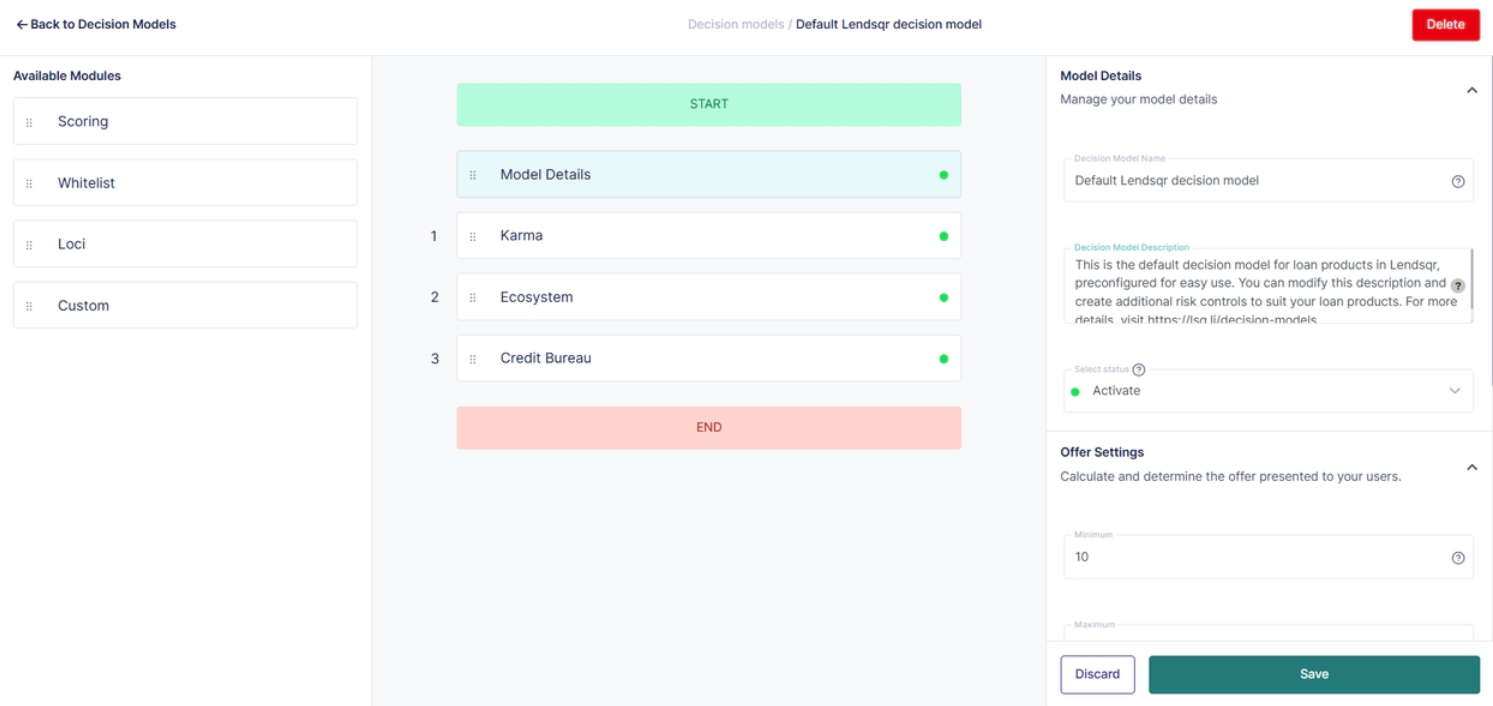
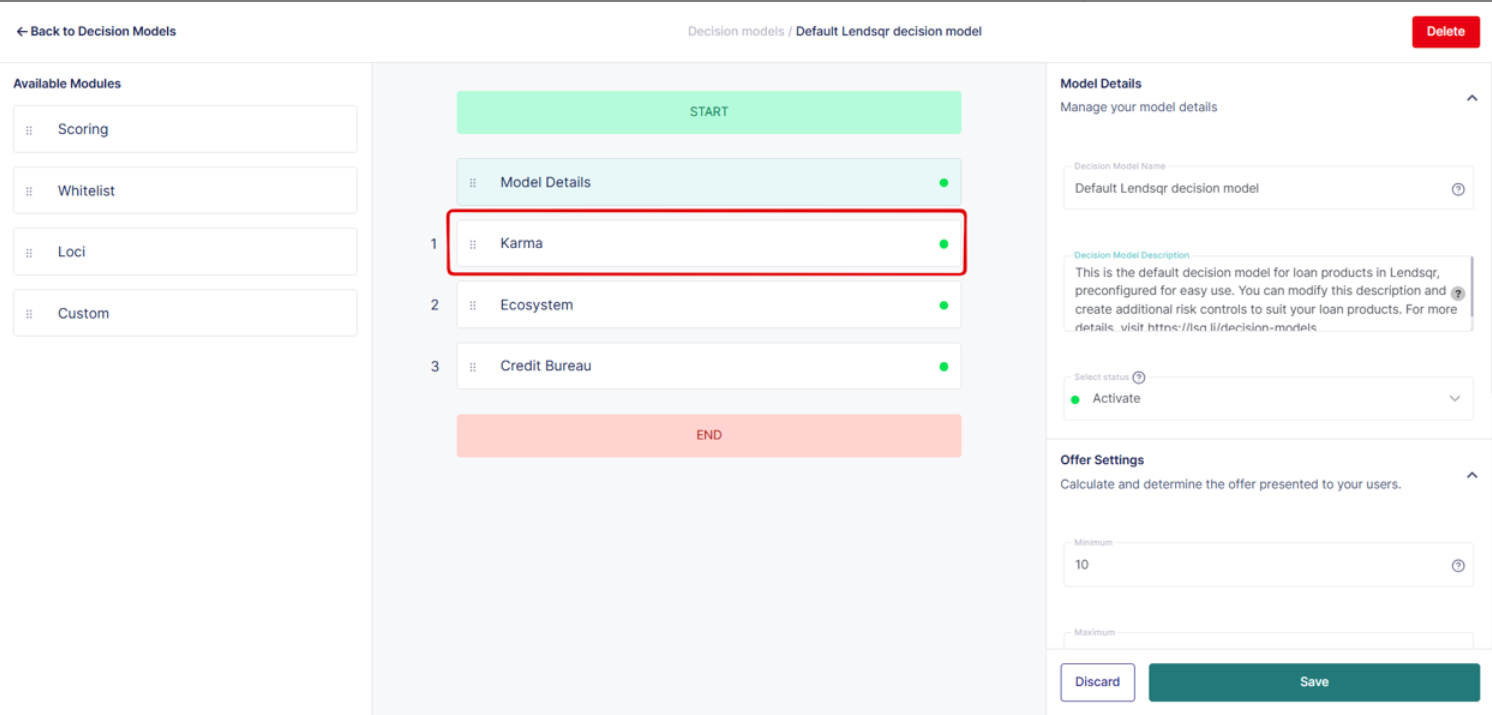
The decision model settings handle the overall flow of the model, including how modules are arranged and how they interact with each other. The decision modules themselves contain the rules and data checks used to assess borrower eligibility.
The offer settings come into play after a borrower passes the defined checks. These settings determine what loan offer is presented, including the amount, tenure, and other terms.
This separation ensures that lenders can independently manage how decisions are made and how offers are structured.
Decision modules are system-level components used to implement risk assessment rules for a loan product. Each module evaluates a specific type of data or behavior and contributes to the overall decision outcome.
Lenders can combine multiple modules within a single decision model to create a layered and robust evaluation process.
Karma
The Karma module connects to a large private blacklist database of known bad actors and chronic defaulters. It is designed to prevent high-risk individuals from accessing loans.
Karma can be configured to check multiple identifiers such as email addresses, phone numbers, BVN, and IP addresses. This allows lenders to detect fraudulent or high-risk users across different data points.
This module is available free of charge to Lendsqr lenders and can also be accessed via API by non-Lendsqr lenders.
Ecosystem
The Ecosystem module checks borrower activity across the entire Lendsqr data ecosystem. It uses the BVN as the primary identifier to retrieve this information.
This module helps lenders determine whether a borrower has outstanding obligations with other lenders on the platform. For example, it can identify if a borrower currently owes another lender within the ecosystem.
Ecosystem functions similarly to a credit bureau but provides deeper insights specific to Lendsqr’s network. It is available free of charge to Lendsqr lenders.
Loci
The Loci module enables lenders to create rules based on high-frequency behavioral data.
It allows you to track how often a borrower makes certain changes, such as updating their income or submitting multiple loan requests within a short period. This type of velocity data is useful for identifying suspicious or risky behavior.
Loci includes a wide range of data points and provides flexibility in defining dynamic rules. It is also free for Lendsqr lenders.
Scoring
The Scoring module uses a traditional weighted scoring approach to evaluate borrowers.
Lenders assign numeric values to different data points, such as employment type, income level, or repayment history. Each parameter contributes to a total score.
Borrowers whose total score exceeds a predefined threshold proceed to the next stage of evaluation. Those who fall below the threshold are filtered out.
This module allows lenders to apply structured risk models and is particularly useful for creating standardized credit policies.
Credit bureau
The Credit Bureau module allows lenders to retrieve real-time credit data from licensed credit bureaus in Nigeria.
Lenders can configure one or multiple bureaus to run checks simultaneously. Currently supported bureaus include CRC, CreditRegistry, and First Central.
Unlike other modules, this service is not free and is charged on a per-use basis. It is typically used for deeper credit verification and regulatory compliance.
Decision modules summary table
Karma
This module taps into one of the largest private blacklist databases of bad actors and chronic defaulters. It protects billions of loans for lenders each month. Karma can be configured to check emails, phone, BVN, IP addresses etc. This is available free of charge to Lendsqr lenders and is available over APIs for non-Lendsqr lenders.
Ecosystem
Ecosystem is the module that checks the entire Lendsqr data ecosystem to see if a borrower meets certain criteria during decisioning. Ecosystem uses the BVN as the primary key for looking up this data. Basically, it checks the borrower’s activity with other lenders on the Lendsqr data ecosystem. For example, it can be used to find out if a potential borrower is owing other Lendsqr lenders. This is similar to credit bureau data but on steroids. Read more about the extensive Ecosystem data dictionary.
Ecosystem is free for Lendsqr lenders and is available over APIs for non-Lendsqr lenders.
Loci
This module allows a lender to write smart rules against high-speed velocity data of customers. For example, check instantly the number of times a borrower has made certain changes to their information like loan requests, net income etc.
Loci is free for Lendsqr lenders but is available over APIs for non-Lendsqr lenders.
Scoring
This is the traditional weighted and risk adjusted scoring method beloved by traditional risk managers where a lender can apply numeric weights and scores against data from customers. Lenders are able to use available data points within the loan request and other modules such as Ecosystem or Loci to make decisions. For example, certain jobs could have higher scores. Customers whose summation of different scores from various parameters are higher than the module’s threshold proceed to the next module. Scoring is free for Lendsqr lenders but is available over APIs for non-Lendsqr lenders.
Credit bureau
This module allows a lender to get online real time data for anyone from any of Nigeria’s credit bureaus. A lender can configure a single or multiple credit bureaus to be searched at the same time. We currently support the three credit bureaus in Nigeria – CRC, CreditRegistry, and First Central (formerly XDS). This is available for a fee and is charged per use.
Decision model settings control how all modules within the model operate together. These settings define the flow, behavior, and logic of the entire decisioning process.
Within the decision model settings, you can configure the sequence of modules. This determines the order in which checks are performed. For example, you may choose to run a blacklist check before performing scoring or credit bureau checks.
You can also define key attributes within each module. For instance, in the scoring module, you can set a minimum score threshold that a borrower must meet to proceed.
Another important configuration is the continue on failure condition. This determines whether a borrower proceeds to the next module after failing a check.
If this setting is set to false, the borrower is immediately disqualified upon failing that module. If set to true, the borrower continues to the next module despite the failure. This allows for more flexible decisioning strategies.
These settings give lenders full control over how strict or flexible their decision models are.
Step by step guide to configuring decision model settings
Follow the steps below to configure decision model settings effectively.
Step 1: Access the decision model configuration
Log in to your admin console and navigate to the Decision Model section under Product Management.
Select the model you want to configure or create a new one if needed. Ensure that you are working on the correct model linked to your loan product.
Step 2: Define the module sequence
Within the model settings, arrange the decision modules in the desired order.
This sequence determines how borrower checks are executed. Place critical checks, such as fraud detection or blacklist verification, early in the sequence to filter out high-risk users quickly.
Step 3: Configure module-specific attributes
Open each module and define its specific parameters.
For example, in the scoring module, set the minimum score threshold. In other modules, define the criteria that determine whether a borrower passes or fails.
Ensure that each configuration aligns with your risk policy.
Step 4: Set continue on failure conditions
For each module, decide whether borrowers should proceed if they fail the check.
Set this option to false if the module represents a strict requirement. Set it to true if the module is part of a broader evaluation where failure does not immediately disqualify the borrower.
Step 5: Save and review the model
After configuring all modules and settings, save your changes.
Review the entire model to ensure that the sequence, thresholds, and conditions align with your intended decision logic.
Common errors and how to fix them
One common issue is incorrect module sequencing. Placing less critical checks before essential ones can lead to inefficient decisioning. To fix this, reorder modules so that high-impact checks occur first.
Another issue is setting unrealistic thresholds, especially in the scoring module. If thresholds are too high, many eligible borrowers may be rejected. If too low, risk exposure increases. Regularly review and adjust thresholds based on performance data.
Misuse of the continue on failure setting is also common. Setting it incorrectly can either make the model too strict or too lenient. Review each module’s role and adjust this setting accordingly.
Failure to save configurations is another frequent problem. Always confirm that changes are saved before exiting the setup interface.
Lastly, relying too heavily on a single module can weaken the model. A balanced combination of modules provides more reliable decision outcomes.
Best practices for configuring decision models
Start with a clear definition of your risk strategy before configuring the model. This ensures that all modules and settings align with your business objectives.
Use multiple modules to create a layered decisioning approach. Combining fraud checks, behavioral data, and scoring models leads to more accurate assessments.
Regularly review decision data from user loan profiles. This helps you understand how your model is performing and identify areas for improvement.
Test your model with different borrower scenarios before deploying it. This allows you to validate logic and ensure consistent outcomes.
Finally, keep your model as simple as possible while still meeting your requirements. Overly complex models can be difficult to manage and may introduce unintended errors.
Conclusion
Oraculi decision models provide a powerful and flexible framework for evaluating borrower eligibility and determining loan offers within Lendsqr.
By combining decision modules, configuring model settings, and defining offer parameters, lenders can create tailored decisioning systems that align with their risk appetite.
Following the correct setup process, avoiding common errors, and applying best practices ensures that your decision model remains effective, efficient, and scalable as your lending operations grow.