Access your Back Office at your fingertips.
Download the app now on Google Play Store.
Scan the QR code
You can also scan QR code with your phone to download the app.
How to cancel a direct debit mandate
Updated
On this page
Direct Debit provides lenders with a reliable and automated way to collect loan repayments directly from a borrower’s bank account. By reducing manual repayment efforts, this repayment method helps improve repayment consistency, minimize missed payments, and simplify collections management. For borrowers, Direct Debit offers convenience by ensuring repayments are deducted automatically according to agreed schedules.
However, there are situations where a borrower may decide to stop automated deductions. A borrower may switch repayment methods, close an associated bank account, settle an outstanding loan early, or request the cancellation of a repayment arrangement for personal financial reasons. In such cases, lenders need a structured and secure process for managing cancellation requests while maintaining proper oversight.
Within the Lendsqr Admin Console, lenders can manage and cancel Direct Debit mandates when required. This functionality provides an organized process for responding to borrower requests while maintaining transparency and operational control.
It is important to note that cancelling a Direct Debit mandate is irreversible. Once cancelled, the mandate cannot simply be reactivated and may require a completely new authorization process if Direct Debit repayments are needed again.
A Direct Debit mandate is an authorization that allows a lender to debit repayments directly from a borrower’s bank account according to agreed loan terms.
Instead of relying on borrowers to manually make payments each month, the Direct Debit system automates repayment collection. This helps reduce delays, improve repayment discipline, and lower the administrative burden associated with manual collections.
For lenders, Direct Debit often improves repayment predictability and reduces the likelihood of missed installments. Borrowers also benefit from a more convenient repayment experience since payments occur automatically without requiring repeated actions.
However, because Direct Debit involves permission to withdraw funds directly from a borrower’s account, mandate management must be handled carefully. Cancellation requests should be processed only after proper verification to avoid errors or disruptions to loan repayment schedules.
Understanding how mandates function helps lenders make more informed decisions when responding to borrower requests.
Why borrowers may request mandate cancellation
Borrowers may choose to cancel Direct Debit mandates for several reasons, and understanding these motivations can help lenders manage requests more effectively.
One common reason is a change in repayment preference. Some borrowers may prefer to repay manually using transfers, card payments, or alternative methods instead of automated deductions.
Another scenario involves changes to banking relationships. Borrowers may close existing bank accounts, switch financial institutions, or update account details, making the original mandate no longer applicable.
Loan completion is another frequent reason for cancellation. Borrowers who have fully repaid obligations may no longer need active repayment authorizations linked to their accounts.
Financial restructuring can also influence cancellation requests. In some situations, borrowers experiencing temporary financial challenges may request repayment adjustments, leading to mandate cancellation while alternative arrangements are explored.
Regardless of the reason, lenders should maintain a structured review process before cancelling mandates to ensure repayment obligations are properly managed.
Why mandate cancellation requires caution
Cancelling a Direct Debit mandate may seem straightforward, but the operational implications can be significant.
Because cancellation is irreversible, lenders should confirm borrower intent before proceeding. Accidental cancellations may interrupt repayment schedules and create unnecessary operational work if a new authorization later becomes necessary.
For example, a borrower may mistakenly assume a mandate must be cancelled to update bank account information when a simpler account modification process would have resolved the issue. Verifying intent before cancellation helps prevent avoidable disruptions.
Lenders should also consider repayment continuity. If a borrower still has active repayment obligations, teams should ensure an alternative repayment method is in place before cancelling automated deductions.
Maintaining clear communication throughout the process helps reduce misunderstandings and ensures borrowers remain aware of how future repayments will be handled.
When to cancel a Direct Debit mandate
Although cancellation requests may arise frequently, lenders should establish clear circumstances under which mandate cancellation is appropriate.
For example, cancellation may be necessary after full loan repayment when no future debits are expected. Similarly, borrowers transitioning to a different repayment method may require existing mandates to be terminated.
In cases involving fraud concerns, unauthorized access, or disputed mandates, lenders may also choose to cancel repayment authorizations to protect borrowers and maintain compliance.
However, lenders should avoid cancelling mandates prematurely when repayment obligations remain unresolved unless alternative repayment arrangements have already been confirmed.
Operational clarity at this stage helps reduce repayment disruptions and protects both lender and borrower interests.
How to cancel a Direct Debit mandate in Lendsqr
Canceling a Direct Debit mandate within the Lendsqr Admin Console follows a simple but important process.
Because mandate cancellations affect repayment infrastructure, organizations should ensure only approved personnel have access to these permissions.
Before proceeding, verify that the cancellation request has been reviewed internally and aligns with borrower instructions or operational requirements.
Step 2: Navigate to Direct Debits
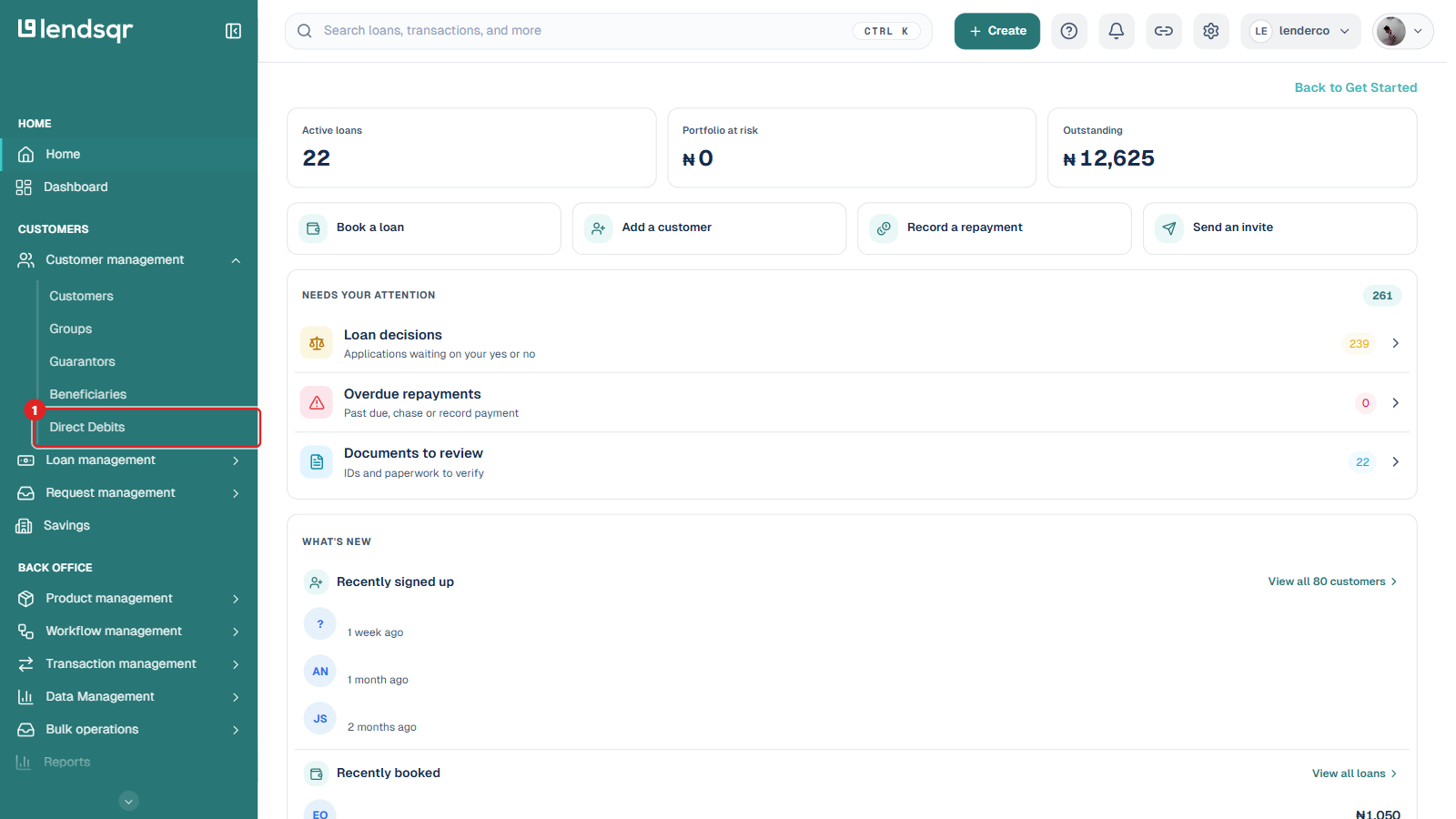
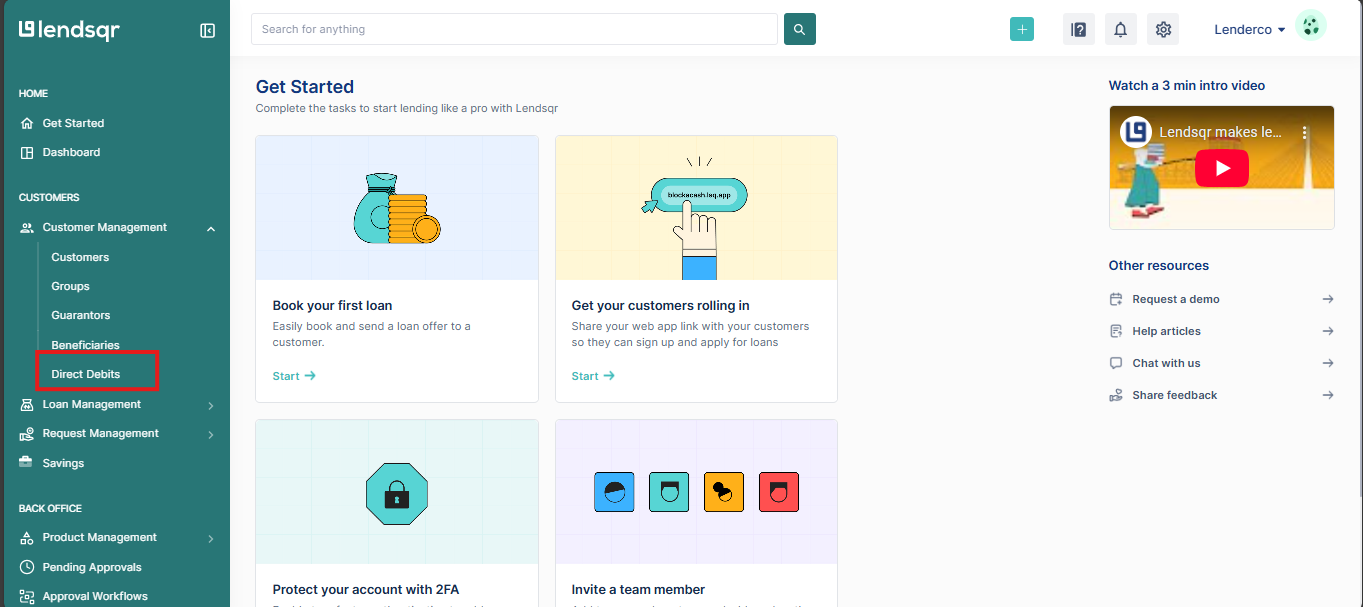
In the left navigation, under Customers, expand Customer management and select Direct Debits. This page lists mandates across a Mandates tab and a Lendsqr DD tab.
Before initiating cancellation, it may be useful to review borrower repayment history and mandate status to ensure there are no unresolved concerns.
Step 3: Open the mandate and its Actions menu
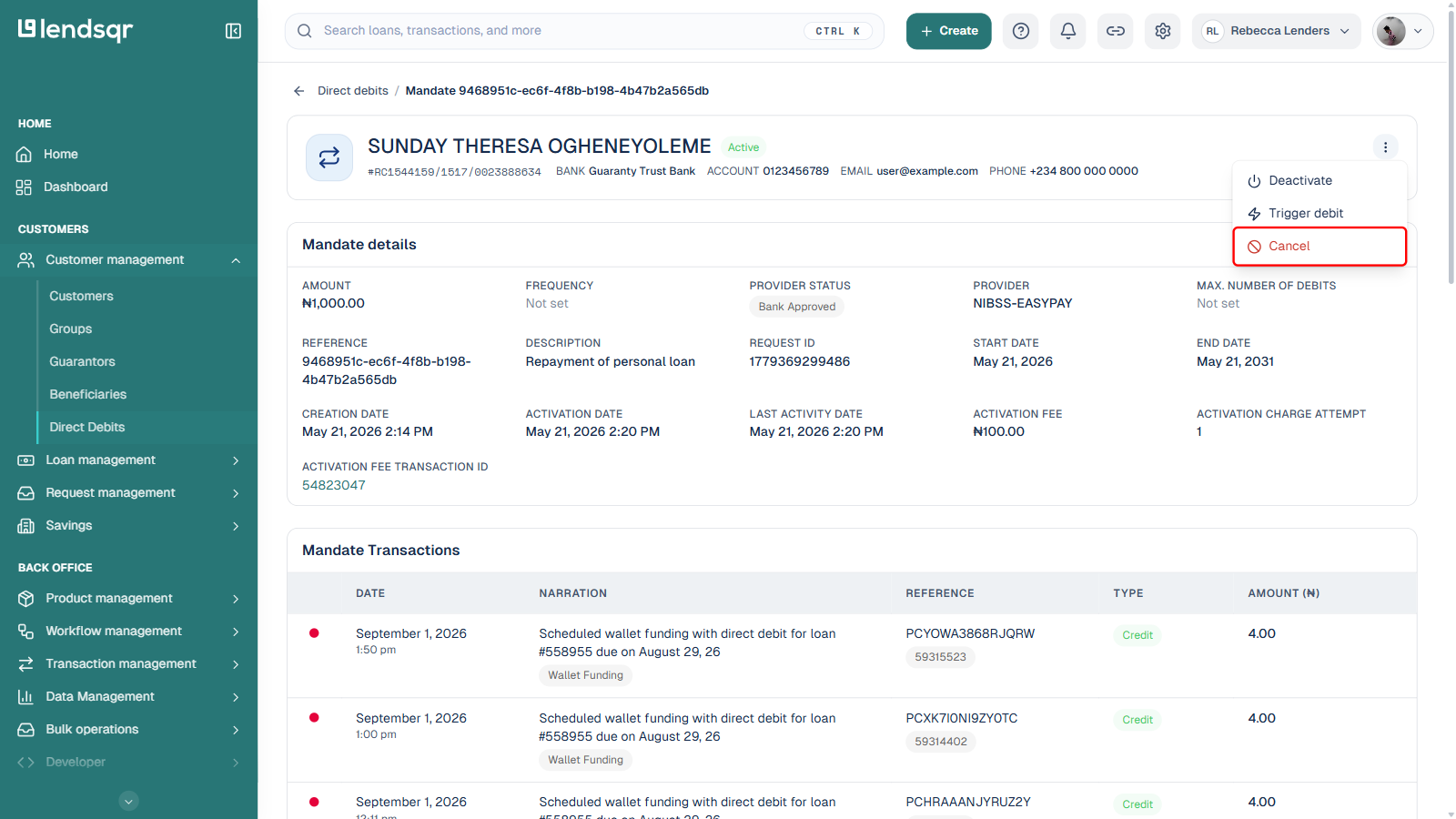
Within the mandates table, identify the mandate you want to cancel and click the row to open its detail page. Carefully verify the bank, account, and mandate details before proceeding, since cancellation cannot be reversed.
On the mandate detail page, click the ⋮ (Actions) icon at the top right. For a mandate that is active or successful, the menu shows Trigger debit and Cancel. A mandate that is still pending activation, or already cancelled, will not show these options.
Step 4: Click Cancel and confirm
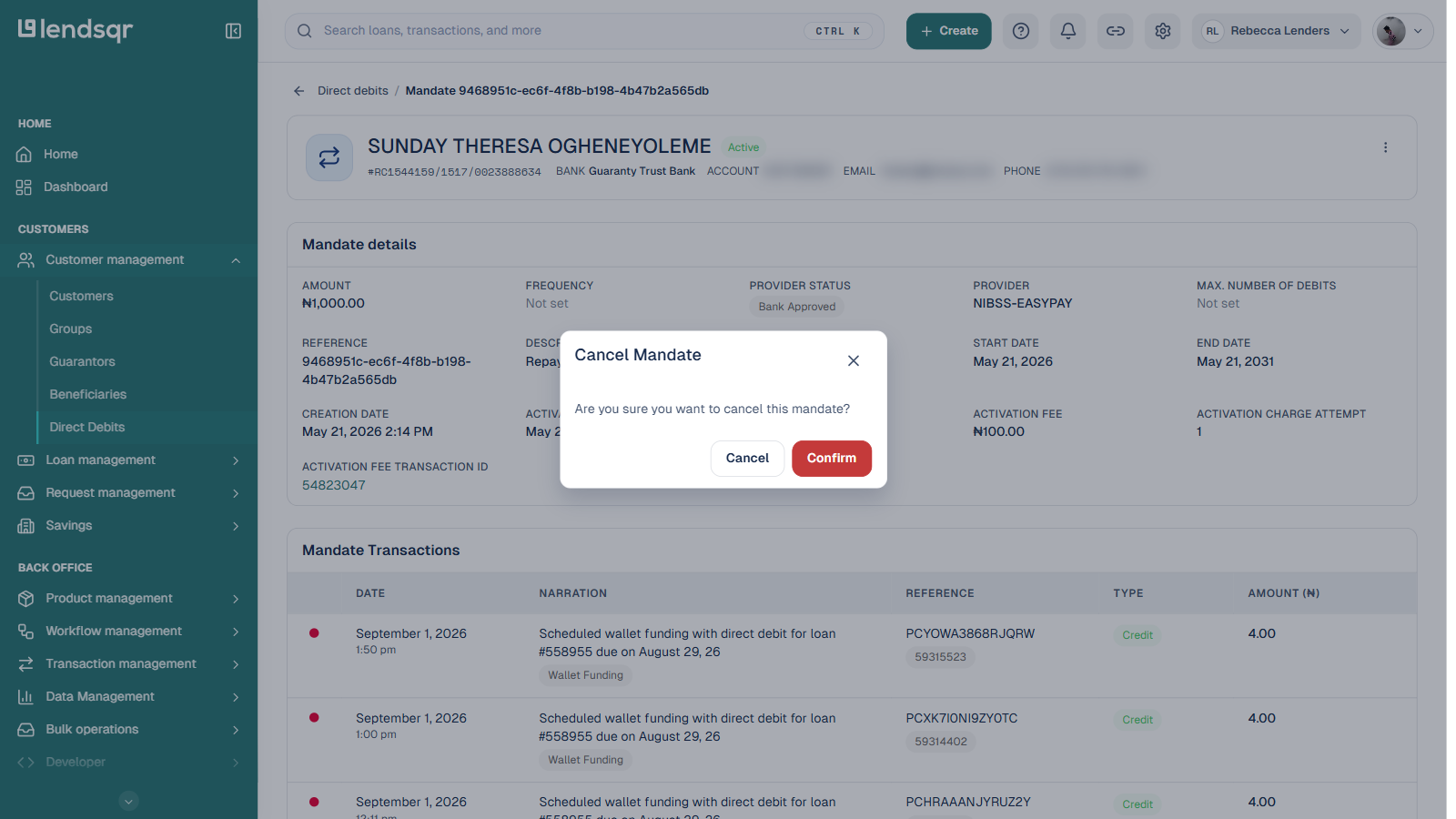
Click Cancel in the Actions menu. A confirmation dialog appears asking, “Are you sure you want to cancel this mandate?” Click Confirm to proceed, or Cancel in the dialog to back out.
Once confirmed, the mandate status updates immediately and the Direct Debit mandate is permanently cancelled. Since cancellations are irreversible, document the reason for cancellation where appropriate and make sure borrowers understand how future repayments will be handled if obligations remain active.
Common mistakes to avoid during cancellation
Although mandate cancellation is relatively simple, some avoidable mistakes can create operational challenges.
One common issue is canceling mandates without borrower confirmation. Since repayment arrangements may be affected, lenders should always confirm intent before proceeding.
Another mistake involves failing to establish an alternative repayment method when loans remain active. Removing automated deductions without a replacement process may increase missed payments and collection difficulties.
Teams should also avoid canceling the wrong mandate. Reviewing borrower details carefully before submission helps reduce errors.
Finally, administrators should avoid treating cancellations as reversible actions. Once canceled, a mandate cannot simply be restored and may require borrowers to complete an entirely new authorization process.
Best practices for managing Direct Debit cancellations
The most effective lenders’ approach mandates cancellation as part of a broader repayment management process.
Organizations should document borrower requests clearly and maintain records explaining why mandates were canceled. This improves accountability and reduces confusion during future reviews.
It is also useful to communicate repayment expectations immediately after cancellation, especially if borrowers still have outstanding balances.
Internal approval processes may further improve oversight for sensitive repayment changes. Some lenders choose to require secondary review before permanently canceling active repayment mandates.
As lending operations become increasingly automated, managing repayment infrastructure carefully becomes more important. Direct Debit helps improve repayment consistency, but lenders must also maintain clear processes for responding to borrower requests and operational changes.
By following the correct cancellation steps and verifying repayment arrangements beforehand, lenders can manage Direct Debit mandates effectively while maintaining strong operational control and borrower trust.
Direct Debit is a convenient way to automate loan repayments, ensuring timely debits directly from a borrower’s bank account. However, there may be instances where a borrower wishes to cancel a direct debit mandate. Lendsqr provides lenders with a streamlined process to manage and cancel these mandates upon request.