Access your Back Office at your fingertips.
Download the app now on Google Play Store.
Scan the QR code
You can also scan QR code with your phone to download the app.
How to transact with your disbursement account on Lendsqr
Updated
On this page
Introduction
Every loan your platform disburses moves through one central account. Every repayment your borrowers make returns through the same place. That account is your disbursement account, and it is the financial backbone of your lending operation on Lendsqr.
Knowing how to access your disbursement account details, find your account number, and track specific transactions gives you direct visibility into your cash flow at any point in time. Whether you are reconciling end-of-month figures, investigating a specific payment, or simply confirming that a disbursement went out correctly, your disbursement transactions page is where you start.
This guide shows you how to view your disbursement account details, copy your account number, and search for any transaction in your disbursement history on the Lendsqr admin console.
What is a disbursement account?
When you sign up on Lendsqr, the platform automatically creates a dedicated disbursement account for your organization. This account handles all loan-related inflows and outflows. Every loan you disburse to a borrower goes out through this account. Every repayment a borrower makes comes back into it.
Think of it as your lending operation’s financial hub. It separates your loan activity from other business finances, keeps your transaction records clean, and gives you a single source of truth for everything moving in and out of your portfolio.
Visibility into your disbursement account is not just a convenience. It is a core part of responsible portfolio management.
Consider a lender running salary advance products for a corporate employer. At the end of each month, dozens of loans go out on the same day. A few repayments come back on different schedules. Without a clear transaction history, reconciling which disbursements cleared, which repayments posted, and what the current account balance reflects becomes a manual and error-prone process.
On Lendsqr, the disbursement transactions page captures every movement in real time. You can view your account number, check your current balance, and filter transactions by type, date, or reference number without leaving the admin console. This makes daily reconciliation and exception handling significantly faster for your finance and operations teams.
How to view your disbursement account details
You need admin-level access to view disbursement account information on the Lendsqr admin console.
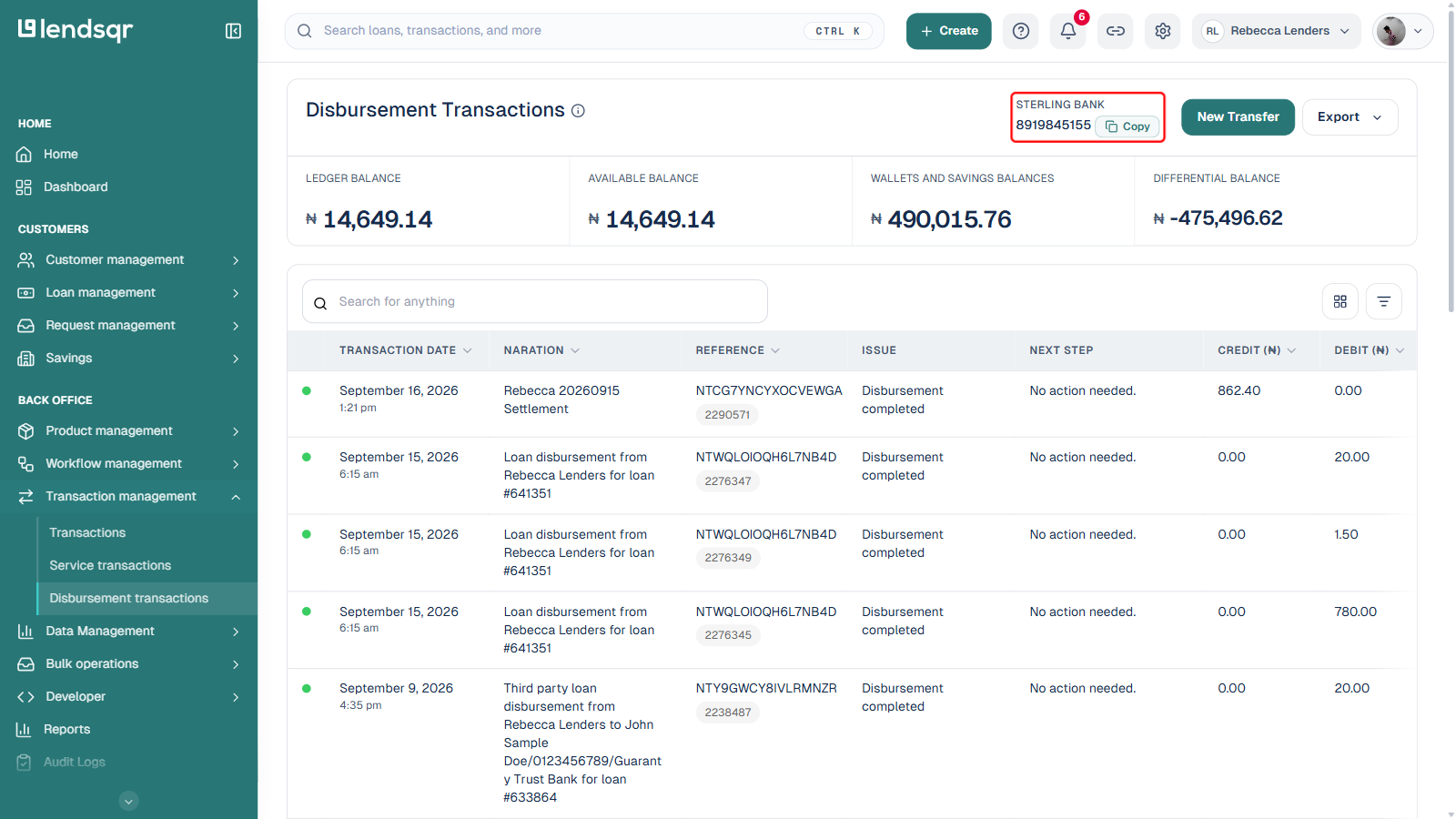
On the top right corner of the Disbursement Transactions page, you can find your disbursement account name and number, and you can copy the number to transact
How to search for a transaction in your disbursement account
Navigate to the “Disbursement Transactions” tab under “Transaction Management“
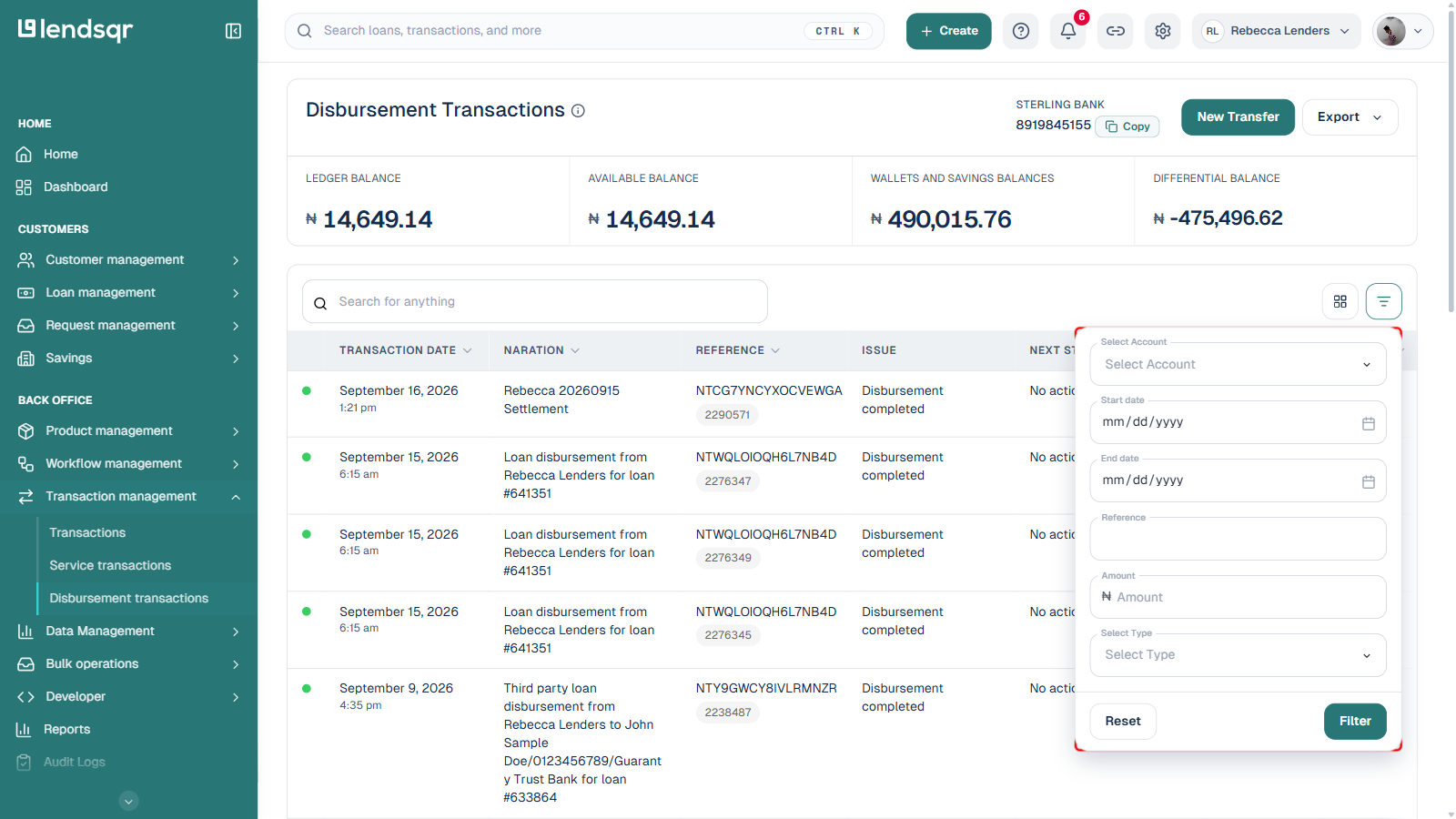
On the Transaction disbursement page, you can filter for a transaction. Click on “Filter By“ to get all the options available to filter by. You can filter by transaction ID, type, account number, etc.
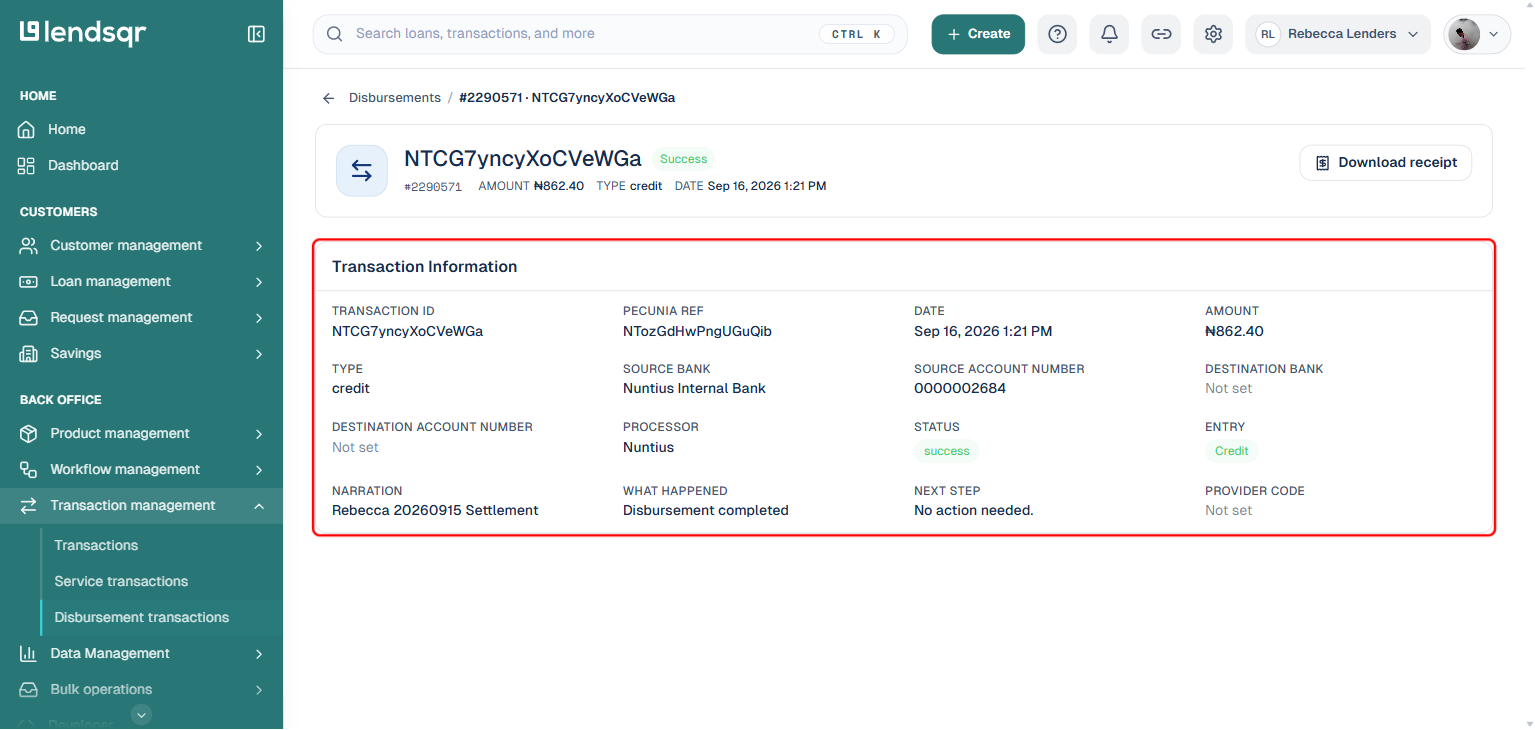
After filtering for a transaction, you will then click on the row of the transaction you wish to view its details.
This will redirect you to the transaction’s details page.
Common reasons to search for a transaction
Understanding when and why to use the transaction search helps you get the most out of the disbursement transactions page.
Investigating a disputed payment. A borrower claims their repayment was deducted but not reflected on their loan. Search by account number or transaction ID to locate the payment and confirm whether it posted correctly.
Confirming a disbursement went out. After approving a loan, use the filter to search for the disbursement transaction and confirm that the funds left your account and reached the borrower’s wallet or bank account.
End-of-month reconciliation. Filter by transaction type and date range to pull all disbursements and repayments for a specific period. This gives your finance team a clean view of portfolio activity for the month without exporting a full statement.
Investigating a failed transaction. If a borrower or team member reports a payment error, filter by transaction ID to locate the record and review the transaction status and any associated error details.
How Lendsqr makes disbursement management practical
Managing loan cash flow across a growing borrower base is one of the most operationally demanding parts of running a lending business. Without a centralized transaction hub, finance teams spend hours piecing together records from multiple sources.
Lendsqr’s disbursement transactions page consolidates everything in one place. Your account number, balance, and full transaction history are accessible from a single screen. Filtering tools let you find any specific transaction in seconds rather than scrolling through hundreds of records manually. And because the page reflects real-time activity, the information you see is always current.
This level of operational visibility is what makes it possible to run a high-volume lending operation without a large back-office team supporting it.
Frequently asked questions
Can I fund my disbursement account directly from the admin console? Your disbursement account number is available on the transactions page for you to copy and use for external transfers. Funding is done by transferring to that account number from your organization’s bank account or payment source.
How far back does my transaction history go? Your disbursement transaction history is available from the date your account was created on Lendsqr. Use the date filter to narrow your search to a specific period.
Can I export my disbursement transaction history? Yes. You can download your disbursement transaction statement directly from the transactions page. See How to download your disbursement transaction statement for the full process.
Who can view the disbursement transactions page? Team members with the appropriate admin permissions can access the disbursement transactions page. If a team member cannot see this page, check their role and permissions with your Super Admin.
What should I do if a transaction appears incorrect? Use the filter to locate the specific transaction and review its details. If the record appears wrong, contact Lendsqr support with the transaction ID and a description of the discrepancy.