Access your Back Office at your fingertips.
Download the app now on Google Play Store.
Scan the QR code
You can also scan QR code with your phone to download the app.
Funding a wallet manually on the admin console
Updated
On this page
Imagine a borrower makes a ₦50,000 repayment via bank transfer directly to your company account instead of using your app.
The money has been received, but it’s not reflected in the borrower’s wallet or loan schedule.
To ensure your records stay accurate, you need to manually fund the borrower’s wallet so the system can apply the repayment correctly.
This is where manual wallet funding comes in.
What is manual wallet funding?
Manual wallet funding allows you to credit a user’s wallet directly from the admin console when a transaction happens outside the platform.
This ensures that:
The user’s wallet balance is updated
Any active loan repayments are applied automatically
Your records remain accurate and reconciled
In Lendsqr, all repayments flow through the wallet before being applied to loans, making wallet funding a critical part of the repayment process.
When would you manually fund a wallet?
Most wallet credits happen automatically. A borrower pays via card, direct debit, or virtual account, and the system updates their balance instantly. But there are situations where an admin needs to credit a wallet directly:
Cash repayments — A field agent collects loan repayments in cash from borrowers who do not use the app. Those collections need to be recorded in the system.
External transfers — A borrower pays via bank transfer directly to the lender’s bank account, outside the Lendsqr payment system. The wallet needs to be updated to reflect this.
Corrections — A failed transaction was resolved externally, and the borrower’s wallet needs to be manually adjusted to match the actual balance.
Migrations — You are bringing in historical loan repayment data from a previous platform and need to update wallet balances to match existing records.
Lendsqr supports all of these scenarios through the manual wallet funding feature on the admin console.
How manual wallet funding works
Here’s what happens behind the scenes:
You upload or enter a wallet funding transaction
The system credits the user’s wallet
If the user has an active loan:
The system automatically applies the funds to repayments
The loan schedule updates accordingly
This allows lenders to capture offline payments and keep loan records consistent.
Real-world examples
Example 1: Offline repayment
A borrower transfers ₦30,000 directly to your bank account.
You upload the transaction
The wallet is credited
The system applies repayment automatically
Example 2: Bulk reconciliation
Your finance team receives payments from 50 customers via bank transfer.
Instead of entering each manually:
You upload all transactions using a spreadsheet
Each user’s wallet is credited at once
Example 3: Wallet top-up without a loan
A customer wants to maintain a wallet balance for future repayments.
You fund the wallet manually
No loan is created
Funds remain available for future use
Who can use this feature
Super Admins
Authorized Lender Admins
Operations users with post-user transaction permissions
Access is controlled via user roles and permissions.
How to fund a user’s wallet manually
1. Log in to the Admin Console and locate the user. You can refer to the guide on how to search and select a user.
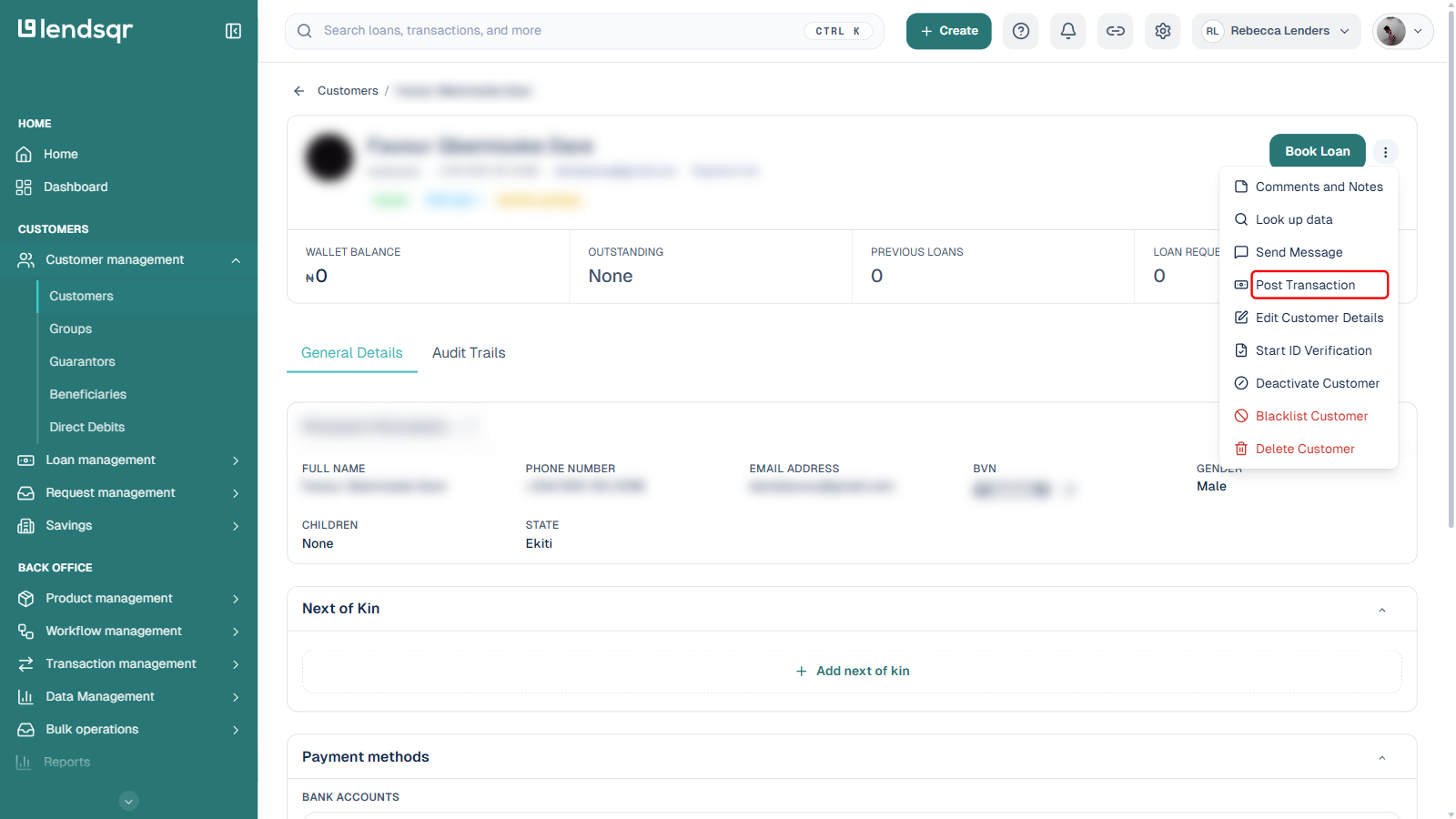
2. Click the More actions icon (three dots) at the top right of the user profile.
3. Select Post Transaction from the menu.
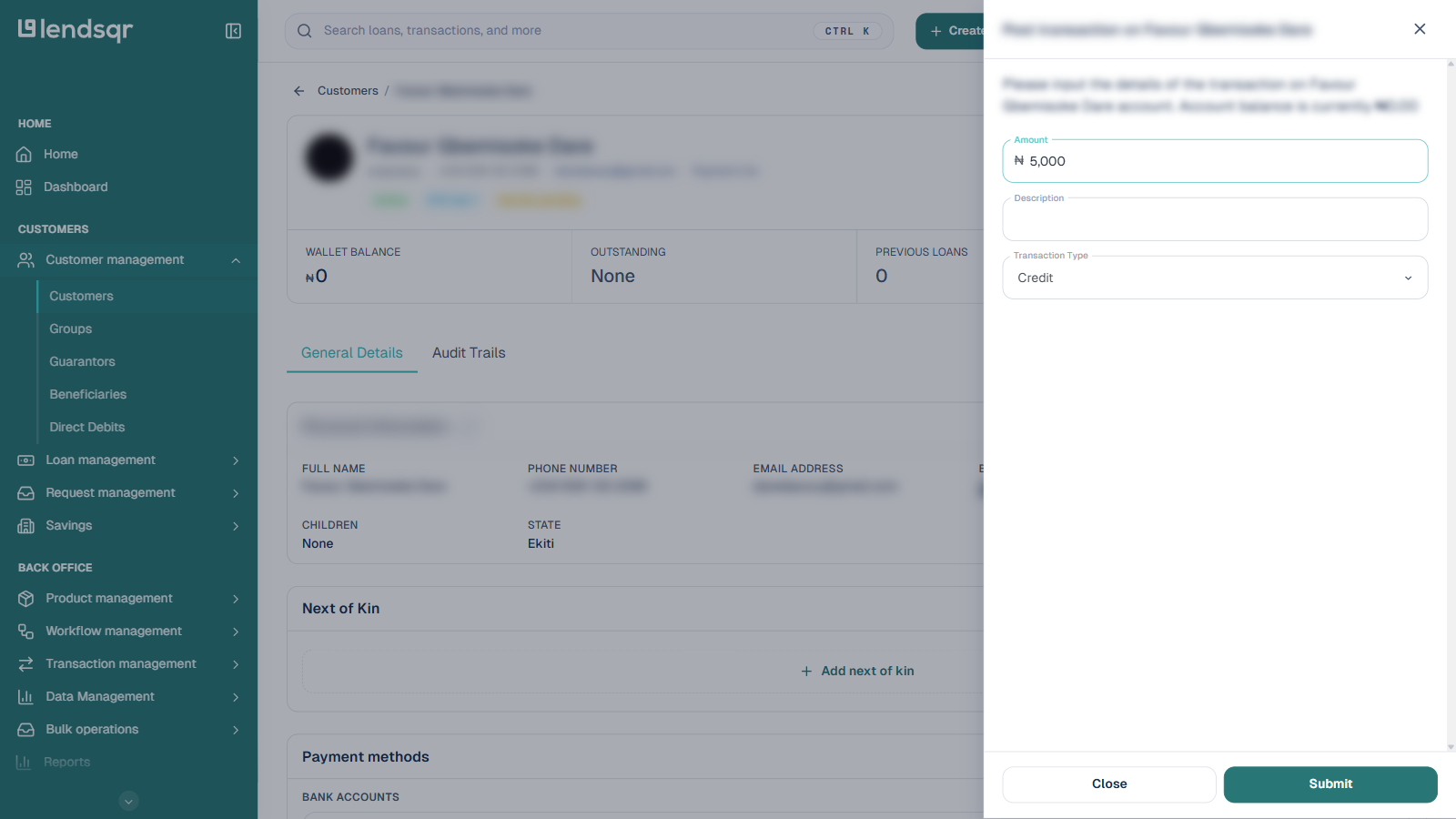
4. A panel slides in from the right. Fill in the required fields:
Amount
Description
Transaction Type (Credit or Debit)
5. Click Submit once all details are entered.
6. After you submit, review the confirmation step, complete any verification step your organisation requires (such as an OTP), and confirm. Exact confirmation and verification steps depend on your organisation’s security settings.
7. Upon successful processing:
A success message will be displayed.
A new transaction entry will be created and visible in the user’s transaction history.
How manual funding applies to loan repayment
Crediting a borrower’s wallet does not automatically settle their outstanding loan. Depending on your platform configuration, the system may automatically apply the wallet balance to the loan repayment, or an admin may need to trigger a manual repayment separately.
Check your loan repayment configuration to understand whether the wallet debit for loan settlement happens automatically or requires a manual trigger after the wallet is funded.
Bulk wallet funding
If you need to fund wallets for many borrowers at once. For example, when reconciling a batch of external repayments, Lendsqr supports bulk transaction uploads via aspreadsheet. This is faster and less error-prone than funding wallets one at a time. See the guide on uploading transactions for more detail.
Frequently asked questions
Does manual wallet funding appear in the borrower’s transaction history?
Yes. Every manual wallet credit is recorded in the borrower’s transaction history with the narration and reference you provided. The borrower can see this in their web app wallet statement.
Who can fund wallets manually?
Only admins with the appropriate permissions can manually fund wallets. If you do not see the Fund Wallet option on a borrower’s profile, contact your Super Admin to review your role permissions.
Can I fund a wallet in a foreign currency?
Wallet transactions are processed in your organization’s configured operating currency. If your platform serves borrowers in multiple currencies, contact Lendsqr support to understand how multi-currency wallet funding works in your setup.