Access your Back Office at your fingertips.
Download the app now on Google Play Store.
Scan the QR code
You can also scan QR code with your phone to download the app.
Masking and unmasking a virtual account
Updated
On this page
Most lenders on Lendsqr do not operate as savings platforms. The virtual account numbers that borrowers receive on a lending app serve one purpose: loan repayment. They are not savings accounts, and lenders have no obligation to hold or return uninstructed deposits.
The problem is that borrowers do not always understand this distinction. Some deposit money into their virtual account before applying for a loan, thinking it functions like a bank account. Others do it accidentally by transposing account numbers. When that happens, your disbursement account picks up the funds, and you get settled for the deposit. Then the borrower asks for it back. You now have an imbalance in your books and a reconciliation problem to solve.
Masking the virtual account removes this risk entirely. When you mask a virtual account on Lendsqr, the account number no longer appears to the borrower, and they cannot use it to fund their wallet. This signals clearly that the platform is a lending service, not a savings one.
What happens when a borrower deposits by mistake
Here is a concrete example of how the imbalance plays out.
A borrower named Amaka opens your lending app and sees a virtual account number assigned to her profile. She assumes it works like a normal bank account and transfers ₦50,000 into it before applying for a loan.
Your settlement process picks up the inflow, and your disbursement account balance increases by ₦50,000. When Amaka later asks to withdraw or disputes the deposit, you have to return the funds. But your disbursement account may have already moved that money. Your team now has to investigate, reconcile, and resolve the issue manually.
This is the scenario masking prevents. Without a visible account number, a borrower has no path to make this kind of accidental deposit.
When to mask and when to leave accounts unmasked
Mask the account when your platform is a pure lending product with no savings component. Most digital lenders fall into this category. If your borrowers have no legitimate reason to fund their wallets independently, masking keeps your books clean and prevents misunderstandings.
For lenders just getting started on Lendsqr, masking is the sensible default unless you have an explicit reason to allow independent wallet funding. It reduces operational risk with no impact on the borrower’s core loan experience.
Leave accounts unmasked when your platform includes a savings product, or when you allow borrowers to pre-fund their wallets. In those cases, the virtual account serves a broader purpose, and masking would block that functionality.
The setting applies to all borrowers on your platform at once. There is no option to mask accounts for some users and not others at this level.
If you run multiple loan products with different models, some savings-enabled and some not, you may want to review whether a platform-wide mask is appropriate before applying it. In that scenario, a restricted wallet configuration on specific products may serve your needs better. Read the guide on how to configure a restricted wallet on your loan products for more on that option.
What borrowers experience after masking
When you enable masking, the virtual account number no longer appears on the borrower’s screen in your app. A borrower who visits the wallet or payment section will not see an account they can transfer funds to.
They can still apply for loans, view repayment schedules, and make repayments through card debits or direct debit mandates.
Lendsqr does not send borrowers an automatic notification when you change this setting. If you switch from unmasked to masked, plan your own communication. A brief in-app message or push notification clarifying that the platform is a lending service, not a savings one, helps manage expectations and reduces support queries.
Masking versus removing a virtual account
It is worth clarifying the difference between masking a virtual account and removing one entirely.
Masking hides the account number from the borrower’s view. The account itself remains active in the background. Your repayment collection infrastructure still uses it if needed for processing. The borrower simply cannot see it and therefore cannot use it to make deposits.
Removing or closing a virtual account is a more permanent action that affects the underlying payment infrastructure. For most lenders who simply want to prevent unsolicited deposits, masking is the right tool. It is reversible, non-disruptive, and takes effect immediately.
If you later decide to offer savings products or enable wallet funding for certain loan products, you can unmask the accounts at any time using the same setting.
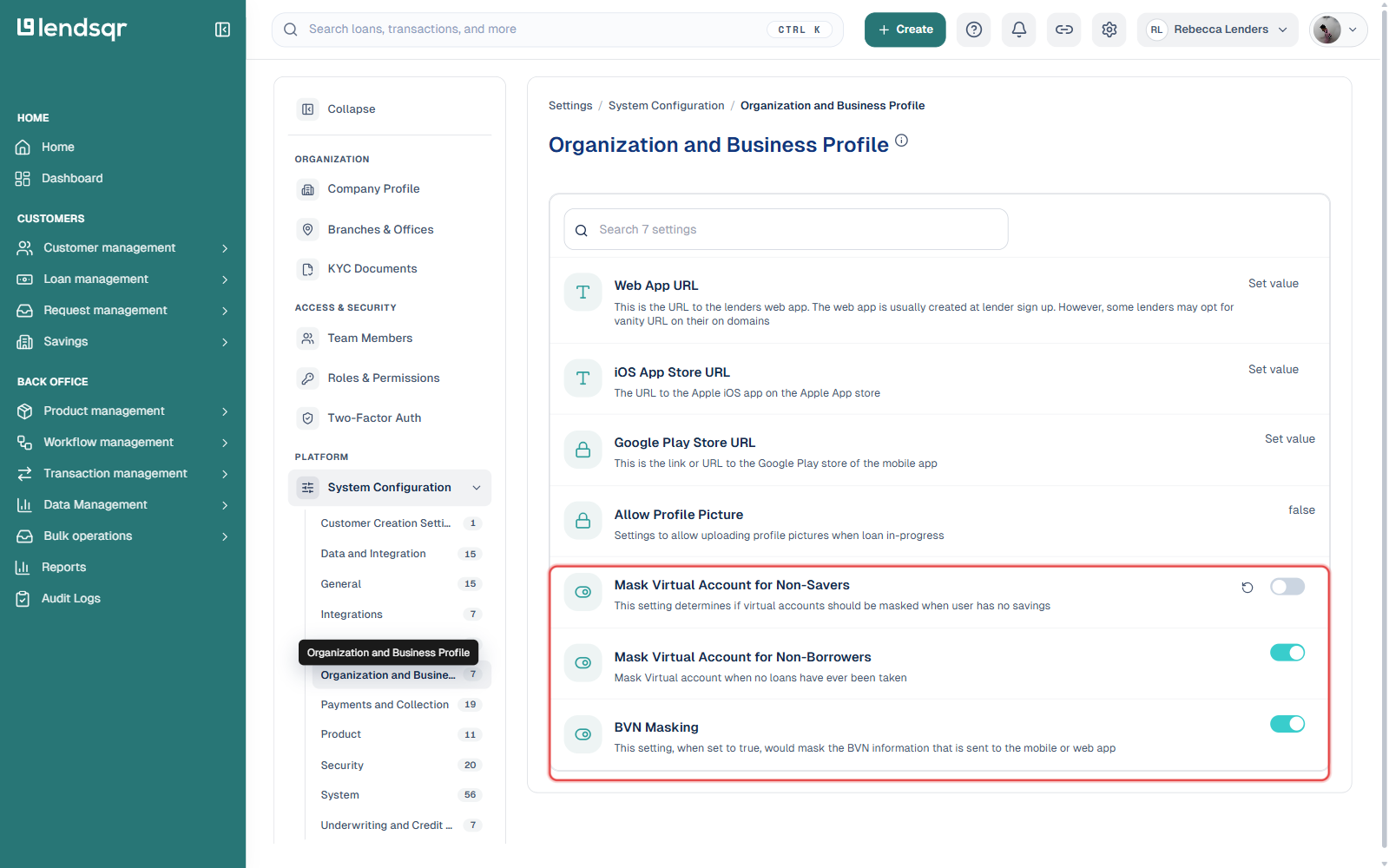
Click the Settings icon (top right) in your Lendsqr admin console, then click System Configuration under the PLATFORM section.
Select Organization and Business Profile from the list of configuration categories.
Find Mask Virtual Account for Non-Savers and flip its toggle on or off directly — there’s no separate dropdown or Close button here, the switch itself is the setting and takes effect as soon as you toggle it. (The adjacent Mask Virtual Account for Non-Borrowers and BVN Masking toggles work the same way, if either is also relevant to your setup.)
The change takes effect immediately. Borrowers who refresh or reopen the app will no longer see their virtual account number once masking is enabled.
To learn more about how virtual accounts work within Lendsqr, read the guide on receiving payments with virtual accounts. For a broader explanation of how virtual accounts work in digital finance, visit the Lendsqr blog.