Access your Back Office at your fingertips.
Download the app now on Google Play Store.
Scan the QR code
You can also scan QR code with your phone to download the app.
How do I get my customers’ web app URL?
Updated
On this page
Finding your Lendsqr web app URL
As a Lendsqr lender, you are provided with a dedicated web application URL that serves as the primary access point for your customers. This URL is where borrowers can log in, apply for loans, manage repayments, view account activity, and interact with your lending services outside of the admin console.
Because this link is unique to each lender, it ensures that customers always access the correct instance of your lending platform. Sharing the right URL is essential for onboarding new users, running campaigns, and supporting customers who prefer web access over mobile applications.
In many cases, lenders use this link across multiple touchpoints such as onboarding emails, SMS campaigns, customer support responses, and marketing materials. Having quick access to it within the admin console helps ensure operational efficiency and reduces the risk of sharing outdated or incorrect links.
This guide explains what the web app URL is, why it matters, and the exact steps required to locate it from your Lendsqr Admin Console.
Understanding the web app URL
The web app URL is a unique link automatically assigned to each lender’s environment on Lendsqr. It connects customers directly to your branded or configured lending platform.
When a borrower clicks on the URL, they are taken to a secure web interface where they can perform key actions such as registering an account, applying for loans, checking loan status, making repayments, and managing their wallet or profile.
Unlike generic financial platforms, the Lendsqr structure ensures that each lender operates within a dedicated ecosystem. This means that every web app URL is tied specifically to your institution’s configurations, products, and borrower base.
This separation is important because it prevents customer confusion and ensures that all interactions are aligned with your lending rules, credit risk rules, and product offerings.
For lenders managing multiple products or borrower segments, the web app URL acts as a centralized gateway into all customer-facing services.
Why your web app URL is important
The web app URL is more than just a link. It plays a key role in how borrowers access and interact with your lending services.
One of its most important functions is enabling smooth customer onboarding. When new borrowers join your platform, they often need a direct link to begin registration or complete their first loan application. Sharing the correct web app URL ensures they are immediately directed to the right environment without unnecessary steps or confusion.
It also supports customer communication. Lenders frequently use the URL in support responses or automated messages to guide users back to the platform when they encounter issues accessing their accounts.
From a business perspective, the web app URL helps maintain consistency across customer touchpoints. Whether a borrower clicks a link from a marketing campaign or receives it through customer service, they always land on the same structured environment.
Additionally, because the URL is tied to your Lendsqr configuration, it ensures that all product offerings, loan rules, and borrower flows remain consistent regardless of how users access the platform.
How to find your web app URL
There are three places to get your web app URL from the Lendsqr Admin Console, depending on what you need it for.
Option 1: Copy it from your account menu (fastest)
This is the quickest way to get the URL onto your clipboard, ready to paste into an SMS, email, or onboarding message.
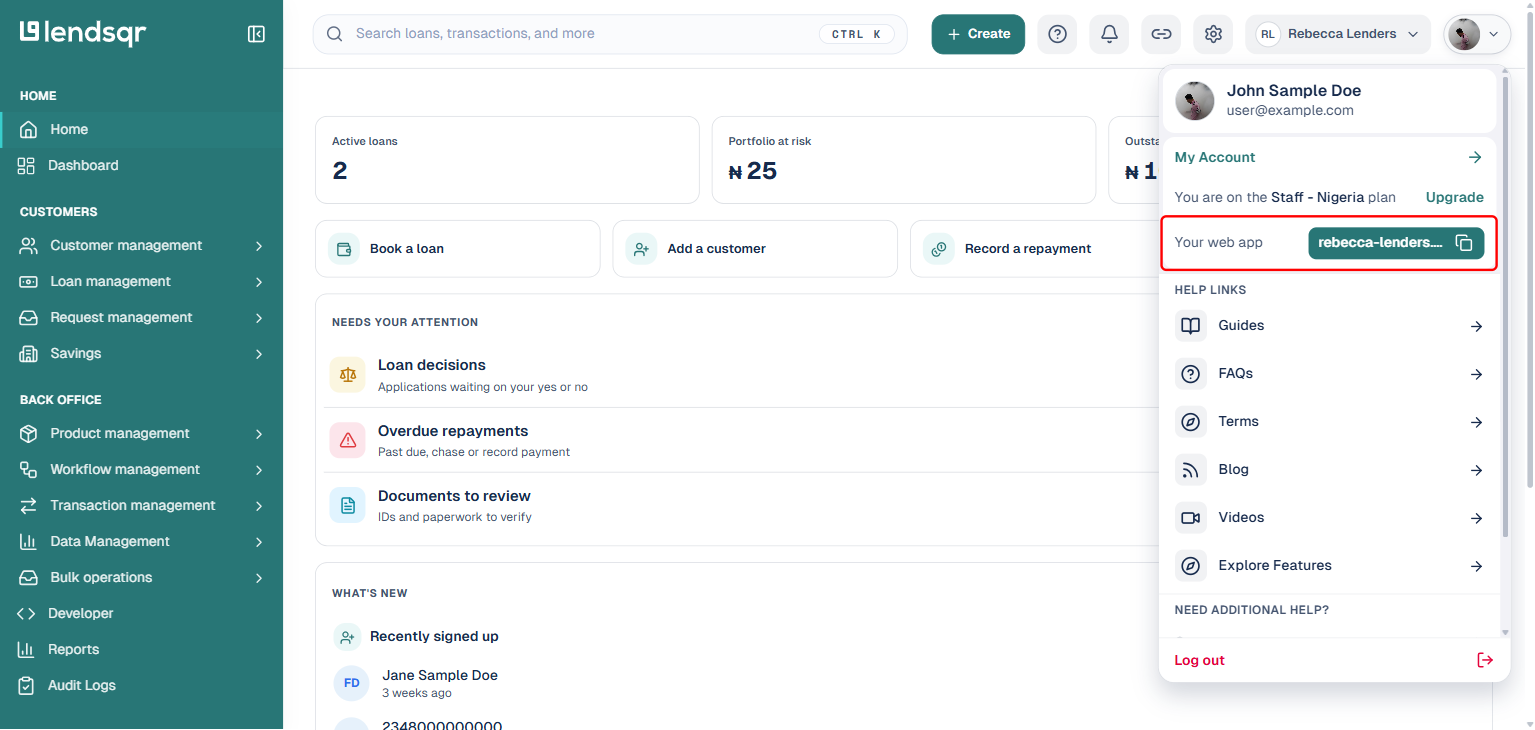
Log into your Lendsqr Admin Console and click your profile picture at the very top-right of the screen, next to the Switch business button. In the menu that opens, you’ll see a “Your web app” row showing your lender’s unique domain (for example, yourbusiness.lsq.app) with a dedicated copy icon next to it. Click the copy icon to copy the full URL to your clipboard.
Option 2: Read it from Company Profile
Use this option if you’re already on the Settings pages managing other organization details and want to double-check the domain without opening the account menu.
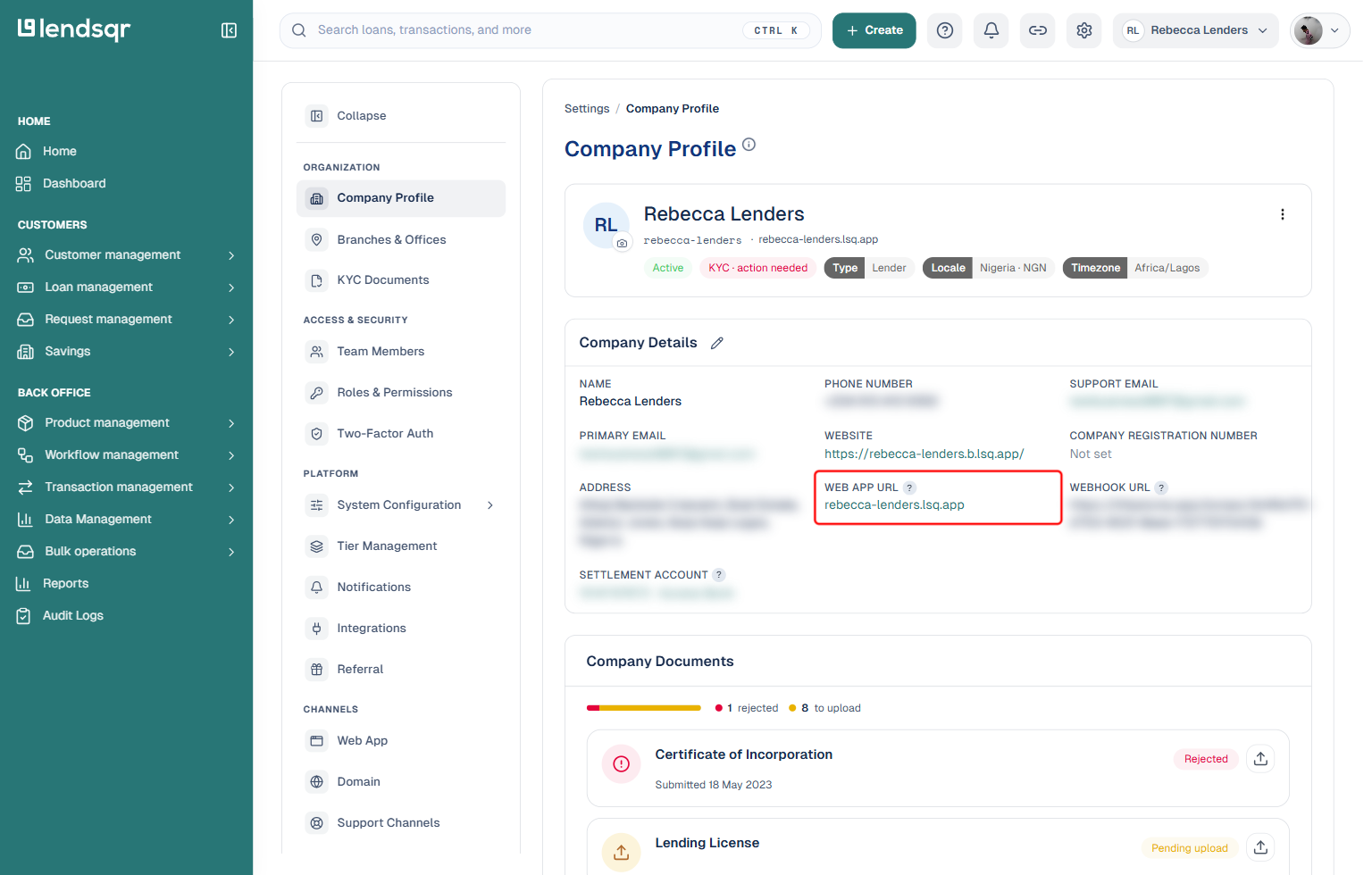
Click the Settings (gear) icon in the top navigation, and select “Company Profile” under “Organization“. Scroll to the Company Details card, where you will find a “Web App URL” field showing the same domain. This field is a plain link rather than a copy button. Select and copy the text directly, or click it to open the web app in a new tab.
Option 3: Open it directly from any page
Use this option when you just want to quickly check what your customers see, rather than copy the link to share elsewhere.
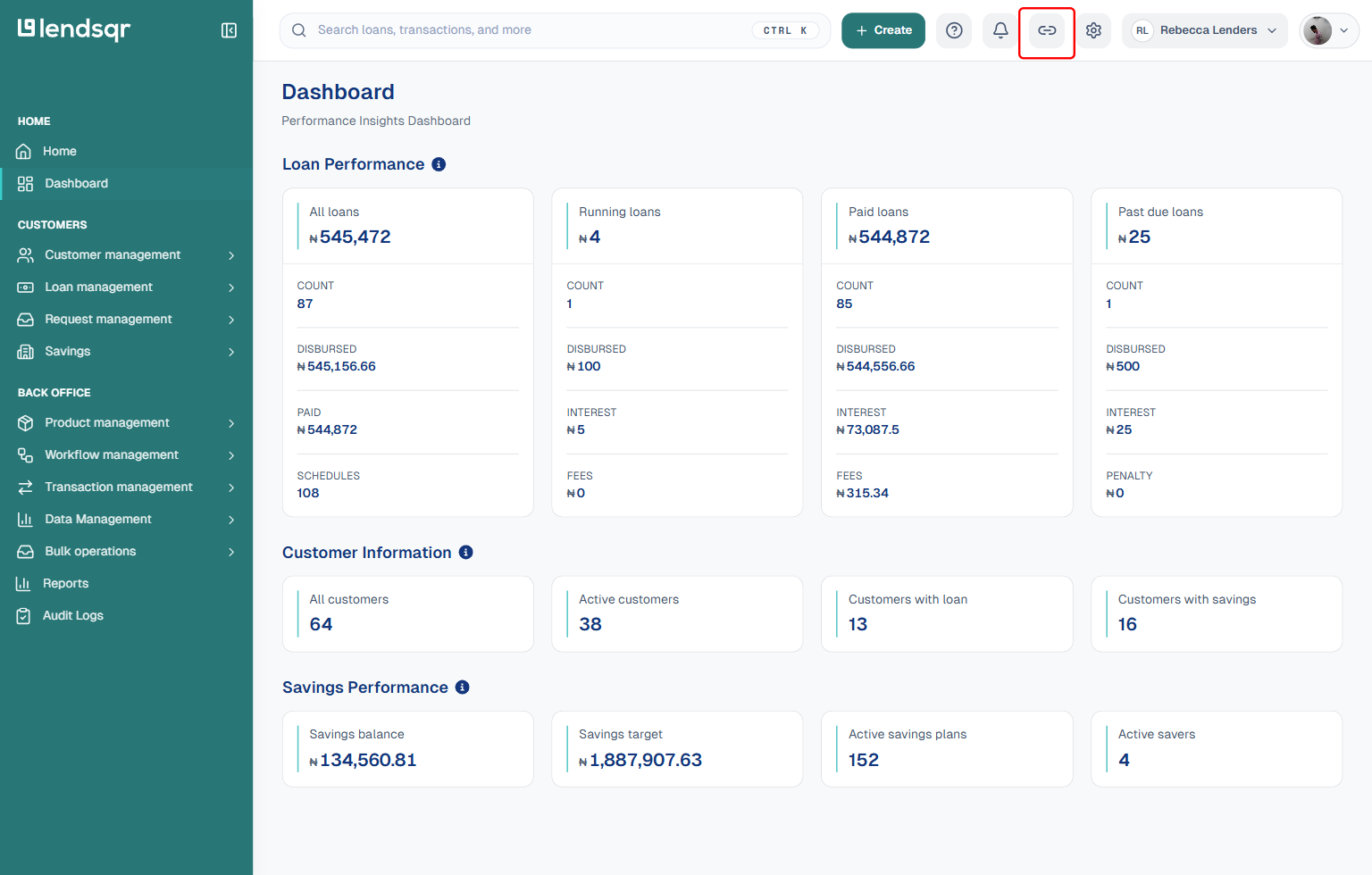
From any page in the admin console, look at the top navigation bar for a link icon labeled “Open web app“, located between the notifications bell and the settings gear icon. Clicking it opens your web app in a new browser tab, where you can also copy the full URL from your browser’s address bar if needed.
Because this link is dynamically tied to your lender setup, all three of the above always reflect your current, active web app URL.
Best practices when sharing your web app URL
Although accessing the web app URL is straightforward, lenders should follow a few best practices when sharing it with customers.
First, always ensure you are using the URL directly from the admin console rather than storing older versions in external documents. This reduces the risk of sharing outdated or incorrect links.
Second, consider pairing the URL with simple instructions for first-time users. Many borrowers may not be familiar with the login or registration process, so adding context can improve conversion rates and reduce support requests.
Third, use consistent messaging when distributing the URL across different channels. Whether shared via SMS, email, or social media, maintaining a consistent format helps build trust and avoids confusion.
Finally, regularly verify that the URL is functioning as expected, especially after system updates or configuration changes. While Lendsqr maintains stability across environments, routine checks help ensure uninterrupted customer access.
Common mistakes to avoid
One common mistake lenders make is manually copying and storing the URL in external files for long-term use. Since platform configurations may change, this can lead to outdated links being shared with customers.
Another issue is sending customers to the wrong environment, especially when managing multiple products or testing environments. Always confirm that the URL belongs to the correct production instance before sharing it externally.
Lenders should also avoid embedding the URL in outdated templates without periodic review. Over time, business changes may require updates to onboarding flows or customer communication materials.