Access your Back Office at your fingertips.
Download the app now on Google Play Store.
Scan the QR code
You can also scan QR code with your phone to download the app.
Understanding transaction statuses on Lendsqr
Updated
On this page
Financial transparency is an important part of effective lending operations. Whether lenders are monitoring loan disbursements, repayments, transfers, or wallet activity, having visibility into transactions helps improve oversight, reconciliation, and operational efficiency. Without a structured way to monitor money movement, it becomes more difficult to investigate issues, understand borrower activity, or maintain accurate financial records.
Within Lendsqr, every transaction is processed through the user’s wallet to ensure proper tracking and accountability. Transactions are classified into credits and debits, allowing lenders to clearly understand whether funds entered or left a borrower’s wallet. In addition to transaction categorization, Lendsqr also provides transaction statuses that help lenders identify whether payments succeeded, failed, remained pending, or were reversed.
Understanding how wallet transactions work helps lenders better monitor financial activity, troubleshoot issues, and improve operational visibility across lending workflows.
You can read more about transaction reports here.
Also read: 5 issues that lenders have with Nigerian credit bureaus
Understanding wallet transactions in Lendsqr
Every financial movement within Lendsqr passes through the user’s wallet.
This wallet-based structure ensures proper tracking of financial activities and creates a transparent audit trail for lenders. Rather than transactions occurring independently across multiple systems, wallet processing centralizes activity and helps simplify reconciliation.
For example, when a borrower receives a loan disbursement, funds first reflect through the wallet. Similarly, when repayments occur or transfers are made, the wallet serves as the intermediary that records the transaction.
This centralized approach helps lenders monitor borrower financial activity more effectively while ensuring consistency across the platform.
Because every transaction moves through the wallet, lenders can investigate payment activity, identify failed transactions, and review account movements more easily.
Understanding transaction categories
Wallet transactions in Lendsqr are grouped into two major categories:
Credit transactions
Debit transactions
Understanding the difference between these categories helps lenders interpret borrower wallet activity more accurately.
Credit transactions
Credit transactions refer to funds deposited into a borrower’s wallet.
In simple terms, these transactions increase the available wallet balance.
Credit transactions commonly include activities where money enters the user’s account, such as loan funding or payment-related credits.
Examples of credit transactions include:
Loan disbursement
Loan disbursements occur when approved loan amounts are deposited into the borrower’s wallet.
In many lending workflows, loan funds first reflect within the borrower wallet before onward transfers occur.
Because loan disbursements increase wallet balances, they are categorized as credit transactions.
For lenders, monitoring loan disbursement activity helps ensure approved funds are reaching borrowers correctly.
Card activation
Card activation transactions may also appear as wallet credits.
Depending on the workflow involved, this transaction category reflects payment activity associated with activating cards linked to borrower accounts.
Since value enters the wallet ecosystem, these transactions are recorded as credits.
Wallet funding
Wallet funding occurs when borrowers add money into their wallets.
This may happen through supported payment methods such as debit cards or transfers.
For example, a borrower may fund a wallet before making repayments or completing platform-related transactions.
Because funds are deposited into the wallet, wallet funding is treated as a credit transaction.
Debit transactions
Debit transactions refer to money deducted from a borrower’s wallet.
These transactions reduce wallet balances because funds leave the account for payments, transfers, or repayments.
Monitoring debit activity is important for lenders because it helps track how borrower funds are being used.
Examples of debit transactions include:
Bank transfers
Bank transfers occur when funds move out of the wallet into bank accounts or external financial destinations.
For example, borrowers may transfer available wallet funds to a personal bank account.
Since money leaves the wallet during this process, bank transfers are categorized as debit transactions.
Loan repayments
Loan repayments are another important debit transaction category.
When borrowers repay loans through wallet-linked methods, repayment amounts are deducted from wallet balances.
These deductions are recorded as debit transactions because money leaves the wallet and contributes toward outstanding loan obligations.
For lenders, repayment monitoring helps improve visibility into portfolio performance and borrower repayment behavior.
How to access transaction history
Lenders can review transaction activity directly within the Lendsqr Admin Console.
Accessing transaction history provides visibility into borrower wallet activity and helps lenders investigate financial movements when needed.
Step 1: Navigate to transaction management
After logging into the admin console, locate the BACK OFFICE section on the side navigation menu.
Under this section, click on Transaction Management.
This area contains tools and records related to transaction activity across the platform.
Step 2: Open transactions
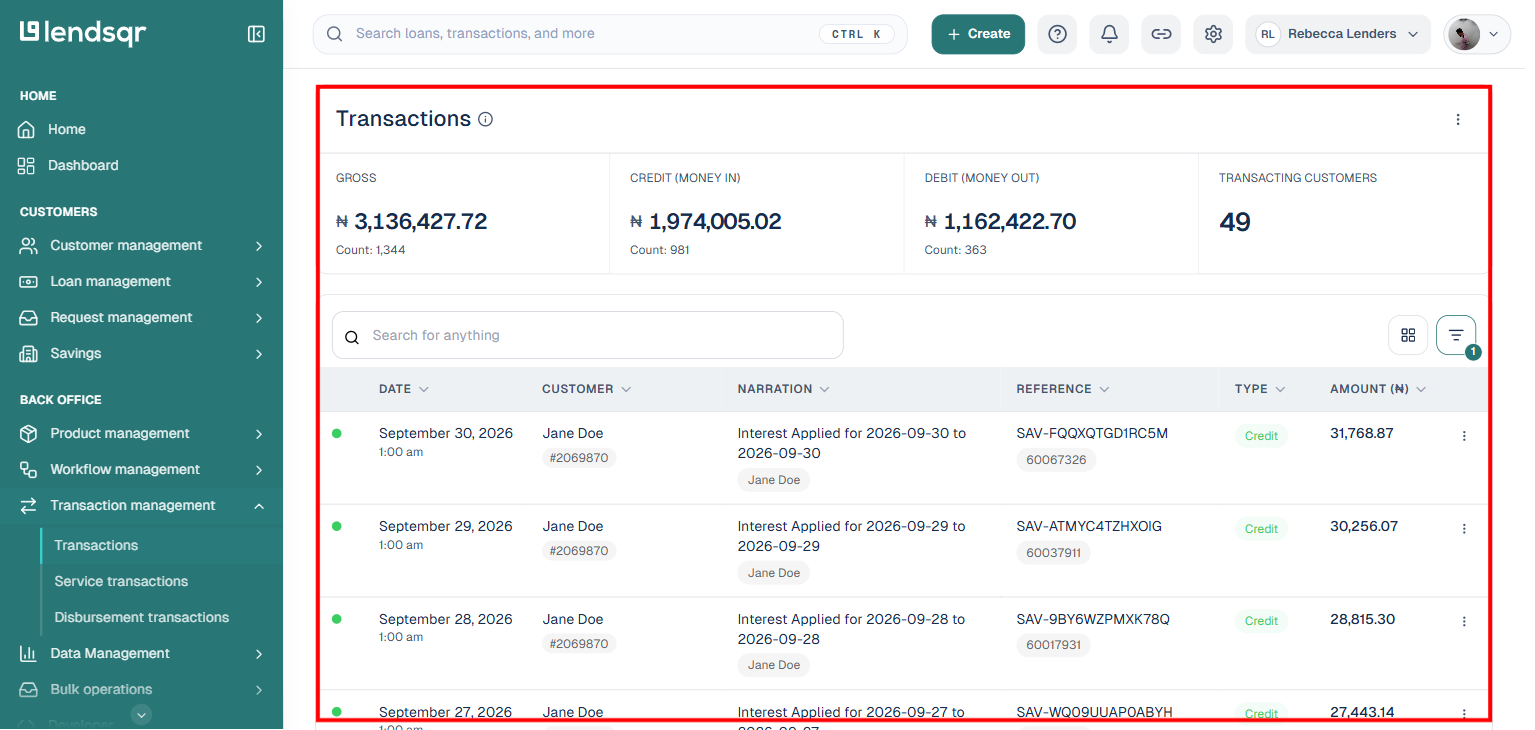
Within the Transaction Management section, click Transactions.
Once selected, a display containing all available transaction records will appear.
This page provides visibility into both credit and debit activities associated with borrower wallets.
Lenders can use this view to review payment movements, investigate financial issues, and monitor transaction performance.
Understanding transaction statuses
Not every transaction reaches completion immediately.
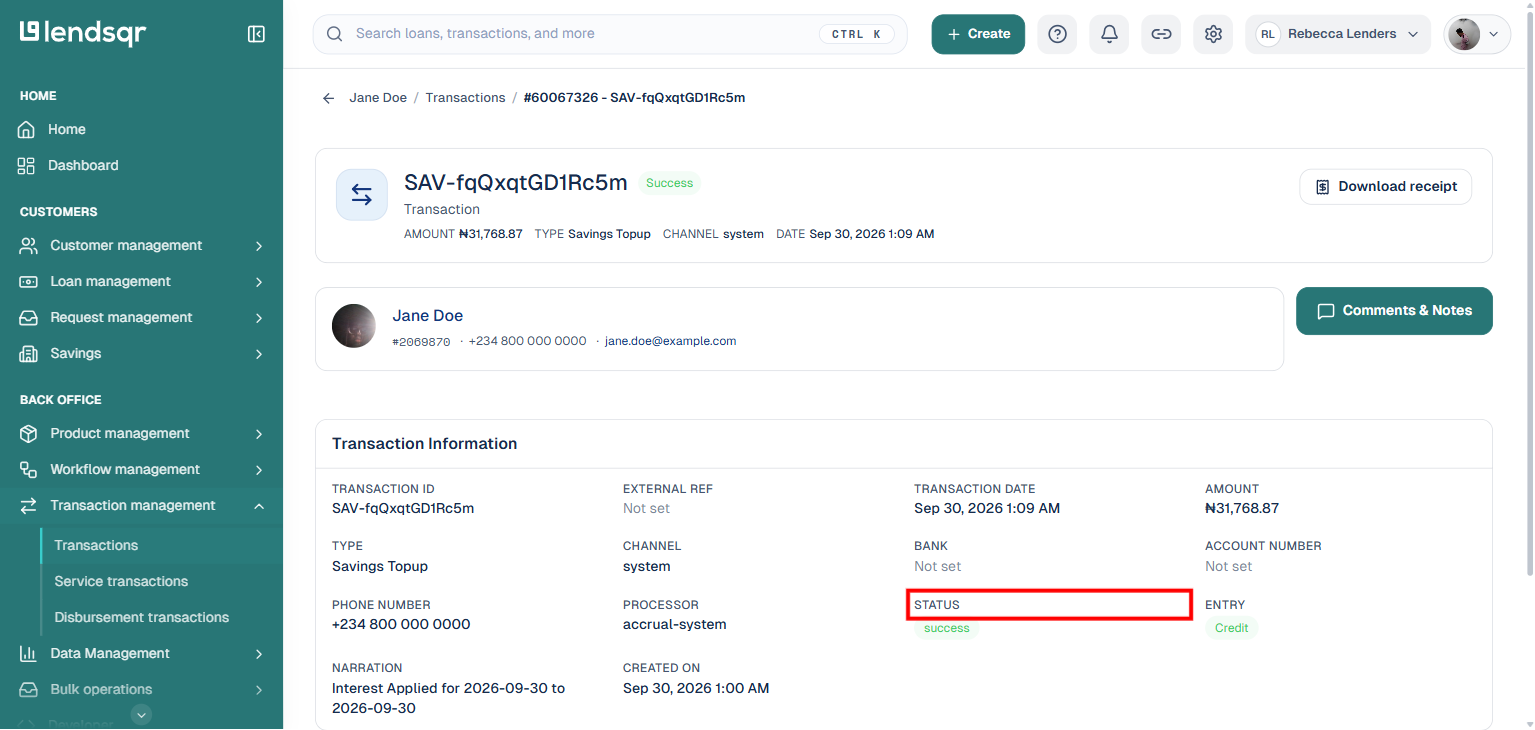
To improve transparency, Lendsqr assigns transaction statuses that indicate the current state of each transaction.
There are four transaction statuses, and each one includes a unique color code to make identification easier. A fifth concept, abandoned, exists elsewhere in the product for loan requests that a borrower started but never completed, but it is not one of the wallet transaction statuses.
By reviewing the status color, lenders can quickly understand what happened during a transaction.
Successful transactions
Status: Success Color code: Green
A successful transaction means the payment or transfer was processed correctly. Funds were successfully moved according to the intended transaction flow.
For example, a borrower funding their wallet successfully or completing a repayment would typically reflect a successful status.
Because no intervention is required, successful transactions generally indicate normal platform activity.
Pending transactions
Status: Pending Color code: Yellow
A pending transaction means the final outcome has not yet been determined. At this stage, the transaction has neither failed nor completed successfully.
Pending transactions are usually temporary and often update within a few hours.
For example, payment processors or banking systems may require additional processing time before confirming the final outcome.
Lenders reviewing pending transactions should typically allow additional time before escalating concerns.
Failed transactions
Status: Failed Color code: Red
A failed transaction means the intended payment or transfer did not complete successfully.
In most cases, funds were not successfully debited from the originating account or wallet.
If funds were deducted despite failure, a reversal process generally follows to restore the affected balance.
A reversed transaction means funds were returned to the originating account or wallet.
This typically happens when a previously attempted transaction could not be completed successfully.
For example, if a payment fails after funds were temporarily deducted, the amount may later be reversed.
Reversal statuses help lenders understand why balances may appear restored after an unsuccessful transaction attempt.
Why transaction statuses matter
Transaction statuses provide more than operational visibility.
For lenders, they help improve troubleshooting, customer support, and repayment tracking.
For example, a borrower claiming repayment failure may simply have a transaction still marked as pending rather than unsuccessful. Similarly, identifying repeated failed or abandoned payments may help lenders intervene earlier to improve repayment outcomes.
Color-coded transaction statuses also make it easier for teams to review high transaction volumes quickly without manually inspecting every record.
Lenders should review transaction histories regularly to identify repayment issues, investigate unusual wallet activity, and improve operational oversight.
Understanding the difference between credits and debits helps prevent confusion during reconciliation.
It is also important to avoid treating pending transactions as immediate failures, since many payment outcomes update automatically within hours.
Organizations should additionally monitor repeated failed or abandoned payments, as these may signal borrower difficulties or payment friction.
As lending operations become increasingly digital, transaction visibility becomes essential for maintaining transparency and operational control. Lendsqr’s wallet transaction system helps lenders track financial movements more effectively by categorizing transactions clearly and displaying transparent status indicators.
By understanding credit and debit transactions, reviewing wallet history, and interpreting transaction statuses accurately, lenders can improve financial monitoring and create smoother lending operations.
Transaction status
There are four transaction statuses, and each has a unique color code indicating its status. You can easily tell the status of one by the color code shown.
Transactions Statuses
Description
Color Code
SUCCESSFUL
This means it has been processed successfully
Green
PENDING
This means it neither failed, nor was it successful, the exact status is yet to be determined. Typically, the exact status is updated within a few hours
Yellow
FAILED
This means it failed i.e. funds were not debited from the originating account/wallet. If funds were debited, then there would be a reversal.
Red
REVERSED
This means it was reversed to the originating account/wallet