Access your Back Office at your fingertips.
Download the app now on Google Play Store.
Scan the QR code
You can also scan QR code with your phone to download the app.
Managing customers and borrowers in Lendsqr
Updated
On this page
Managing customers and borrowers is at the heart of any successful lending operation. Whether you run a salary advance business, microfinance institution, or digital lending platform, keeping track of who your borrowers are, what loans they have taken, and how they are performing is essential for smooth operations and growth.
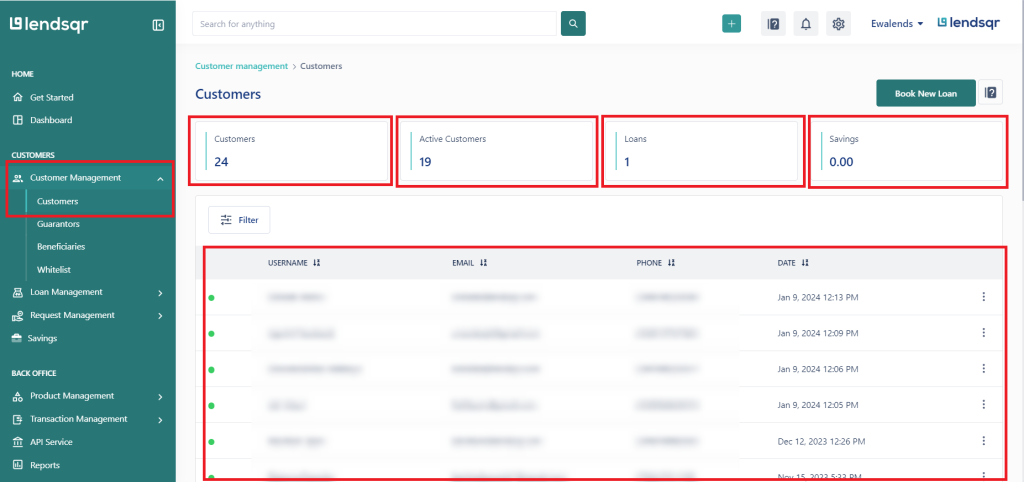
The lendsqr admin console provides a centralized place to view, organize, and manage all your customers and borrowers. From one dashboard, you can see key metrics, access detailed profiles, and perform important tasks without switching between tools.
This overview explains what customer management looks like in lendsqr, why it matters, and how it supports your daily lending activities.
What is a customer profile in lendsqr?
A customer profile in lendsqr is a complete digital record of each borrower. It contains information provided during signup or updated later, such as personal details, contact information, employment or business data, identity documents, and loan history.
Having well-maintained profiles helps you understand each borrower’s background and lending behavior in one place.
Why effective customer management matters
Strong customer management delivers several important benefits for lenders:
Better collections through timely follow-ups and accurate contact details
Improved risk control by spotting patterns in borrower behavior
Higher repeat business by identifying loyal or well-performing customers
Enhanced customer service with quick access to complete borrower information
Easier compliance and reporting for regulators or internal reviews
Without good tools, lenders often struggle with scattered data, delayed collections, and missed opportunities as their borrower base grows from a few dozen to thousands.
When do lenders rely on customer management tools?
You will use customer and borrower management features when:
Onboarding new customers and verifying their information
Reviewing active or past loans before approving new requests
Following up on repayments or handling collections
Segmenting borrowers for targeted offers or risk groups
Preparing performance reports or compliance documentation
For example, a salary advance lender in Nigeria can quickly check recent signups to see how many new staff members joined this month and assess their repayment readiness. A microfinance institution might use active user metrics to monitor group lending performance across different branches.
Key metrics on the customers dashboard
The customers page in lendsqr gives you an instant overview with these important metrics:
Total users: Overall number of registered customers and borrowers
Active users: Customers who are currently engaged or have open loans
Loans given: Total value or count of loans disbursed
Savings deposited: Total savings held if your platform offers savings products
Recent signups: New customers who joined in the last few days or weeks
These numbers help you monitor business health, spot trends, and make data-driven decisions quickly.
Common customer management tasks
In the lendsqr admin console you can:
Search and view detailed customer profiles
Activate or deactivate customer accounts when needed
Assign account managers to specific borrowers
Review loan history and repayment records
Update customer information as details change
All these tasks are designed to be fast and intuitive so your team can focus on lending rather than manual tracking.
What this enables in your lending operations
With lendsqr’s customer management tools, you get a centralized view of all borrowers, quick access to profiles, and powerful metrics. This helps you run smoother operations, improve service quality, reduce risk, and grow your lending portfolio efficiently in one secure admin console.
Many lenders rely on these features daily to build stronger borrower relationships and scale their businesses confidently.
Next steps
Combine customer management with loan origination and repayment tools for end-to-end visibility.
Explore the customers section in your admin console to become familiar with the layout.
Use the metrics and profile views to support your regular operations and decision-making.
Frequently asked questions
Question
Response
#1 What is KYC for customers?
KYC (Know Your Customer) is the process of verifying a borrower’s identity through details like government-issued ID, and personal information to prevent fraud and ensure safe, compliant lending on the Lendsqr platform.
#2 Can my user use the KYC process of another country?
The KYC documents required depend on the country where you operate for example, Nigerian lenders use documents like BVN, NIN, or Driver’s License so if you’re unsure, consult the relevant regulator in your country of operation.
#3 Why is the image of my user’s BVN empty? (Nigeria)
A user’s BVN image may appear empty due to no photo being linked by the issuing bank, or a poor internet connection, try refreshing the page, and if the issue persists, contact [email protected] with the user’s details and a screenshot.