Access your Back Office at your fingertips.
Download the app now on Google Play Store.
Scan the QR code
You can also scan QR code with your phone to download the app.
Adding a custom scoring module to your decision model
Most lenders rely on the data that comes in through their application form: BVN details, income information, and bank statements. But some of the most useful signals about a borrower’s creditworthiness exist outside your platform entirely, sitting in credit bureaus, alternative data providers, or your own proprietary scoring systems.
Lendsqr’s custom scoring module lets you bring that external data into your loan decision process. Instead of making approval decisions based only on what is already inside Lendsqr, you can connect to any external API that returns a score and use that score as part of your decision model.
This article explains what custom scoring is, when to use it, and how to configure it in the Lendsqr admin console.
What custom scoring means in practice
When a borrower applies for a loan, Lendsqr runs them through a decision model. That model is a set of checks run in sequence: verify identity, check for fraud flags, assess affordability, and so on. Each check either passes or fails, and the combined outcome determines whether the loan gets approved.
A custom scoring module adds one more check to that sequence: it sends a request to an external service you specify, receives a score in return, and passes or fails the applicant based on whether their score meets a minimum threshold you set.
The external service could be anything with an API endpoint. Common examples include credit bureaus that return a formal credit score, alternative data providers that score borrowers based on mobile money history or utility payments, or an internal scoring model your organization built and hosted separately.
The practical result is that you can bring the same borrower intelligence you trust elsewhere directly into your automated loan decisions on Lendsqr.
How the module works technically
The custom scoring module sends an HTTP request to an endpoint you define. The request can be a simple GET call, a GET with query parameters carrying borrower details like BVN or loan amount, or a POST request with a JSON body containing the data your scoring service needs.
Your scoring service receives the request, runs its logic, and returns a score. Lendsqr checks whether the returned score meets the minimum threshold you configured. If it does, the module passes and the decision process continues to the next check. If it does not, the module fails and the application stops or continues depending on how you configured the failure behaviour.
You can also control where in the decision sequence the custom check runs. Placing it early filters out low-scoring applicants before running more expensive checks downstream. Placing it later means it only runs on applicants who have already passed your other criteria.
How to add a custom scoring module on Lendsqr
1. Log in to the admin console
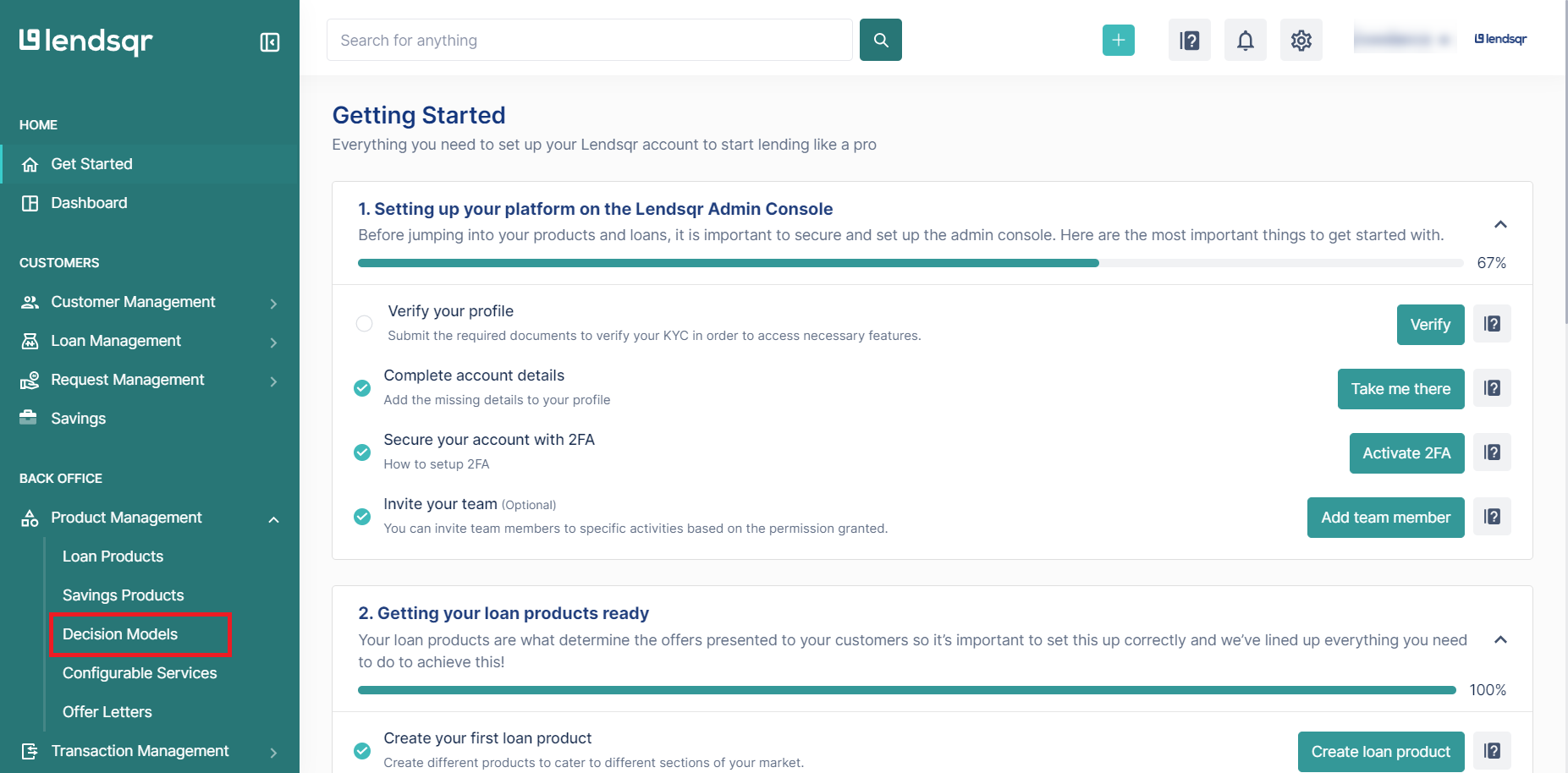
2. Navigate to “Decision Models” under the “Product Management” tab.
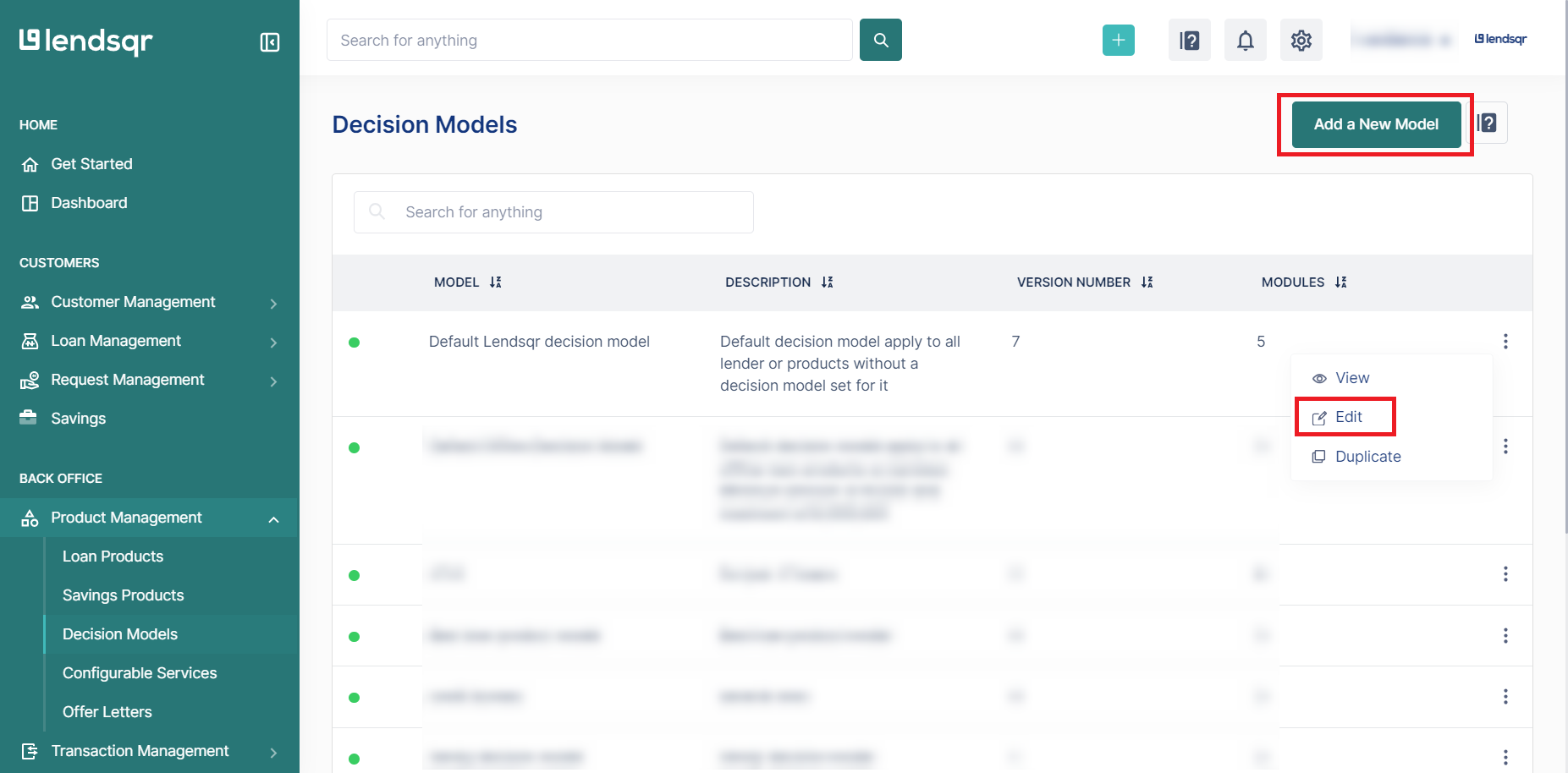
3. To create a new decision model, click the “New Decision Model” button. To update one, locate it in the list and click “Edit” next to it.
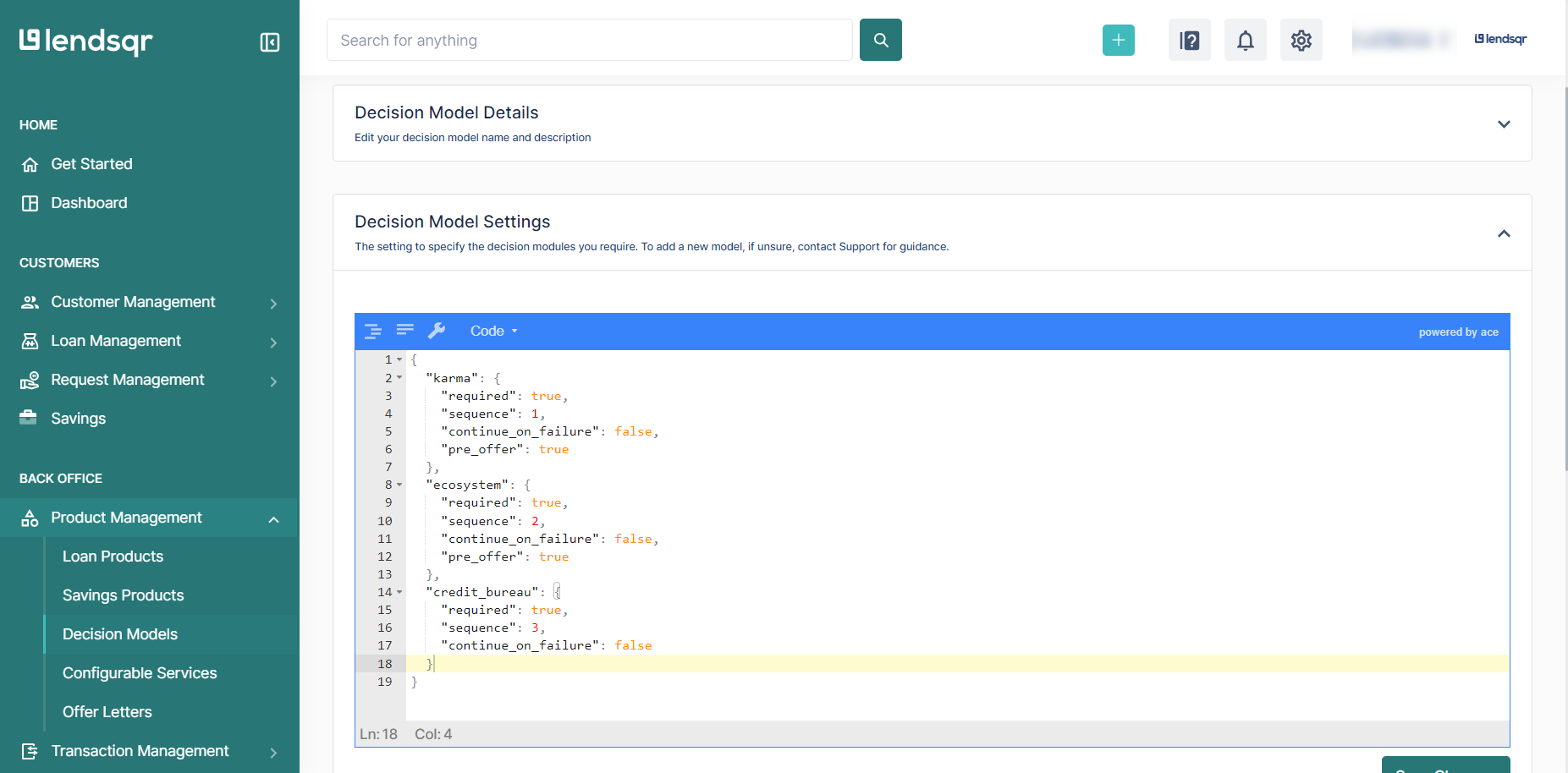
4. Scroll down to the “Decision Model Settings” section of the page.
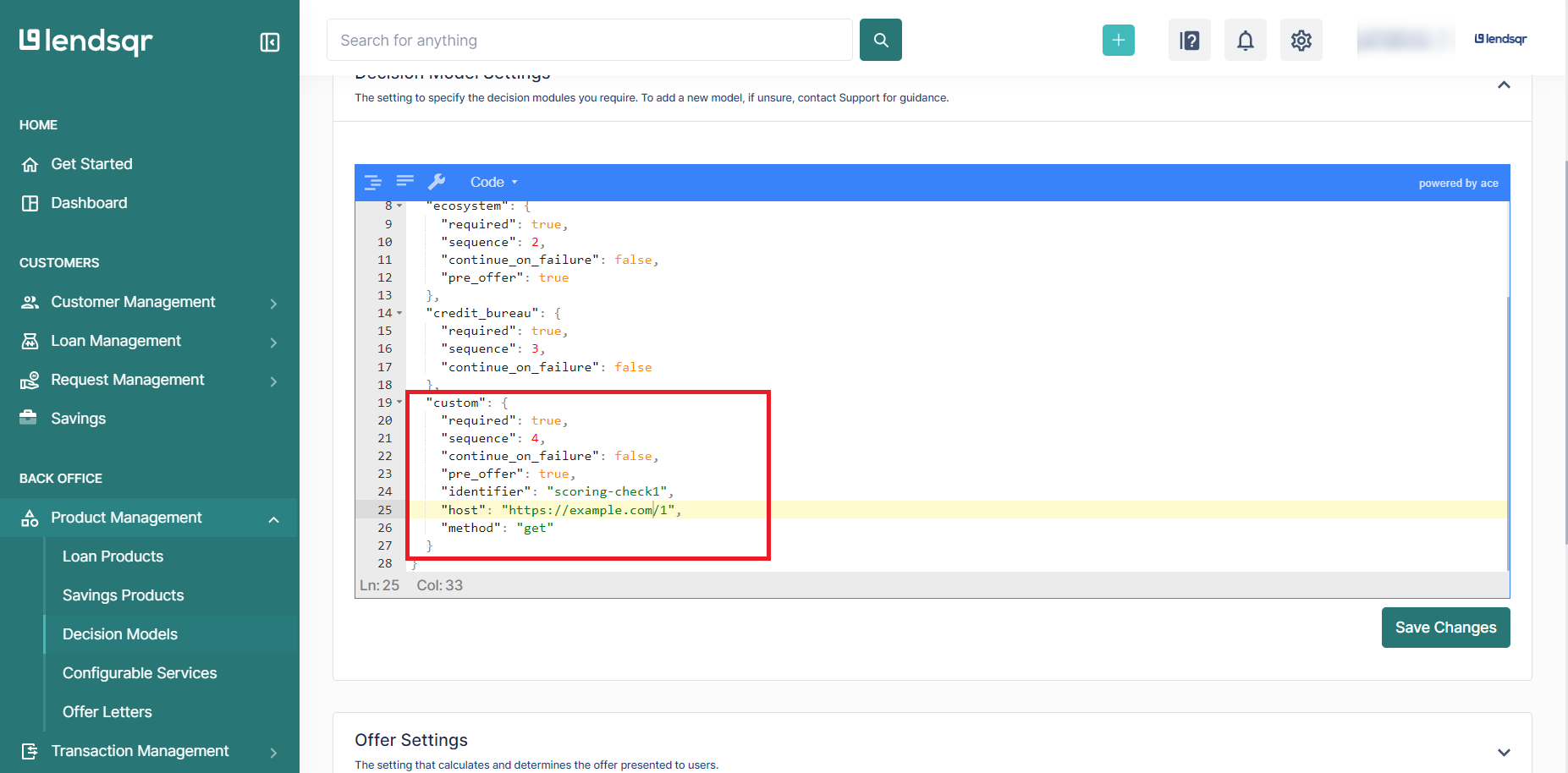
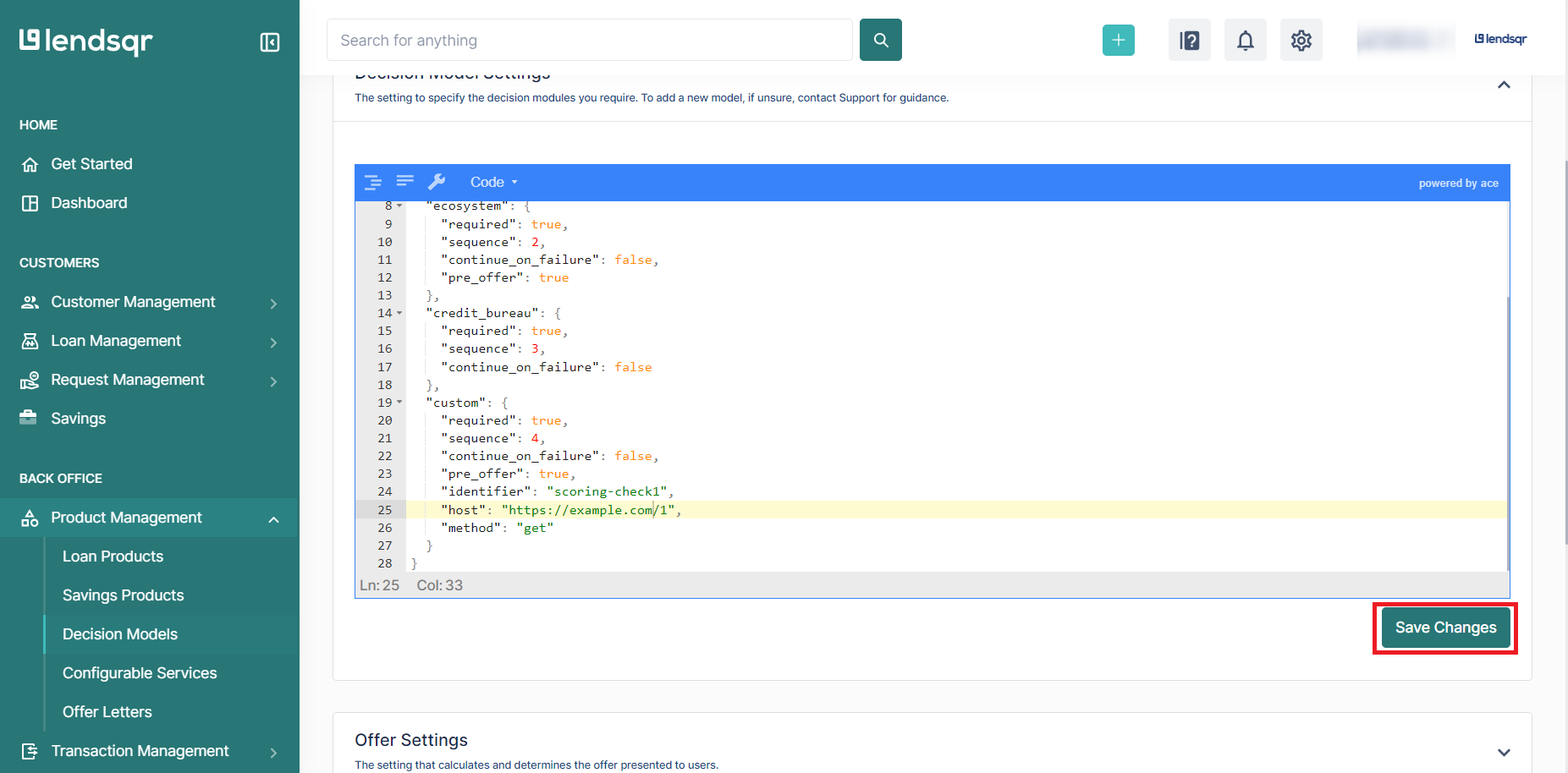
5. Add or update the existing JSON logic with your custom module payload. Then, insert the following JSON payload under the correct sequence in your decision model settings:
The custom module uses a JSON object placed within your decision model settings. Below are four configurations covering the most common use cases, from simple to more complex. Below are different configurations of the custom scoring module:
Simple Case: GET Request (No API Key, Simple Scoring)
Description: This simple configuration performs a “GET ” request to retrieve scoring data. No authentication or additional payload is required.
Ensure that each field is correctly configured according to your custom module’s requirements.
S/N
Variable
Description
1
required
Type: boolean (true or false) Description: This setting shows whether the module is mandatory for the decision process. If set to true, the module must run successfully. If set to false, it can be skipped without affecting the overall decision flow.
2
sequence
Type: integer Description: This setting defines the module’s execution order in the decision model. A lower number runs it earlier in the sequence, helping determine the order in which modules or rules are applied.
3
continue_on_failure
Type: boolean (true or false) Description: This setting decides if the process continues when the module fails.
4
pre_offer
Type: boolean (true or false) Description: This setting specifies whether the module runs before generating a loan offer.
5
identifier
Type: string (URL) Description: This is a unique identifier for the custom scoring module. It is used to reference the module in the system and logs. The identifier must be unique across all modules.
6
host
Type: string (URL) Description: This is the endpoint URL where the scoring logic or API is hosted.
7
method
Type: string (HTTP method, e.g., "get", "post") Description: This setting specifies the HTTP method used when calling the host URL.
8
minimum
Type: integer Description: This sets the minimum score a customer must achieve to pass this module’s requirements.
9
headers
Type: string Description: This is the authentication key or bearer token needed to call the host.
10
query
Type: object (optional) Description: Key-value pairs sent as query parameters
11
body
Type: object (optional) Description: Key-value pairs sent as query parameters for POST requests.
7. After adding the JSON payload, click on the “Save Changes” button to apply the changes to the decision model.
To learn more about how decision models work on Lendsqr, read the guide on what are decision models. For broader thinking on building credit assessment systems for your borrowers, visit the Lendsqr blog.