Access your Back Office at your fingertips.
Download the app now on Google Play Store.
Scan the QR code
You can also scan QR code with your phone to download the app.
How to set up social login on your Customer Web App
Updated
On this page
Getting a borrower to complete sign-up is harder than it sounds. Long registration forms, forgotten passwords, and unverified email addresses are common reasons people abandon onboarding before they ever apply for a loan. For lenders, every incomplete sign-up is a lost customer.
Social login addresses this directly. By allowing borrowers to sign up using their existing Google or Facebook account, you reduce onboarding friction, improve data accuracy, and strengthen your first line of identity verification in one step.
Social login is a feature that allows users to sign in or sign up to an application using their existing social accounts. On Lendsqr, this feature works with Google and Facebook.
When a customer signs up using their Google or Facebook account, Lendsqr validates their email address securely with the chosen provider. Lendsqr does not access the borrower’s passwords or other credentials from their social account.
The process confirms that the email provided by the customer is valid and belongs to them. It also reduces your exposure to fraudsters and bad actors who might otherwise sign up with disposable or fabricated email addresses.
Why social login matters for lending onboarding
Onboarding is the first real interaction a borrower has with your platform. A smooth, trustworthy experience sets the tone for the relationship. A clunky one can push potential customers away before they complete their first application.
Beyond experience, there is a more practical reason to care about social login: data quality. When a borrower types their email address manually, there is no guarantee it is accurate or belongs to them. Typos are common. Some users deliberately provide fake email addresses to avoid follow-up. This creates problems downstream, including failed loan notifications, undelivered OTPs, and unreachable borrowers at critical moments.
Social login solves this by connecting your sign-up process to an authentication system that Google or Facebook already manages. The email address a borrower uses to sign in is confirmed as valid and owned by them. Lendsqr validates this in a secure way without ever accessing the borrower’s password or other credentials.
The onboarding problem for lenders
Most digital lenders operate in a competitive space where borrowers have multiple options. If a customer lands on your web app and faces a tedious sign-up process, they may simply leave. The drop-off rate on manual onboarding forms is real, and it often has nothing to do with the loan product itself. It is purely a friction problem.
Beyond abandonment, inaccurate customer data collected at sign-up creates lasting operational headaches. A wrong email address means a borrower cannot receive their loan offer letter. They cannot get repayment reminders. They cannot complete two-factor authentication. Every gap in your customer data at the point of onboarding becomes a potential problem later in the loan lifecycle.
A practical scenario
Consider a digital lender targeting young urban professionals. Many of these borrowers use Google accounts daily for work, personal email, and other apps. When they arrive at the lender’s web app and see a “Sign in with Google” option, the process takes seconds. They do not need to create a new password, verify their email separately, or remember a new set of login credentials.
From the lender’s side, the email address collected is verified, the borrower’s name may also come from their Google profile, and the account is tied to a real, active digital identity. This creates a cleaner customer record from day one, which benefits KYC reviews, loan notifications, and fraud detection.
For a lender offering salary advance loans where speed matters, this kind of frictionless entry can meaningfully improve how many borrowers complete onboarding and proceed to apply.
How to enable social login for customer onboarding
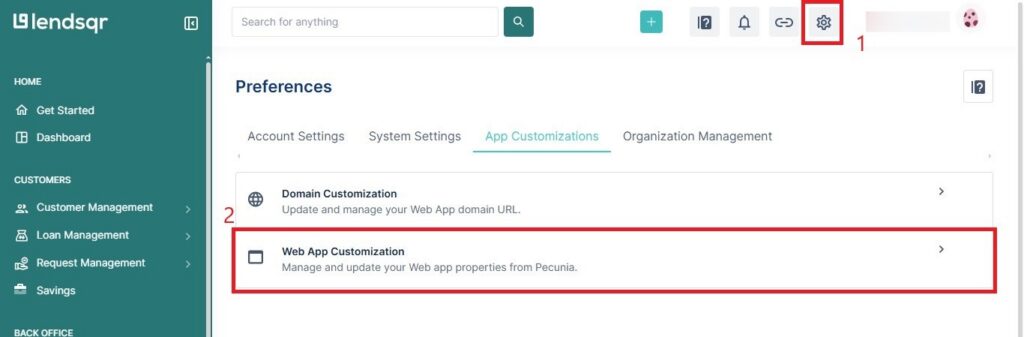
Enabling social login is easy and can be done via the Lendsqr’s admin console dashboard. Follow these simple steps to enable this feature for your customer’s onboarding process:
Click the Settings icon at the top right of the admin console.
Click on Web App Customization settings.
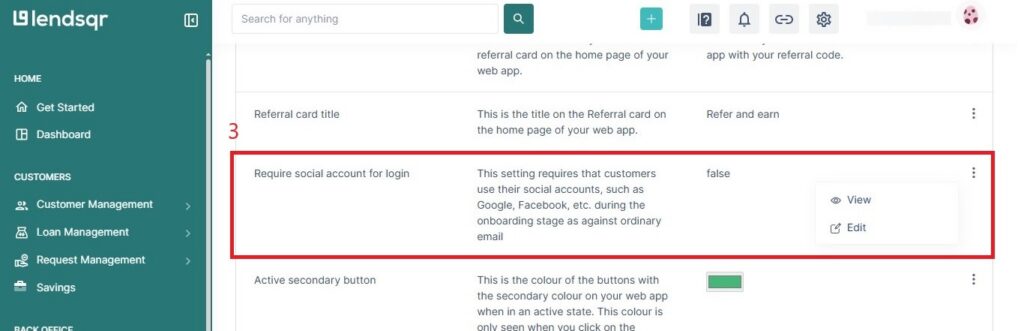
Scroll down to the Require Social Login option.
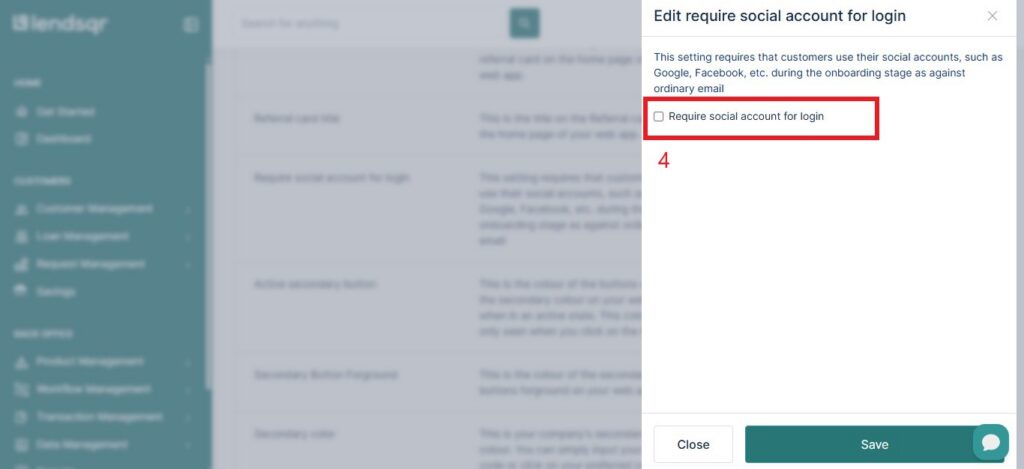
Toggle the switch to true to enable social login during onboarding.
To disable it at any time, toggle the switch back to false.
Please note that if this feature is disabled, customers will be required to provide their email address via an input field during the onboarding process. But if enabled, customers would be required to sign up using their social account as shown below.
This method is a convenient and secure way to ensure that your customers’ email addresses are valid during the onboarding process. By enabling it, you can be sure that the emails provided by your customers belong to them.
Privacy and consent considerations
Social login involves the transfer of personal data from Google or Facebook to your platform. As a lender, you have some responsibilities to be aware of.
Borrower consent. Google and Facebook both display a consent screen to the borrower before sharing any information. The borrower sees exactly what your app will receive and chooses to proceed. Lendsqr does not bypass this step.
Your privacy policy. Your lending platform’s privacy policy should clearly explain that you collect borrower data via social login, which fields you collect, and how you use them. If your platform operates in a regulated market, your compliance team should review this before you enable the feature.
Data minimisation. Lendsqr only requests the permissions needed to create and authenticate a borrower account. The platform collects no unnecessary social data.
If you have any questions or need help with social login, please contact our customer support team for assistance.