Access your Back Office at your fingertips.
Download the app now on Google Play Store.
Scan the QR code
You can also scan QR code with your phone to download the app.
What are organization documents on Lendsqr?
Updated
On this page
Introduction
A salaried worker applies for a personal loan. A business owner applies for SME financing. A first-time borrower applies for a short-term digital loan. Each of these borrowers has a different risk profile, a different document trail, and a different set of verification needs.
Asking all three for the same documents does not work. It slows down the ones who qualify quickly and frustrates the ones whose documents do not match the requirements. Collecting the wrong documents wastes your team’s time and pushes borrowers to abandon the application before they finish.
Organization documents solve this. They let you define exactly what each borrower must submit during onboarding or at any point in the lending lifecycle. Your borrowers only see what is relevant to their loan type. Your team only reviews what actually supports your credit decision.
This guide explains what organization documents are, why they matter for lenders and compliance, where they appear in Lendsqr workflows, when to require each document type, and how to configure them on the admin console.
What are organization documents?
Organization documents are the KYC (Know Your Customer) files your borrowers submit to verify their identity, address, employment, and financial standing. They form the foundation of your onboarding process.
Without the right documents, your credit team cannot assess risk accurately. Your compliance function cannot meet regulatory requirements. And your borrowers cannot access credit.
Every lending operation has a different risk profile and a different borrower base. Lendsqr gives platform administrators full control over which documents to require. You configure this based on your internal policies and the specific borrower segments you serve.
Configuring your organization documents correctly does three things. It reduces friction during onboarding by removing document requests that are irrelevant to your borrower type. It lowers drop-off rates caused by confusing or excessive requirements. And it keeps your verification process aligned with your internal risk standards and any applicable regulatory obligations.
Where organization documents appear in Lendsqr
Organization documents are not a standalone feature. They connect directly to your borrower onboarding flow and your KYC verification process on the Lendsqr platform.
When a borrower applies for a loan on your platform, the onboarding flow prompts them to upload the documents you have configured as required. The borrower cannot complete onboarding and submit their application until they upload every required document. Optional documents appear in the flow but do not block progression.
Once uploaded, your team can review submitted documents from the borrower’s profile in the Customer Management module of the admin console. This is where your credit officers verify identity, confirm employment, and assess financial standing before making a loan decision.
Your document configuration also interacts with your decision engine. Some lenders configure their decision engine to include document verification as a check before credit bureau or affordability assessments run. In this setup, incomplete or missing documents stop the application before it reaches the credit assessment stage.
Why organization documents matter for compliance
Beyond credit assessment, document configuration is a compliance function. Most financial regulators require lenders to collect and retain specific borrower information before disbursing credit. The exact requirements vary by market, but identity verification is a universal baseline across Nigeria, Kenya, Ghana, South Africa, and most other markets where Lendsqr lenders operate.
Configuring your organization documents correctly demonstrates that your onboarding process meets minimum KYC standards. It also creates a verifiable record of the documents collected from each borrower, which supports audit processes and regulatory reporting when required.
Lenders who skip or disable key document requirements may process loans faster in the short term. However, they expose themselves to regulatory risk and make it significantly harder to defend credit decisions if a loan goes into dispute or default.
Default documents on Lendsqr
The documents settings page includes eight document categories by default. Each category covers a specific area of borrower verification. Understanding what each one confirms helps you decide which to require and which to leave optional or disabled.
Individual borrower documents
Identification documents
Identification documents confirm who the borrower is. Lendsqr supports four identification types by default: International Passport, Driver’s License, Voter’s Card, and National Identity Card.
When to require it: Always. Identification documents should be mandatory for every loan product on your platform. Without them, you cannot confirm that the person applying is who they claim to be.
Proof of address
Proof of address confirms where the borrower lives. The default options are an Electricity Bill, Waste Disposal Bill, and Rent Receipt.
When to require it: For lenders offering higher-value loans or products where the borrower’s physical location is material to the lending decision. For short-term digital loans, proof of address may add friction without improving your credit assessment.
Proof of employment
Proof of employment confirms the borrower’s income source and employer. The default options are a Company ID Card, Letter of Employment, and Payslip.
When to require it: For all salary-backed loan products. At minimum, require either a payslip or a letter of employment. For lenders serving informal workers, leave this optional or disabled entirely.
Financial documents
Financial documents give lenders visibility into the borrower’s transaction history and cash flow. The default option is a Bank Statement. This document supports affordability assessments and income verification for borrowers without formal employment records.
When to require it: For any loan product where affordability analysis is part of your credit decision. For SME loans, a business bank statement is often the most informative document on the list.
Business borrower documents
CAC documents
CAC 1, CAC 2, and CAC 3 are Corporate Affairs Commission documents for registered businesses in Nigeria. Together, they confirm the legal structure, shareholding, and leadership of a registered business. Specifically, CAC 1 covers the company’s particulars, CAC 2 covers the statement of share capital and return of allotment, and CAC 3 covers the particulars of the company’s directors.
When to require it: For any loan product targeting registered businesses. For smaller business loans, CAC 1 may be sufficient. For larger facilities, requiring all three gives a more complete picture of the business structure.
Certificate of incorporation
A Certificate of Incorporation confirms that a business is legally registered with the Corporate Affairs Commission.
When to require it: For all SME and corporate loan products. Pair it with the relevant CAC documents for a complete business verification package. Without it, you cannot confirm the legal existence of the business you are lending to.
Practical configuration examples by loan product
Different loan products call for different document combinations. Here are three practical examples to guide your configuration.
Individual consumer loan for salaried workers
Enable identification documents and set them as required. Enable proof of employment and require at least a payslip or letter of employment. Add a bank statement as a required financial document if your decision engine uses transaction history. Leave CAC documents and Certificate of Incorporation disabled for this product type.
SME loan for registered businesses
Start by enabling identification documents for the business owner or directors and set them as required. Next, enable CAC 1, CAC 2, and CAC 3 as required documents. Finally, enable the Certificate of Incorporation as required. Add a bank statement to support the cash flow assessment. Leave proof of employment disabled, as it does not apply to business borrowers.
Short-term digital loan for informal workers
Enable identification documents and set them as required. Add a bank statement as required if your platform uses transaction data for credit scoring. Leave proof of employment, proof of address, and all business documents disabled to reduce onboarding friction for this borrower segment.
How to manage organization documents
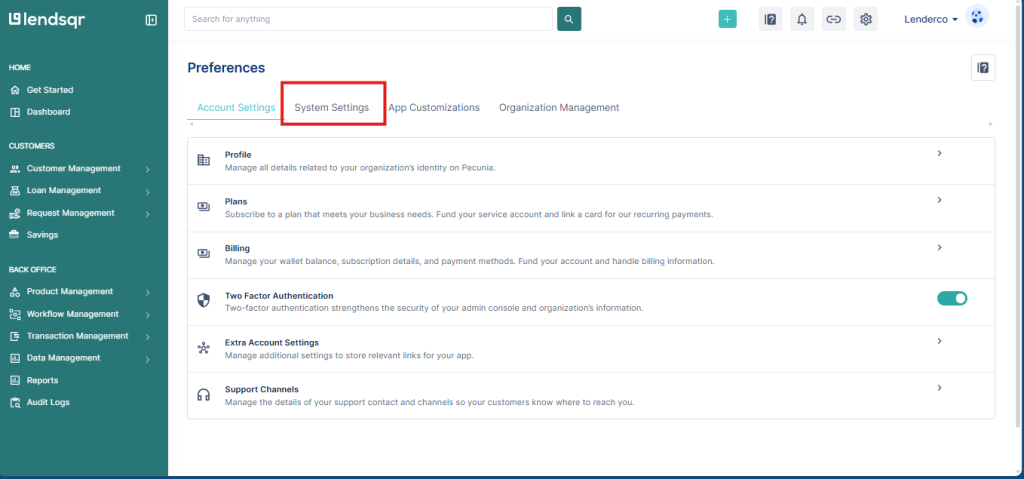
You need admin access to configure document settings on the Lendsqr admin console.
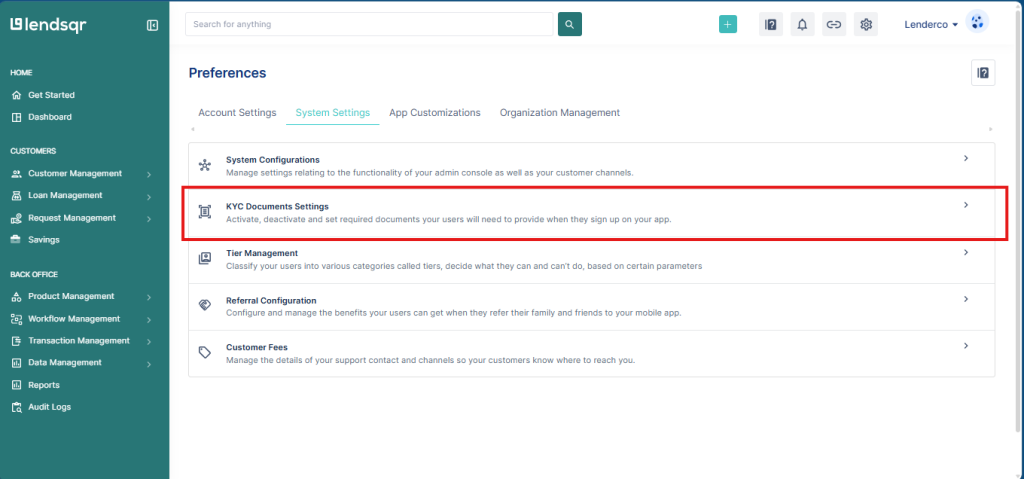
4. Click “KYC Document Settings” to open the documents configuration page.
5. Review the eight default document categories.
6. Enable or disable specific documents based on your borrower requirements and internal policy.
7. Save your changes
Document upload checklist for lenders
Use this checklist before publishing any loan product to confirm your document configuration is complete.
Identification documents enabled and set as required
Proof of address configured based on your loan product type
Proof of employment enabled for salary-backed products
Bank statement enabled for products using affordability analysis
CAC documents enabled for business borrower products
Certificate of Incorporation enabled for SME and corporate products
All optional documents reviewed and confirmed as optional rather than required
Configuration tested in a fresh onboarding session before going live
Troubleshooting
Borrowers are not seeing the document upload step during onboarding. Confirm that the relevant documents are enabled in your KYC Document Settings. A document that is disabled will not appear in the borrower’s onboarding flow.
Borrowers are abandoning the application at the document upload step. Review the number and type of documents you are requiring. Reducing the document set to only what is essential for your credit decision can significantly improve completion rates.
A document type I need is not in the default list. The default list covers the most common KYC document types. If your operation requires something outside this list, contact Lendsqr support to explore your options.