Access your Back Office at your fingertips.
Download the app now on Google Play Store.
Scan the QR code
You can also scan QR code with your phone to download the app.
How to configure the Verve card for loan repayments
Updated
On this page
Debit card repayment is one of the most common ways borrowers on digital lending platforms pay back their loans. When a repayment falls due, the system attempts to charge the card the borrower linked during onboarding. If that charge succeeds, the repayment is recorded, and the loan moves forward. If it fails, your collections process has to pick up the difference.
By default, Lendsqr does not accept Verve cards for loan repayments. This is because Verve cards frequently require re-authorization, which disrupts the automatic charging that makes card repayments reliable. For lenders whose borrowers rely heavily on Verve, a default creates a practical problem: borrowers cannot complete repayment setup and therefore never receive their loan.
This guide covers when enabling Verve makes sense, what tradeoffs to expect, and how to configure it.
Where Verve fits in your repayment strategy
Lendsqr supports three main repayment methods: debit card charging, direct debit mandates, and virtual account transfers. Each has its place depending on your borrower segment and product design.
Card charging is the lightest-touch option for borrowers. They add a card once during onboarding, and repayments run automatically from that point. No mandate setup, no bank paperwork. This makes it popular for short-term consumer loans, where the speed of onboarding is crucial.
Direct debit mandates are more durable for recurring repayments over longer loan tenures. They are bank-level authorizations that are harder to revoke accidentally and typically more reliable for automated collection. Read more in the guide on payments with direct debit.
Verve cards occupy a specific segment of the card market. Many Nigerian borrowers, particularly those banking with smaller or regional financial institutions, hold Verve as their primary or only card. If your platform only accepts Visa and Mastercard, but many borrowers hold Verve, those borrowers hit a wall at repayment setup and cannot proceed.
When to enable Verve card support
Enable Verve when your borrower data shows that a significant share of your customers use it as their primary card. This tends to be most common in the following situations.
Semi-urban and rural lending: Borrowers banking with mid-tier or regional institutions are more likely to hold Verve than international card networks. A lender operating in these segments noticed that several loan applications were failing at the repayment setup stage. After enabling Verve support, application completion rates improved because borrowers could link the only debit card they had.
Payroll-linked products for lower-income earners: Many workers at small businesses bank with institutions that issue Verve by default. Blocking Verve in this context reduces your addressable market without a good reason.
Any product where the card type is a conversion blocker: High drop-off at the card-linking stage, combined with support tickets about rejected Verve cards, is a clear signal to enable the option.
What to expect after enabling Verve cards
Enabling Verve changes what card types borrowers can link during onboarding. It does not change how repayment collection works at a system level.
The practical tradeoff is that Verve cards require more frequent re-authorization than Visa and Mastercard. This means automatic charges on Verve cards have a higher failure rate. A charge that succeeds silently on Visa may return an authentication error on Verve, requiring the borrower to manually authorize the debit.
This does not make Verve unusable, but you should monitor failed repayment rates by card type after enabling it. Some lenders find that a short communication sent to borrowers at onboarding, explaining that they may occasionally need to re-authorize their Verve card for a repayment to go through, reduces confusion when an authentication prompt appears. Borrowers who understand what to expect are less likely to ignore the request and more likely to complete the authorization. If Verve-linked loans show higher failed collection rates, consider pairing them with direct debit as a backup for those borrowers. For guidance on handling failed repayments, read the guide on managing failed transactions and repayment to user wallets.
How to enable Verve cards on Lendsqr
This guide will walk you through the necessary steps to enable this feature:
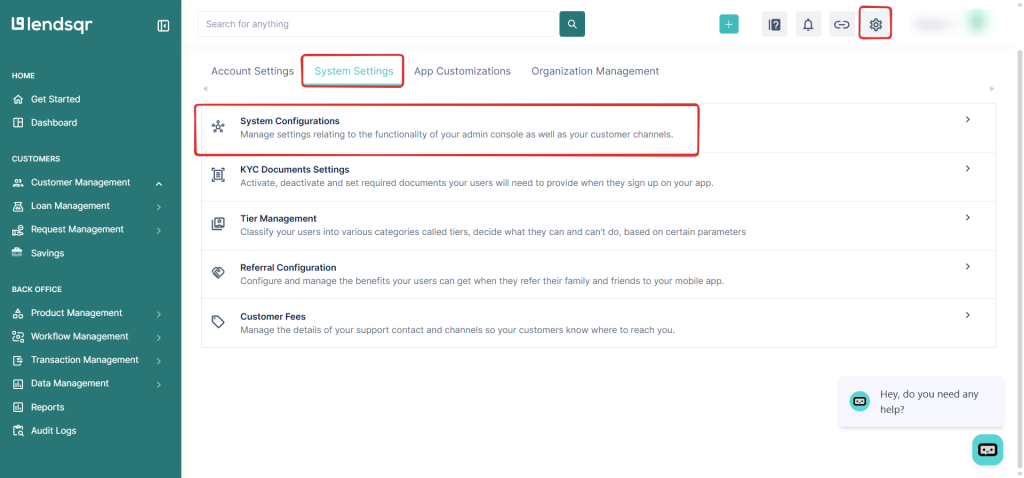
On the top menu on any page on the Lendsqr admin console, click the Settings icon
Locate and click on System Configurations under the System Settings tab.
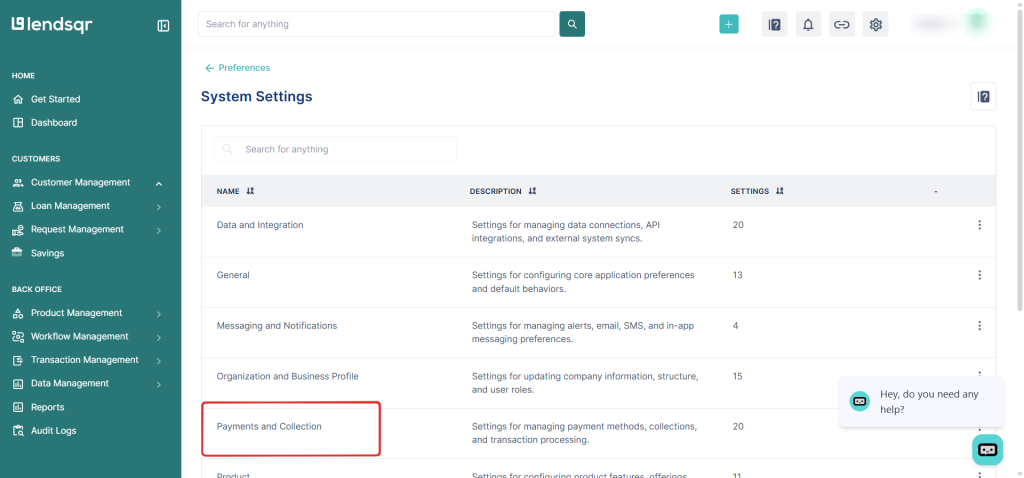
Click on Payments and Collection
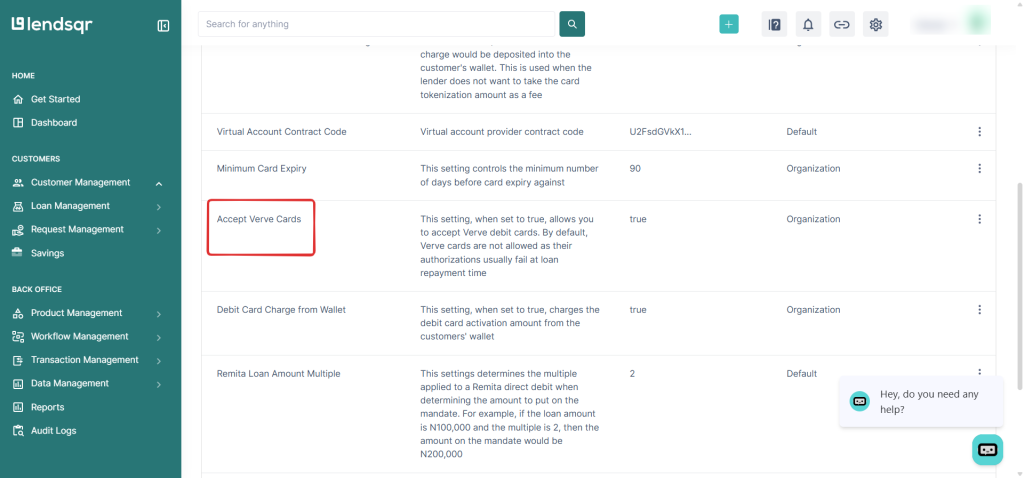
Click on Accept Verve cards
Click on the Edit button.
Click the checkbox to Accept Verve Cards, and then click on Save
The change takes effect immediately. Borrowers who could not previously link a Verve card can do so the next time they open the app.
After enabling the setting, it is worth watching your repayment success rates over the following loan cycle. Look at how Verve-linked repayments are performing compared to Visa and Mastercard. If you see higher authorization failures on Verve cards, prompt those borrowers to set up a direct debit mandate as a backup. A backup method reduces the risk of a failed card charge becoming a missed repayment and an unexpected penalty.