Access your Back Office at your fingertips.
Download the app now on Google Play Store.
Scan the QR code
You can also scan QR code with your phone to download the app.
How to modify the schedule of a loan request
Updated
On this page
Modifying a loan request schedule on Lendsqr gives lenders more flexibility when managing loan products and helps them align repayment timing with how borrowers actually earn. This is especially useful for customers with irregular income, seasonal earnings, or business cash flows that do not fit a standard repayment pattern.
When lenders can adjust the repayment schedule before approval, they are better able to structure loan requests in a way that is realistic for the borrower and operationally manageable for the lender. That can reduce avoidable repayment pressure, improve the borrowing experience, and support stronger repayment outcomes over time.
A fixed repayment structure may work for some borrowers, but it is not always the best fit for everyone. Borrowers who earn weekly, seasonally, or through irregular business activity may need dates that better reflect when money is actually available.
For lenders, this feature makes loan products more adaptable without needing to rebuild the request from scratch. It also supports more thoughtful underwriting and helps loan officers respond to borrower needs in a controlled way during the request review process.
Before you start
Before modifying a loan request schedule, make sure you have admin access to the Lendsqr admin console. You should also confirm that the loan request is in your queue and that the request is one you are permitted to edit.
It also helps to review the borrower’s repayment pattern or any special arrangement tied to the loan product before making changes. That way, the updated schedule is not only technically correct but also practical for the borrower and consistent with the lender’s lending policy.
What to check before confirming
Before clicking Confirm, review the schedule carefully to ensure the following:
The repayment dates are accurate.
The changes match the loan product rules.
The updated schedule reflects the borrower’s expected income timing.
The request is still consistent with the lender’s approval process.
This final check is important because once the schedule is confirmed, it becomes part of the request record and will guide the next stage of the loan workflow.
Steps to modify the schedule
Follow these steps to modify the schedule of a loan request in the Lendsqr admin console:
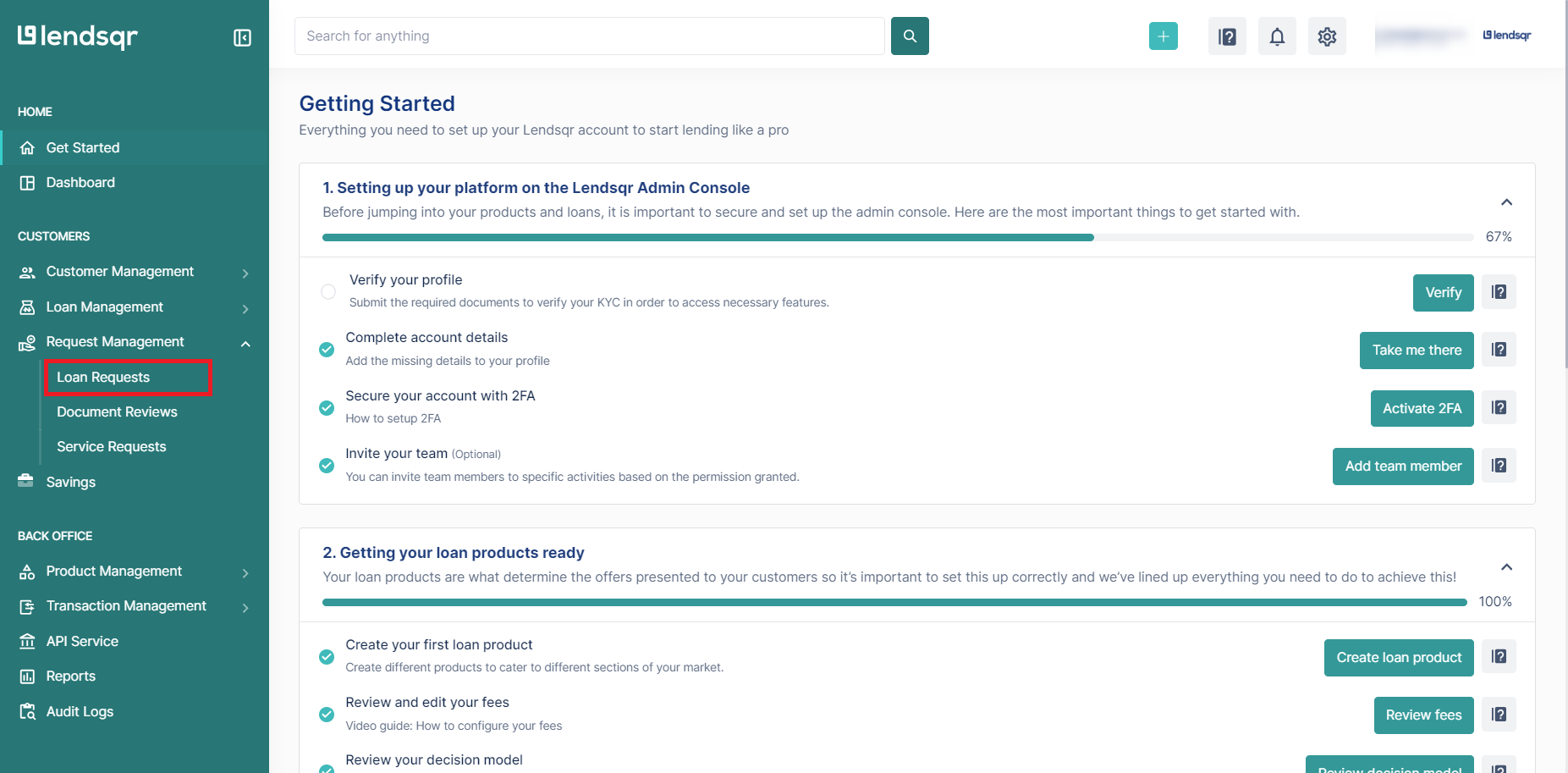
Log in to your Lendsqr admin console using your admin access.
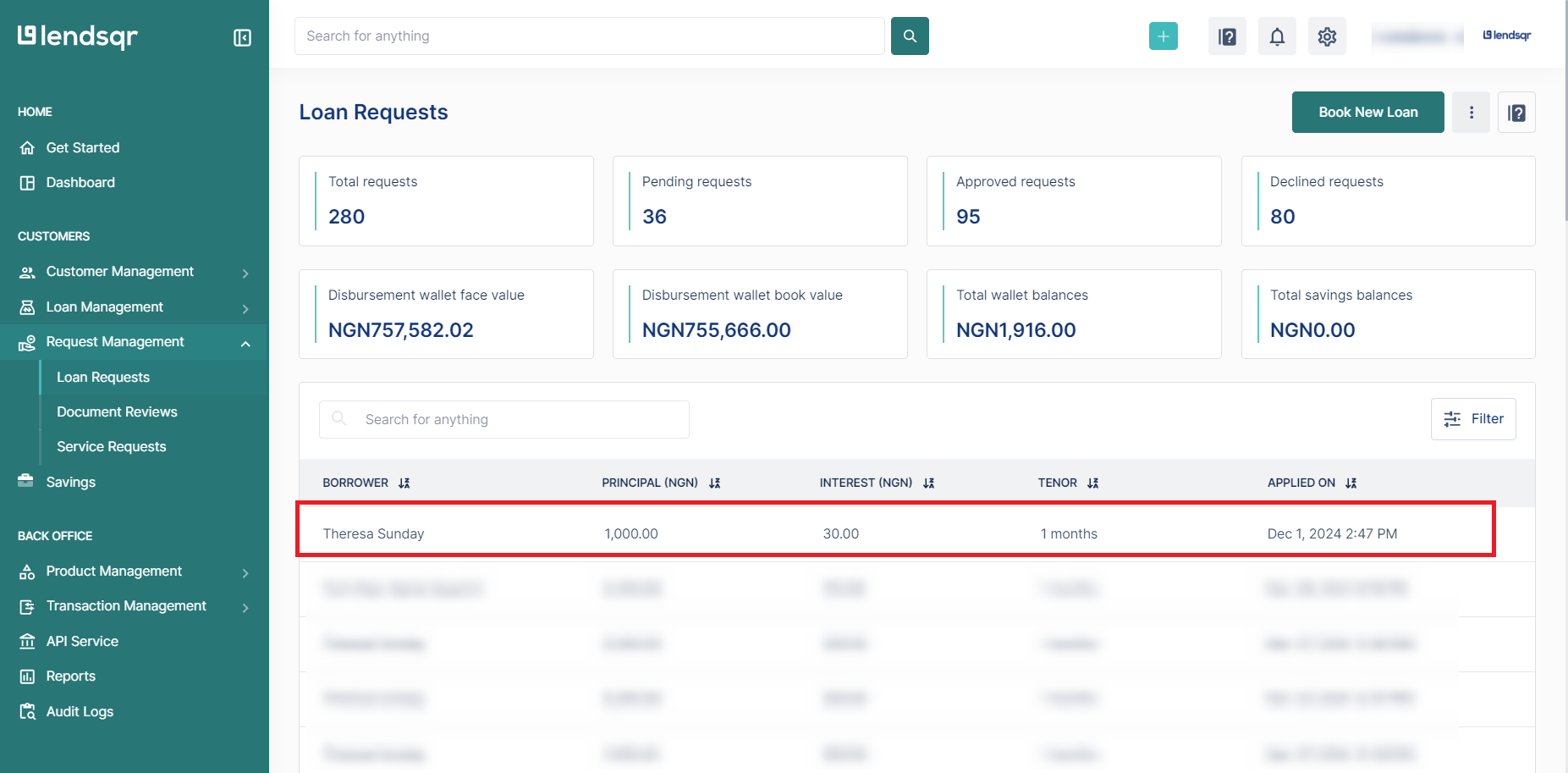
Go to the Loan Request tab under the Request Management section of your dashboard.
Select a loan from your request queue.
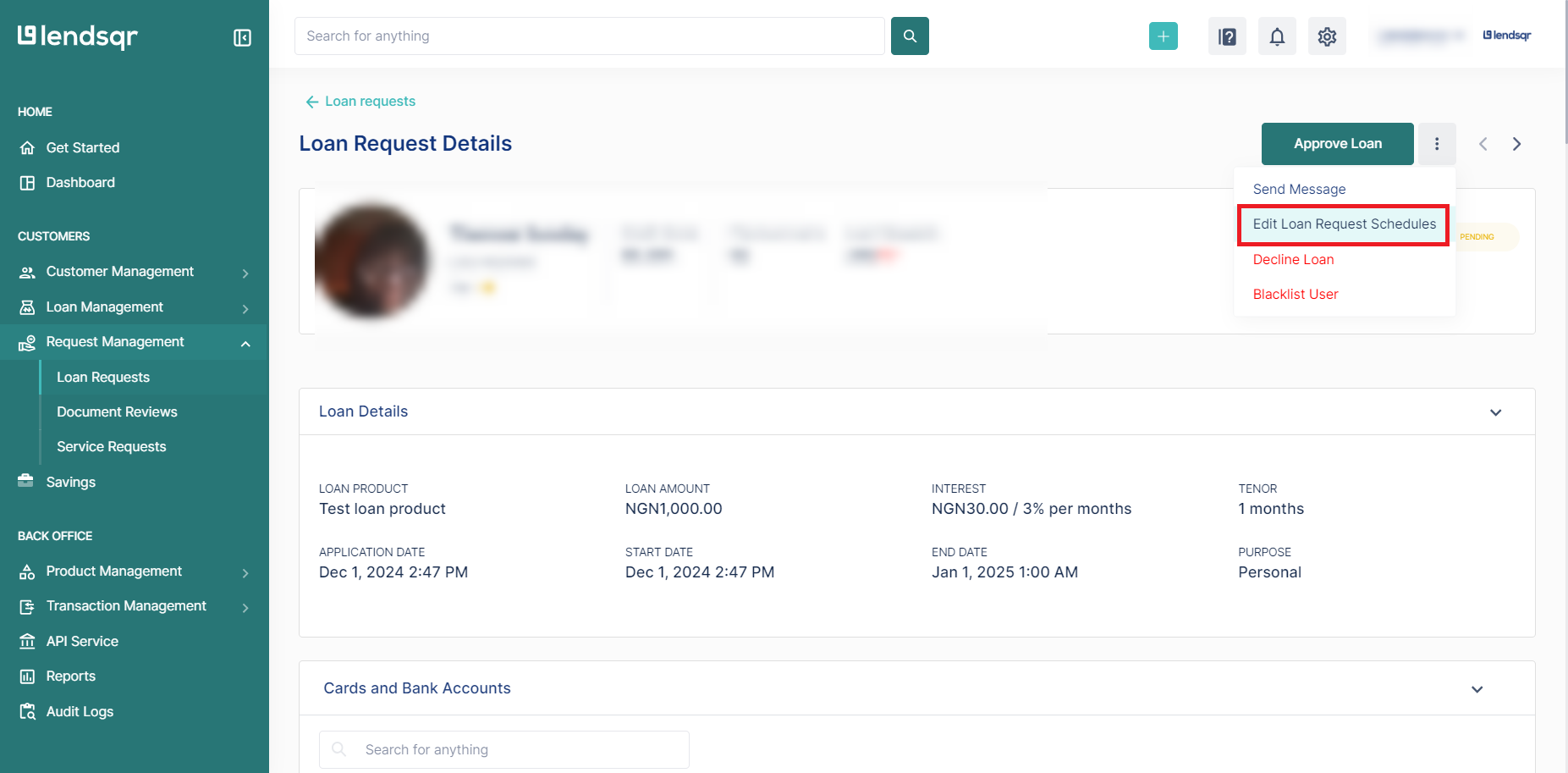
Open the options menu beside Approve loan by clicking the three dots.
ChooseEdit Loan Request Schedule from the menu.
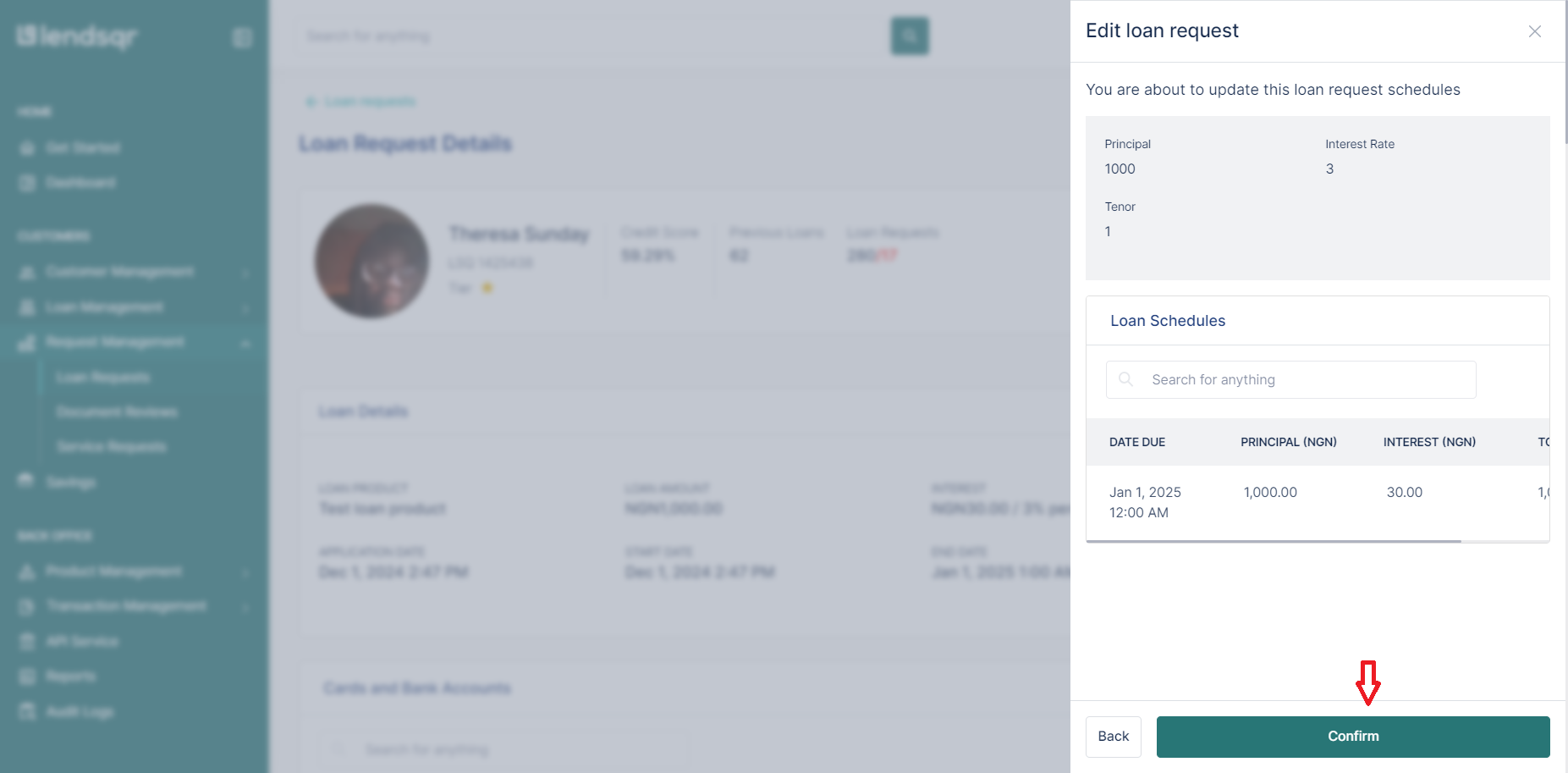
Review the modal that appears and update the editable schedule fields as needed.
ClickSubmit after changing the details.
Confirm the changes once you have reviewed the updated schedule across the request.
Each step should be completed carefully so the modified schedule reflects the intended repayment structure. If the schedule is changed incorrectly, the loan request may no longer match the borrower’s expected repayment timing or the lender’s underwriting decision.
What happens after editing
After the schedule is updated and confirmed, the new details become part of the loan request review process. That means the lender can continue with approval or other next steps using the revised repayment structure rather than the original one.
This is useful when the borrower’s loan can still proceed, but the repayment timing needs to be better aligned before the request is approved. In practice, the feature supports cleaner loan administration because the lender can correct the schedule early instead of making later adjustments that could complicate repayment tracking.
This feature is most valuable in situations where repayment timing needs to reflect real-world earning patterns. Examples include:
Seasonal farmers who receive income after harvest.
Small business owners whose revenue depends on sales cycles.
Salary earners whose pay dates do not align neatly with the existing loan schedule.
Borrowers whose repayment dates need to be adjusted after a review of the request.
These scenarios show why schedule flexibility is not just a convenience feature. It is a practical lending control that helps the loan product remain useful to a wider range of customers.
Why would a lender modify a loan request schedule?
A lender may modify a loan request schedule to better align repayment dates with the borrower’s cash flow, income cycle, or business season. This makes the repayment structure more realistic and can reduce the chance of early delinquency.
Can the schedule be changed before approval?
Yes. The feature is designed for use during the loan request review process, before the lender finalizes the decision.
What should the lender check before confirming the change?
The lender should confirm that the updated schedule is correct, consistent with the loan product, and suitable for the borrower’s expected repayment pattern.
A microlender working with farmers may need to align repayment dates with harvest periods so the borrower can repay after selling crops. In that case, editing the loan request schedule makes the product more suitable for the borrower’s actual income cycle.
A lender serving small traders may also need to shift repayment timing to match daily or weekly sales patterns. Instead of requiring a payment date that falls before revenue is available, the lender can adjust the schedule during request review and improve the likelihood of successful repayment.
Why this feature is useful
This feature is useful because repayment schedules are not always one size fits all. Some borrowers earn more predictably than others, and some receive income only at certain times of the month, quarter, or season. A flexible schedule helps lenders respond to those differences without losing control of the loan review process.
It also helps reduce repayment strain. When borrowers are given a schedule that better matches when money comes in, they are more likely to meet obligations on time and less likely to experience stress caused by unrealistic due dates.
From an operational perspective, schedule modification supports better loan management because the lender can correct timing issues before the request is approved. That can make the approval process smoother and help avoid later adjustments that are harder to manage.
Best practices
To make the most of the loan request schedule modification feature, keep the following best practices in mind:
Review the borrower’s repayment profile before editing. Make sure the new schedule matches the borrower’s income pattern, business cycle, or expected cash flow.
Confirm that the loan request is still eligible for editing. Only modify schedules when the request is in the correct stage and still under active review.
Use clear and accurate schedule dates. Double check due dates, repayment frequency, and any other editable fields before submitting the change.
Keep the updated schedule consistent with the loan product. The new schedule should follow the lender’s policy and the product’s repayment structure.
Explain the change internally where needed. If your team uses notes or review comments, record why the schedule was adjusted for future reference.
Verify the final schedule before confirming. Once you click Confirm, the updated schedule becomes part of the loan request workflow.
Use the feature for flexibility, not shortcuts. The goal is to improve repayment fit, not to bypass normal loan assessment or approval standards.