Access your Back Office at your fingertips.
Download the app now on Google Play Store.
Scan the QR code
You can also scan QR code with your phone to download the app.
How to turn off BVN validation for your customers’ added accounts
Updated
On this page
By default, when a customer adds a bank account on your Lendsqr-powered platform, the system runs a bank verification number check to confirm that the account belongs to the person registered on your app. This is a fraud prevention measure that ensures borrowers cannot add accounts tied to other people’s identities.
However, there are legitimate scenarios where you may need to turn this check off. For example, if your platform caters to business owners who want to add company accounts that are not tied to their personal bank verification number, or if you are onboarding users in a testing or pilot environment, the default validation can become a blocker. The bank verification number override setting in your system configurations gives you the flexibility to handle these cases.
This guide walks you through exactly how to locate and enable this setting.
When to use this setting
Turning off bank verification number validation should be a deliberate decision, not a default one. Consider using this setting when:
Your lending product is designed for businesses where the repayment account belongs to a company, not an individual
You are running a pilot or internal test and need to add accounts without going through identity verification
A specific user group on your platform legitimately holds accounts that are not tied to their personal bank verification number
You have alternative account verification methods in place and do not need the built-in check. If none of these scenarios apply to your platform, it is advisable to leave the default validation in place to protect against fraudulent account additions.
If none of these scenarios apply to your platform, it is advisable to leave the default validation in place to protect against fraudulent account additions.
How to turn off bank verification number validation
Step 1: Log in to the admin console
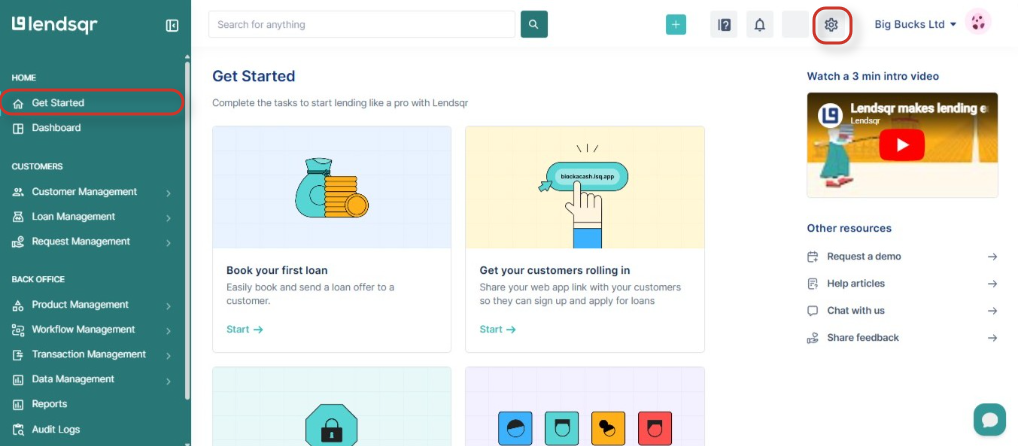
Go to app.lendsqr.com and log in with your administrator credentials. Once on the dashboard, click the Settings icon.
Step 2: Navigate to system configurations
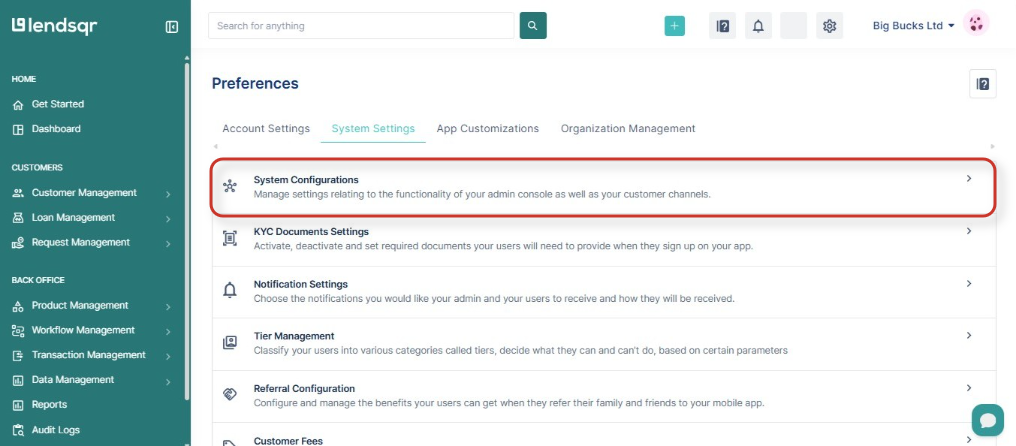
Under System settings, select System configurations. This section contains platform-wide settings that control how your organization and its users interact with core Lendsqr features.
Step 3: Open the system settings tab
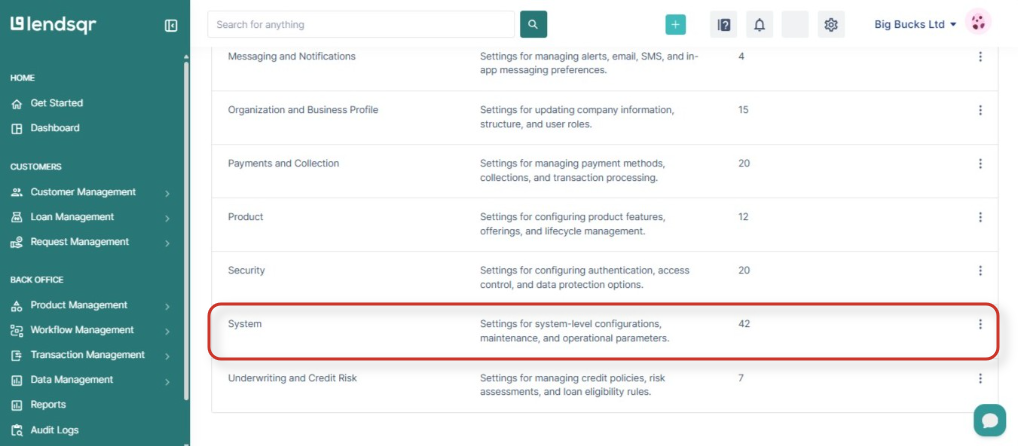
Within system configurations, click on the System tab. This tab holds settings that specifically relate to your lender organization’s operational behavior.
Step 4: Locate the bank verification number override setting
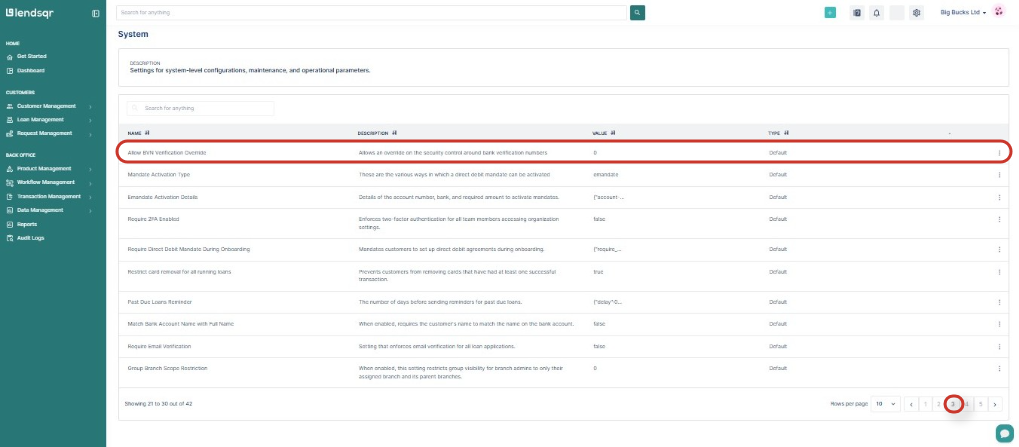
The settings list can be long. Scroll to the bottom of the page and navigate to the last page using the pagination control at the bottom of the table. Look for the setting labeled Allow bank verification number verification override and click on it.
Step 5: Enable the override and save
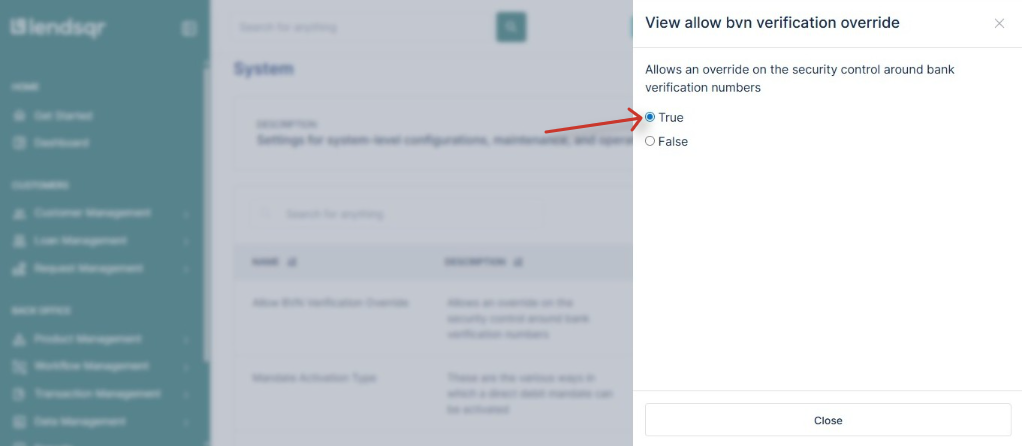
In the edit panel that appears, set the value to true and click the Update button to save your changes.
Once saved, customers on your platform will be able to add bank accounts without the system checking whether the account’s bank verification number matches their registered identity.
As soon as the setting is saved, the bank verification number check is bypassed for all new account additions on your platform. Existing accounts already added by customers are not affected this change only applies going forward.
Customers who were previously blocked from adding their accounts due to a bank verification number mismatch will now be able to proceed without errors.
How to re-enable bank verification number validation
If you need to turn the check back on at any point, follow the same steps and set the Allow bank verification number verification override value back to false. The validation will immediately resume for all subsequent account additions.
Best practices
Only enable this override when there is a clear business reason to do so leaving bank verification number validation off indefinitely increases your exposure to fraudulent account additions
If you enable the override for a specific use case such as a business lending pilot, consider disabling it again once that phase is complete
Document internally when this setting was changed and why, so that future administrators understand the context
Combine this setting with other risk controls such as know-your-customer document requirements and tier-based access to maintain a sufficient level of security even without bank verification number validation
Periodically review the accounts added during periods when the override was active to confirm there are no irregularities
Read also: Why is the image of my user’s BVN empty?