Access your Back Office at your fingertips.
Download the app now on Google Play Store.
Scan the QR code
You can also scan QR code with your phone to download the app.
How to set up a hybrid collection method on a savings product
Updated
On this page
Overview
The funding method defines how contributions to a savings product are collected from a user. It is a foundational configuration that directly affects how reliably users can contribute to their savings goals and how seamlessly the savings experience works end to end.
Lendsqr supports four funding methods on savings products: Card, Account, Direct Debit, and Hybrid. Hybrid is the most versatile of the four. Rather than restricting a product to a single channel, it lets contributions be collected through a combination of channels, such as card, wallet, or account, and the system uses whichever is active or has a sufficient balance at the time of collection.
This guide walks through how to configure the Hybrid funding method on a savings product in Lendsqr, along with best practices, use cases, and key considerations to keep in mind.
Hybrid is a funding configuration that lets a savings product collect contributions through more than one channel, such as card, wallet, or account, rather than locking a product to a single channel. When a collection is due, the system attempts the channels available to the user and uses whichever is active or has sufficient balance, rather than requiring the user to have set up one specific channel in advance.
This is distinct from the other three funding methods, each of which restricts a product to one channel:
Card: contributions are processed automatically using the user’s linked debit or credit card.
Account: contributions are debited directly from the user’s registered bank account.
Direct Debit: contributions are deducted automatically from the user’s account based on a standing mandate.
By combining channels, Hybrid caters to a wider segment of users and increases the probability of a successful deduction, particularly in environments where payment infrastructure reliability can vary.
When to use the Hybrid funding method
Hybrid is best suited for the following scenarios:
Savings products targeting a broad user base. When a savings product is designed for a diverse group of users, some of whom may have a linked card but no funded wallet and others who prefer bank-based deductions, Hybrid ensures neither group is excluded.
Products with flexible contribution structures. If the savings product allows users to contribute on demand or on a schedule, letting the system pick from several channels means a single failed channel does not stop the contribution.
Operators looking to reduce failed deductions. One of the most practical reasons to use Hybrid is to reduce failed or missed savings contributions. If one channel does not have sufficient balance or is inactive, another channel may still succeed, improving overall collection rates.
Savings products in markets with mixed payment preferences. In Nigeria and similar markets, users often have varying levels of comfort with card, wallet, and bank account transactions. A Hybrid setup accommodates this variety without requiring separate product configurations.
Steps to configure the Hybrid funding method
Follow the steps below to set the funding method to Hybrid on a savings product in Lendsqr. This works the same way whether you are configuring it while creating a new product or updating an existing one.
Step 1: Open the savings product
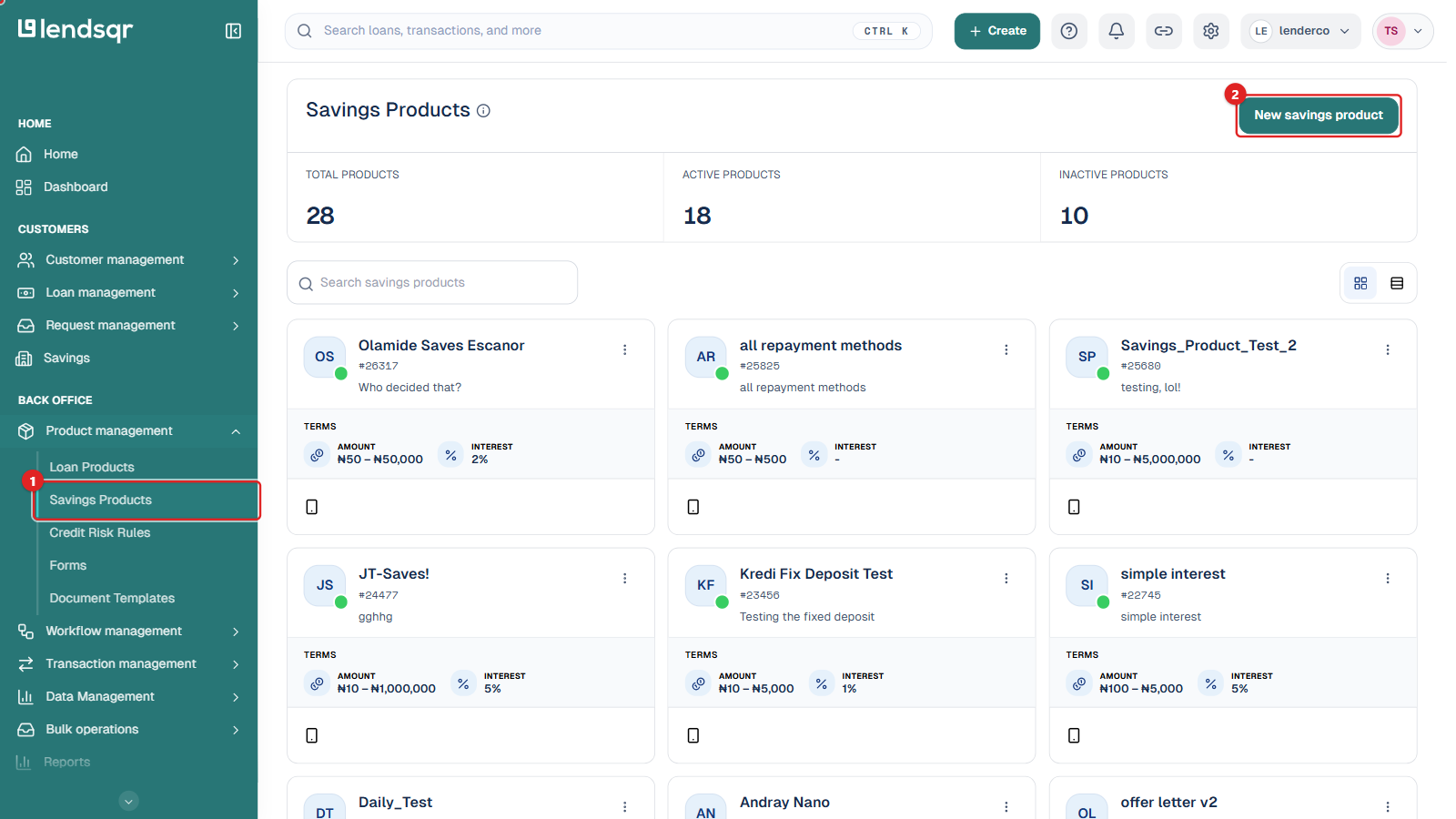
Log in to your Lendsqr admin console. In the left navigation, under Back Office, expand Product management and select Savings Products.
Click the savings product you want to update to open its detail page.
Step 2: Open the edit form
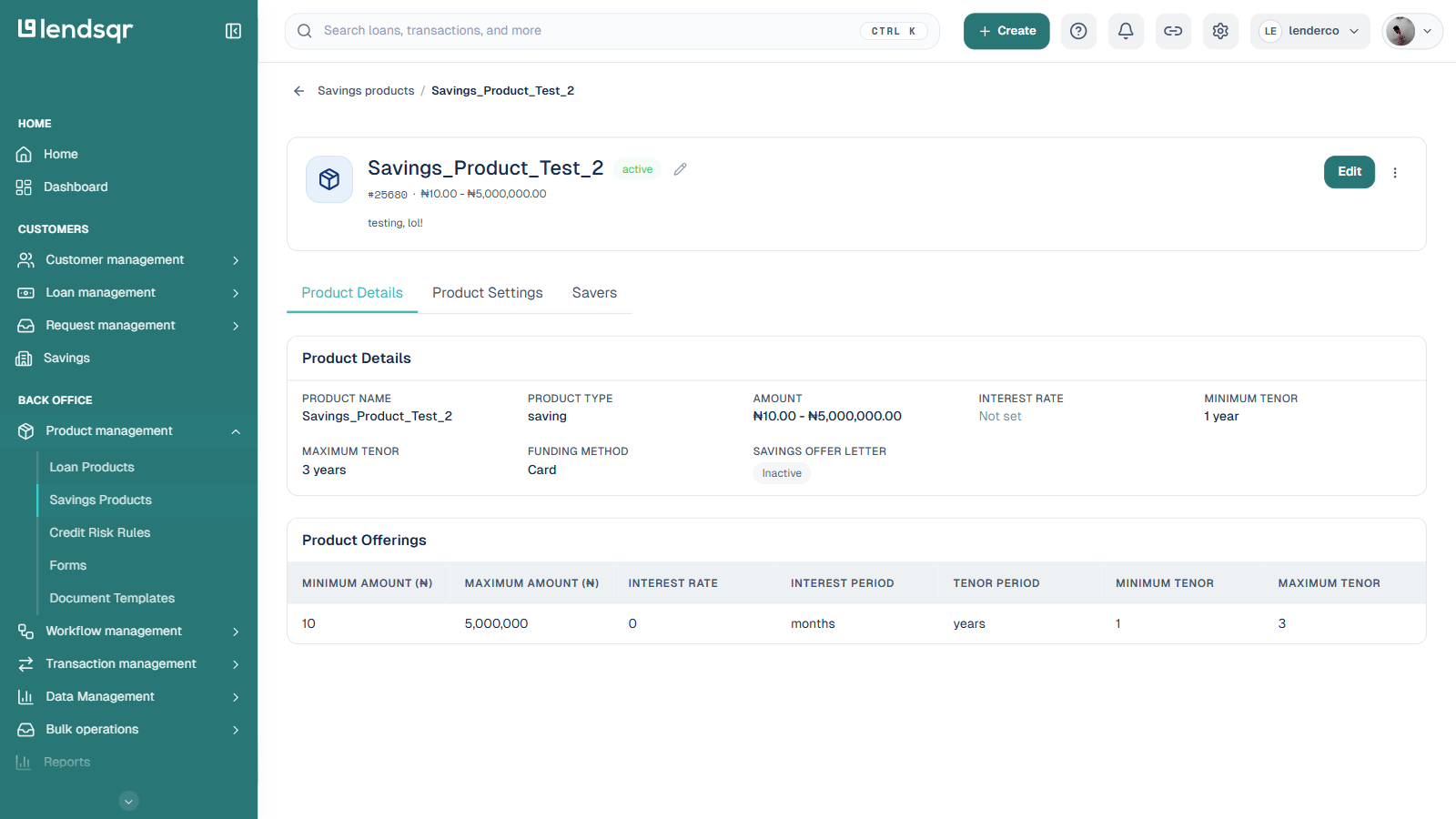
On the product detail page, click the Edit button at the top right. This opens the Edit Savings Product form, pre-filled with the product’s current configuration.
Step 3: Open the Funding Method dropdown
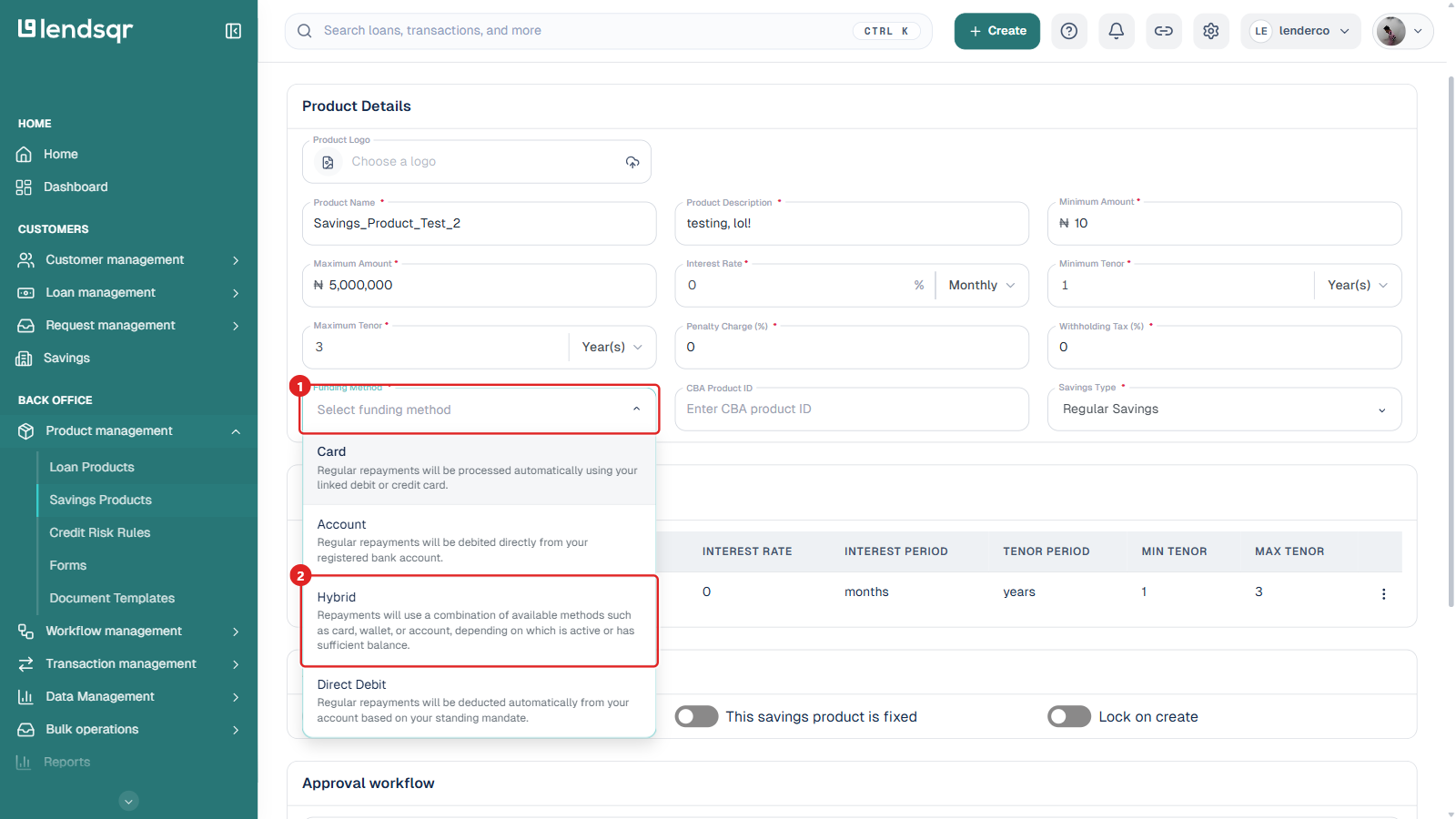
In the Product Details section, click the Funding Method dropdown. It lists the four options, Card, Account, Hybrid, and Direct Debit, each with a short description of how it collects funds.
Step 4: Select Hybrid
Select Hybrid from the list. This configures the savings product to collect contributions through a combination of available channels rather than a single fixed one.
Step 5: Save your changes
Scroll to the bottom of the form and click Save Changes. The savings product now reflects the Hybrid funding method, and users interacting with it will have their contributions collected through whichever supported channel is active and has sufficient balance.
Best practices for using the Hybrid funding method
Communicate available funding options to users. Once a savings product is configured with Hybrid, make sure users are informed through your app or platform interface that their contributions may be collected via card, wallet, or bank account. Clear communication reduces confusion and increases the likelihood of users completing their savings contributions.
Ensure users have at least one funding channel set up. For Hybrid to work effectively, users need a valid card, a funded wallet, or a bank account linked to their profile. It is advisable to prompt users to complete this setup as part of onboarding or account activation flows.
Monitor collection performance by channel. Where analytics or reporting is available, track which channel is being used and which has higher success rates for your user base. This data can inform future product decisions.
Test the configuration before going live. Before rolling out a new or updated savings product to users, test the funding flow in a staging or test environment to confirm that deductions are processed correctly.
Things to keep in mind
Changing the funding method on a savings product that already has active users may affect how existing users fund ongoing savings cycles. It is advisable to make such changes before a savings product is widely deployed or during a maintenance window, and to communicate any changes to affected users.
The availability of each channel also depends on your organization’s integration setup within Lendsqr. Card, wallet, and bank account collection each need to be active and properly configured at the platform level for Hybrid to function as expected. If you notice that only one channel is working after switching to Hybrid, verify that the relevant integrations are enabled and correctly set up under your organization’s settings.
Speak to your Lendsqr account manager if you need help confirming which channels are enabled for your organization.
Summary
The Hybrid funding method is a practical, user-friendly configuration for savings products that need to serve users across different payment preferences and infrastructure conditions. By collecting through several channels on a single product, operators can improve collection success rates, reduce drop-off caused by payment friction, and provide a more inclusive savings experience.
Configuring it is straightforward: open the savings product, click Edit, open the Funding Method dropdown, select Hybrid, and save. With the right user communication and channel setup in place, Hybrid can significantly improve the performance of your savings product.