Access your Back Office at your fingertips.
Download the app now on Google Play Store.
Scan the QR code
You can also scan QR code with your phone to download the app.
How to add an approval workflow to a savings product in Lendsqr
Updated
On this page
Many lenders use customer savings as collateral to secure loan repayments. Without proper controls, borrowers could withdraw funds before the loan is fully repaid, putting your portfolio at risk.
An approval workflow solves this by adding structured review stages to withdrawal requests from specific savings products. The request stays pending until all required approvers grant permission.
Lendsqr makes it straightforward to create approval workflows and attach them to savings products. This gives you secure control while keeping the process transparent for your team and borrowers.
This guide explains why approval workflows matter, when to use them, prerequisites, step-by-step instructions, and what happens after setup.
Why approval workflows matter for savings products
Approval workflows add a layer of protection and governance to savings products. Key benefits include:
Preventing unauthorized or premature withdrawals when savings serve as collateral
Reducing the risk of loan defaults by safeguarding pledged funds
Ensuring compliance with internal policies or regulatory requirements
Creating clear accountability through defined approver roles and stages
Improving transparency with automated notifications and audit trails
Without workflows, withdrawal requests may be processed instantly, exposing lenders to unnecessary risk.
When should you add an approval workflow?
Add an approval workflow to a savings product when:
Using customer savings as collateral for loans (common in salary advance or personal lending)
Launching products where withdrawals need oversight, such as target savings or emergency funds
Implementing group lending or microfinance programs that require joint approval
Responding to regulatory changes or internal risk policies
Testing new savings features before full rollout
For example, a salary advance lender in Nigeria might attach a workflow to a payroll-linked savings product so any withdrawal request during an active loan requires manager approval. This protects the collateral used to secure the advance. A microfinance institution could apply workflows to group savings products to ensure all members or officers approve large withdrawals, maintaining trust within the group.
Prerequisites before setting up a workflow
You must have admin or appropriate permissions to access Workflow Management and Savings Products.
Define clear approver roles in advance (e.g., branch manager, risk officer, or senior admin) and assign them in team settings.
Understand your internal policies for withdrawal approvals to configure rules effectively.
Best practice: Document your approval policy before creating workflows to ensure consistency.
How to add an approval workflow to a savings product
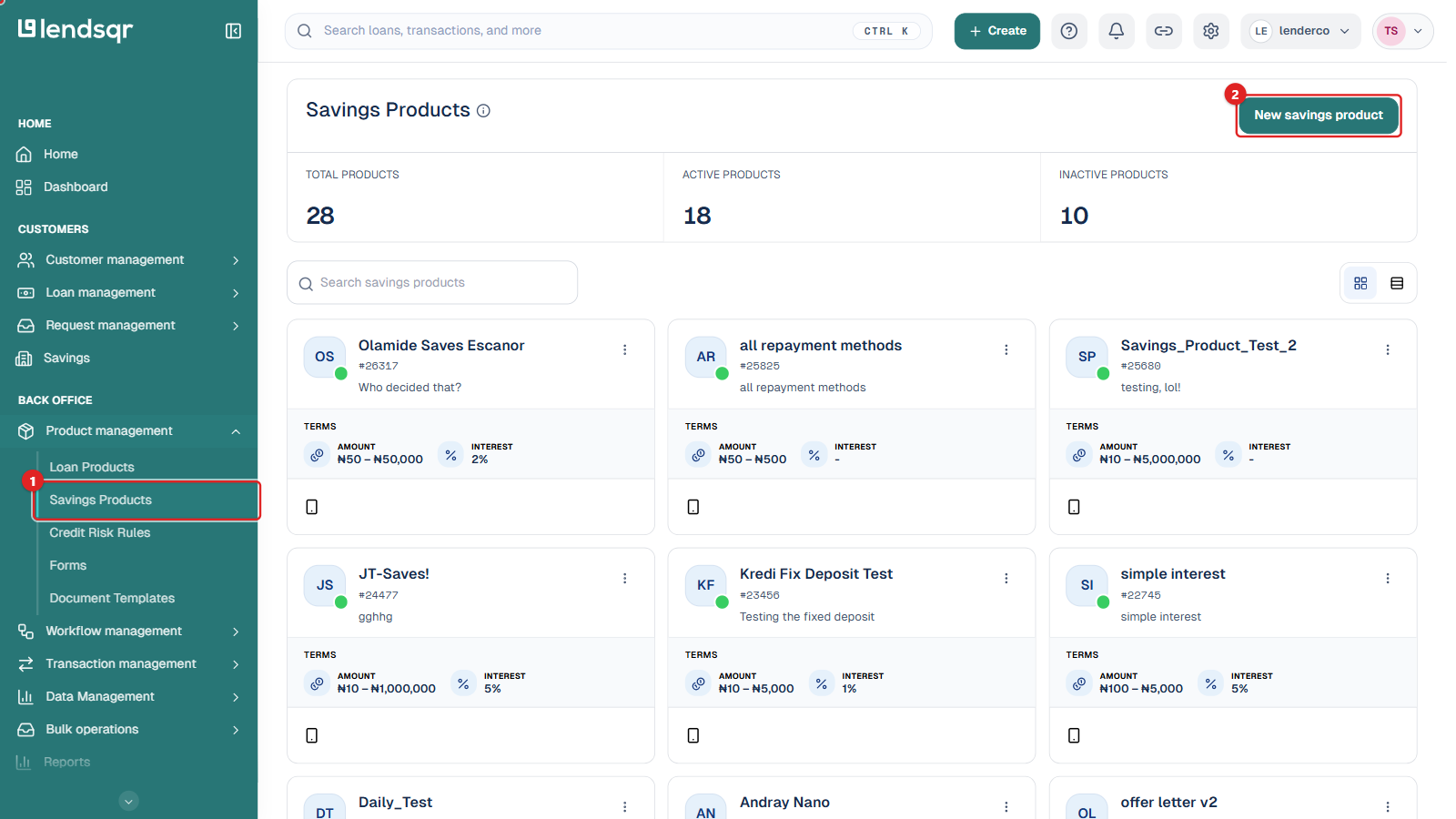
On the left navigation, under Back Office, expand Product management and select Savings Products.
Create a new savings product by clicking New savings product, or open an existing one by clicking its Product actions menu and selecting Edit.
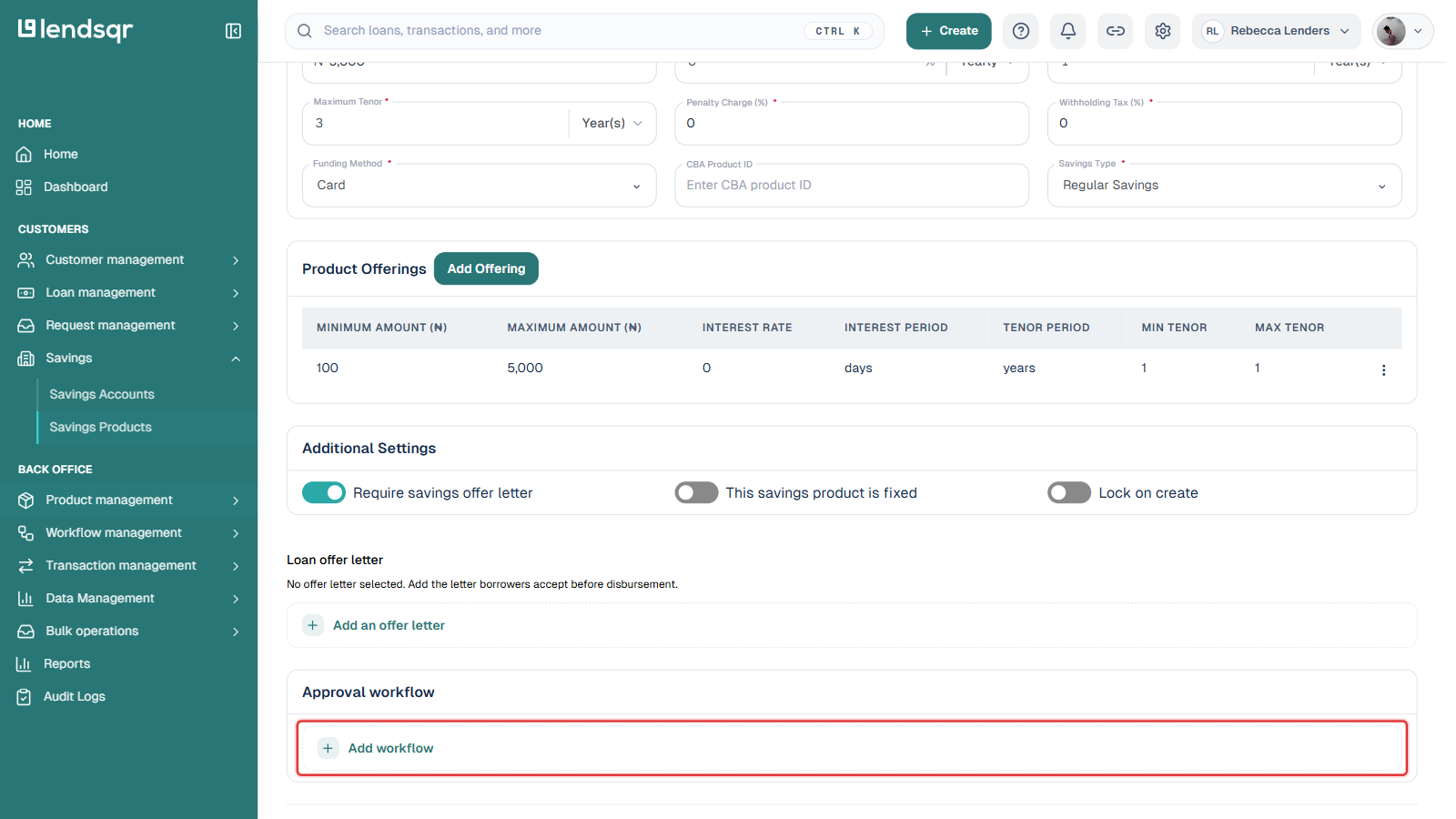
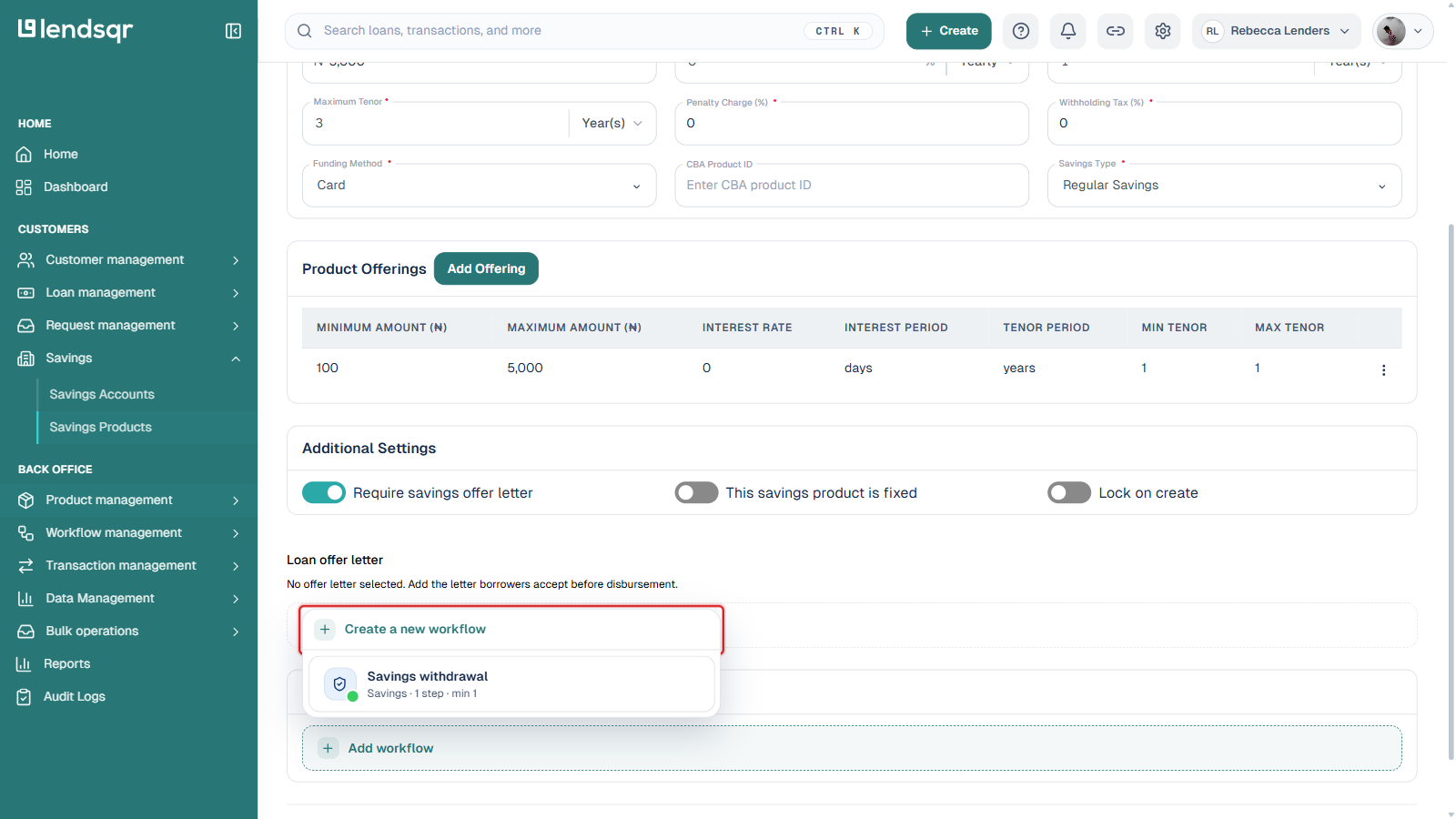
Scroll to the Approval workflow section near the bottom of the product form and click Add workflow. This opens a picker listing the workflows your organization has already created.
To reuse a workflow already created for another product, select it from the list, each entry shows its type, number of steps, and minimum approvers required (for example, “Savings · 1 step · min 1”).
To build a new one instead, click Create a new workflow at the top of the picker. This takes you through the same workflow builder covered in How to create an approval workflow, where you define the approval stages, set rules and responsibilities for each stage (such as amount thresholds or specific approver roles), and configure notification behavior for approvers.
Once a workflow is selected, scroll to the bottom of the product form and click Save Changes (or Create savings product if you’re creating a new one).
The workflow is now attached to the savings product.
Tip: Start with a simple two-stage workflow for testing before adding more complex rules or multiple approvers.
What happens to withdrawal requests after setup
When a customer initiates a withdrawal from the linked savings product:
The request automatically enters the approval workflow instead of processing instantly.
It moves through each defined stage and notifies the assigned approvers.
The withdrawal remains in a pending status until all required approvals are granted.
Once fully approved, the funds are released to the customer.
All actions (requests, approvals, rejections) are logged in the audit trail for compliance and review.
This automated process protects collateral while keeping your team informed.
Governance and best practices
Assign workflows only to products where collateral protection or oversight is truly needed to avoid unnecessary delays.
Keep workflows simple at first and expand stages as your operations grow.
Regularly review active workflows and adjust rules based on actual withdrawal patterns.
Train team members on their roles within each workflow to ensure timely responses.
Combine savings workflows with loan product rules for end-to-end collateral management.
Troubleshooting and frequently asked questions
Q: I cannot see the Add workflow button when editing a savings product. What should I do?
A: Check your user permissions. You may need admin rights or the specific “manage workflows” permission. Contact your platform administrator.
Q: How do I notify approvers automatically?
A: Notification settings are configured when creating the workflow. Ensure email or in-app alerts are enabled for each stage.
Q: Can I apply the same workflow to multiple savings products?
A: Yes. Create the workflow once, either from a product’s Add workflow picker or from Workflow Management, and attach it to as many products as needed.
Q: What if a withdrawal request is rejected?
A: The customer receives a notification, and the reason can be recorded for transparency. The funds remain in the savings account.
If you encounter other issues, check the audit logs or reach out to Lendsqr support.
What this enables in your lending and savings operations
With approval workflows in Lendsqr, you gain secure control over collateral savings while keeping the process transparent and automated for your team. This reduces risk, protects loan repayments, and builds confidence when using customer savings as security.
Many lenders rely on this feature to balance customer convenience with strong risk management.
Next steps
Combine this with other risk tools, such as liens or credit scoring, for layered protection.
Create and test a simple approval workflow on a sample savings product.
Define clear approver roles and notification rules for your team.
Monitor withdrawal requests and approval times to refine your workflows.