Access your Back Office at your fingertips.
Download the app now on Google Play Store.
Scan the QR code
You can also scan QR code with your phone to download the app.
Understanding users’ referrals on the Admin Console
Updated
On this page
Introduction
Referral programs are an important growth strategy for digital lenders because they help increase borrower acquisition through trusted customer recommendations. When existing users refer friends, family members, or colleagues to a lending platform, it often leads to higher-quality borrower acquisition, improved trust, and lower customer acquisition costs.
On Lendsqr, a customer’s referral activity, who they referred, and when, is visible directly on their profile. This guide focuses on that: what a user’s referral record looks like, how to read it, and where the reward rules behind it are configured.
Understanding a customer’s referral record
Every customer who has referred at least one other person to your platform has a Referrals tab on their profile. If you are not yet familiar with finding a specific customer on the admin console, see Locating users’ profile page first.
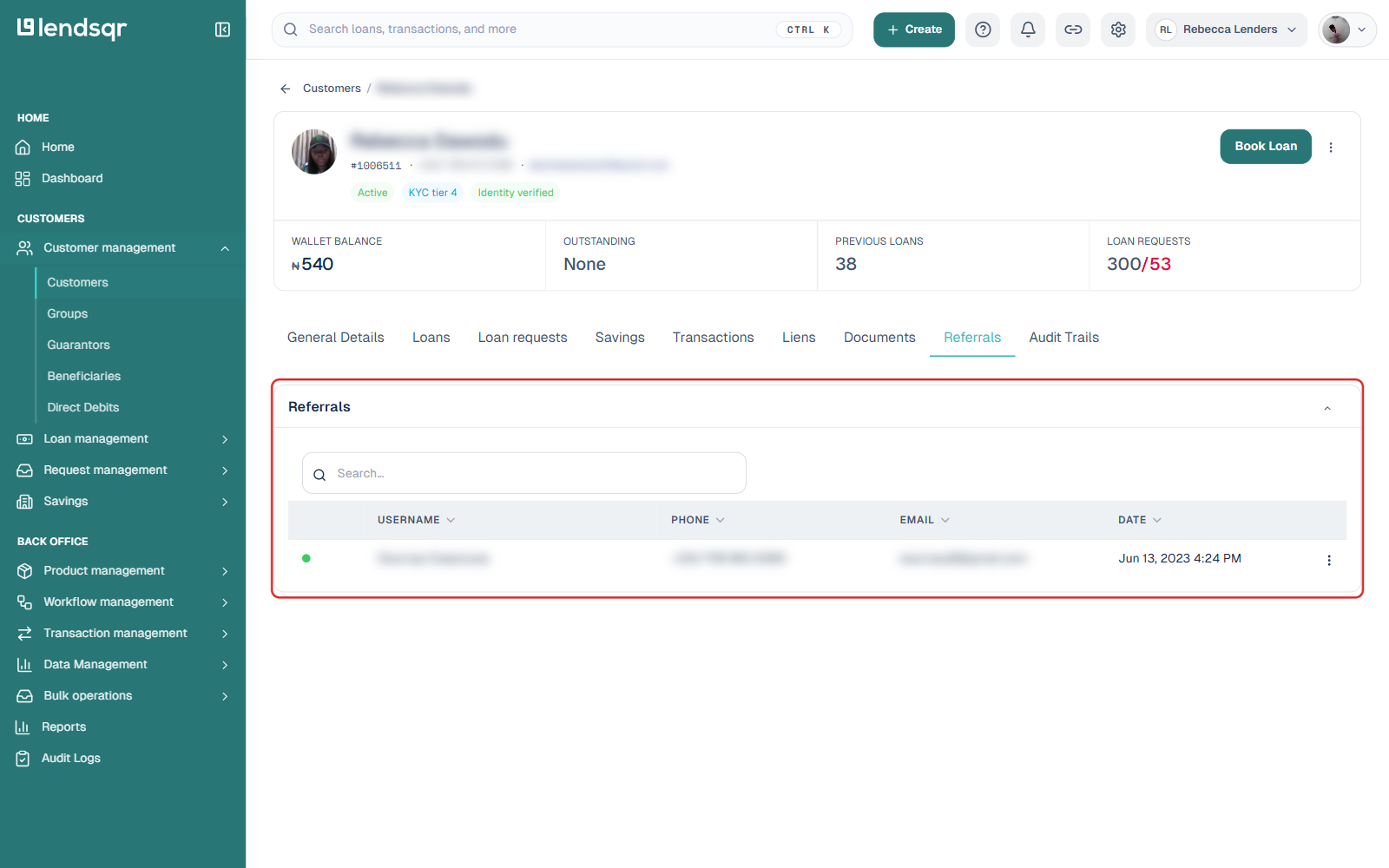
Open the customer’s profile and click the Referrals tab. Like the Loans or Savings tabs, this only appears if the customer has activity to show, in this case, at least one referral.
The table lists everyone this customer has referred, with the referred person’s username, phone, email, and the date the referral happened. This is the definitive record of who a given customer actually referred, separate from whatever reward that referral may or may not have earned.
Use this tab when a customer disputes a missing referral reward, when you are investigating a cluster of suspicious sign-ups tied to one referrer, or simply when you want to confirm a specific referral relationship exists before acting on it.
How referral rewards are configured
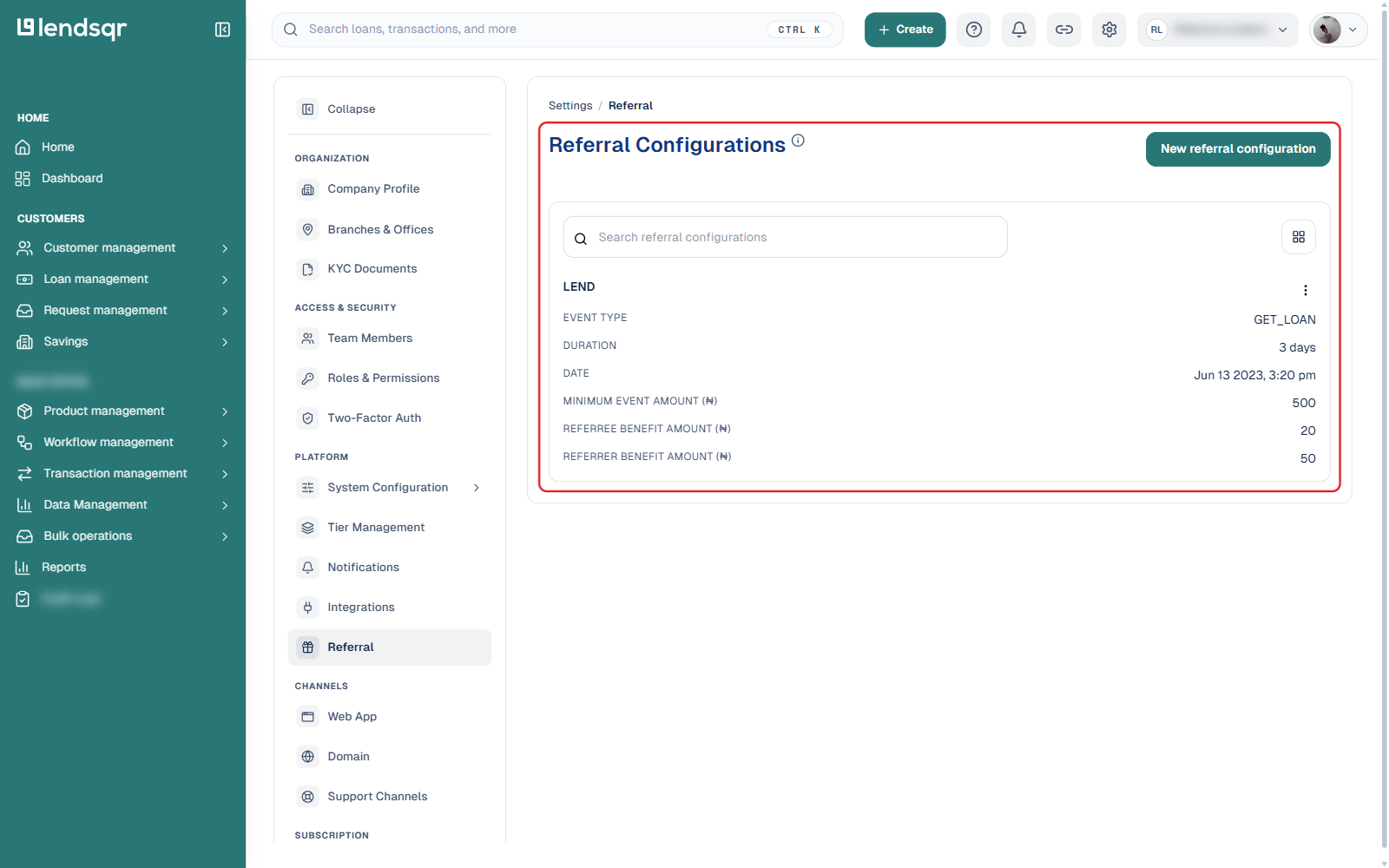
A referral showing up on a customer’s Referrals tab does not by itself guarantee a reward was paid. Whether a reward applies, and how much, is governed by rules your organization sets up separately, under Settings, in the Platform section, under Referral.
Click the Settings (gear) icon in the top navigation.
Under Platform, select Referral.
Each referral configuration on this page is built around a triggering event, such as a referred customer taking out a loan, and defines:
Event type, the customer action that qualifies a referral for a reward (for example, getting a loan).
Duration, the window of time within which the event must happen after the referral for the reward to apply.
Minimum event amount, the smallest transaction size (for example, a minimum loan amount) that qualifies.
Referee benefit amount, the reward paid to the person who was referred.
Referrer benefit amount, the reward paid to the existing customer who made the referral.
You can create a new configuration, or edit and delete existing ones, directly from this page. This is also where you would look first if a customer’s Referrals tab shows a referral that never earned a reward, since the underlying event may not have met the configured duration, minimum amount, or event type.
Referral systems can significantly improve lending business growth while reducing acquisition costs, but only if you can actually see who referred whom and confirm the reward rules are working as intended.
Lower marketing spend
Higher borrower trust
Increased app adoption
Better borrower retention
Organic customer growth
Tying the reward to a real event, such as an actual disbursed loan above a minimum amount, rather than paying out the moment someone signs up, helps keep the program tied to genuine borrower activity rather than referral volume alone. Checking individual customers’ Referrals tabs periodically also helps you spot patterns, such as one customer referring an unusually large number of new sign-ups in a short window, worth a closer look.
Best practices for referral programs
Tie rewards to real activity. Setting a minimum event amount and requiring a genuine event, such as a loan disbursement, rather than just a sign-up, helps reduce incentive abuse.
Watch the duration window. A duration that is too short may cause legitimate referrals to miss the reward window; one that is too long makes it harder to tie the event back to the original referral.
Balance referee and referrer amounts. Both the person referring and the person being referred can be rewarded differently. Review these amounts periodically against your acquisition costs from other channels.
Spot-check individual referral records. Don’t rely on configuration alone. Periodically open a sample of customers’ Referrals tabs to confirm referral activity looks legitimate and matches what your reward payouts reflect.