Access your Back Office at your fingertips.
Download the app now on Google Play Store.
Scan the QR code
You can also scan QR code with your phone to download the app.
Monitoring admin activities using audit logs
Updated
On this page
Introduction
Audit logs are a critical part of modern lending operations because they provide a complete record of actions taken within your system, including who performed an action, what was changed, and when it happened. In lending environments where multiple team members manage loan products, customer accounts, approvals, and risk decisions, audit logs ensure transparency, accountability, and compliance.
For lenders, having access to detailed audit logs helps reduce operational risk, improve internal governance, and support regulatory requirements. Whether a loan product was modified, a loan was approved or declined, or a configuration change was made in the system, audit logs allow you to trace every action back to the responsible user.
This makes audit logs especially valuable for internal reviews, dispute resolution, fraud investigation, and operational monitoring.
This guide explains how to use audit logs in the Lendsqr admin console to track administrative activities and monitor system changes effectively.
Audit logs are a system-generated record of all actions performed within the Lendsqr platform. They capture key operational events such as:
Loan product modifications
Loan approvals and declines
User and admin activity
System configuration changes
Role and permission updates
Financial or repayment adjustments
Each log entry typically includes:
The user who performed the action
The action that was taken
The time and date of the action
The affected record or entity
Additional metadata for context
This creates a transparent activity trail that helps lenders maintain full visibility over system usage.
Why Audit logs are important for lenders
Audit logs play a major role in strengthening operational control within lending organizations.
Some key benefits include:
Improved accountability across teams
Stronger fraud detection and prevention
Easier investigation of loan disputes
Better compliance with regulatory requirements
Clear visibility into system changes
Reduced operational errors
Enhanced internal governance
In environments where multiple admins can approve loans or modify loan products, audit logs ensure every action is traceable.
How to monitor admin activities using Audit logs
Follow the steps below to track administrative actions in the Lendsqr admin console.
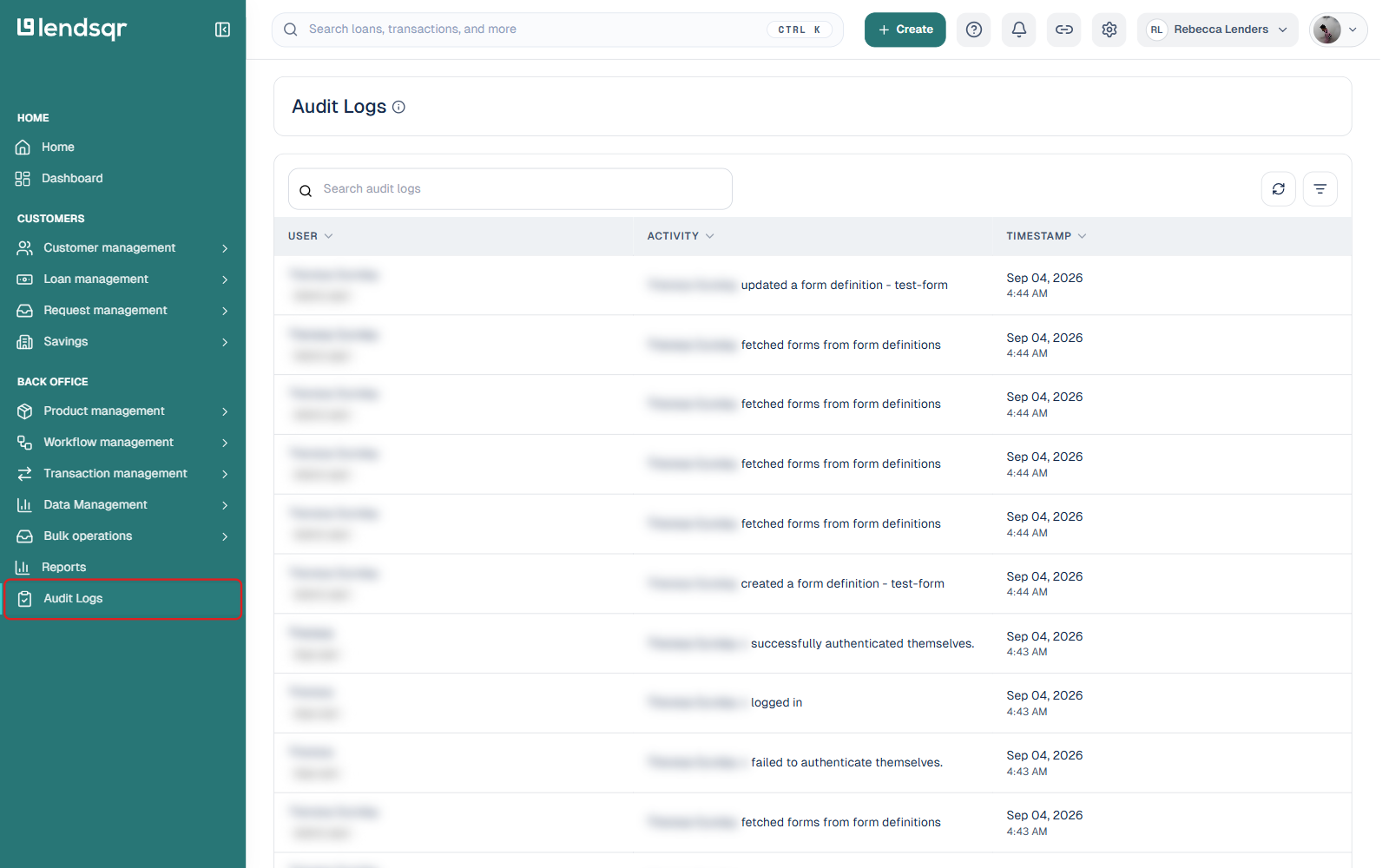
Step 1: Navigate to Audit Logs
Log in to your Lendsqr admin console. In the left navigation, scroll to the BACK OFFICE section and click Audit Logs directly — it’s its own item in the sidebar rather than a page tucked inside Settings. This section contains a complete record of all system activities performed by users within your organization.
Step 2: Open the filter panel
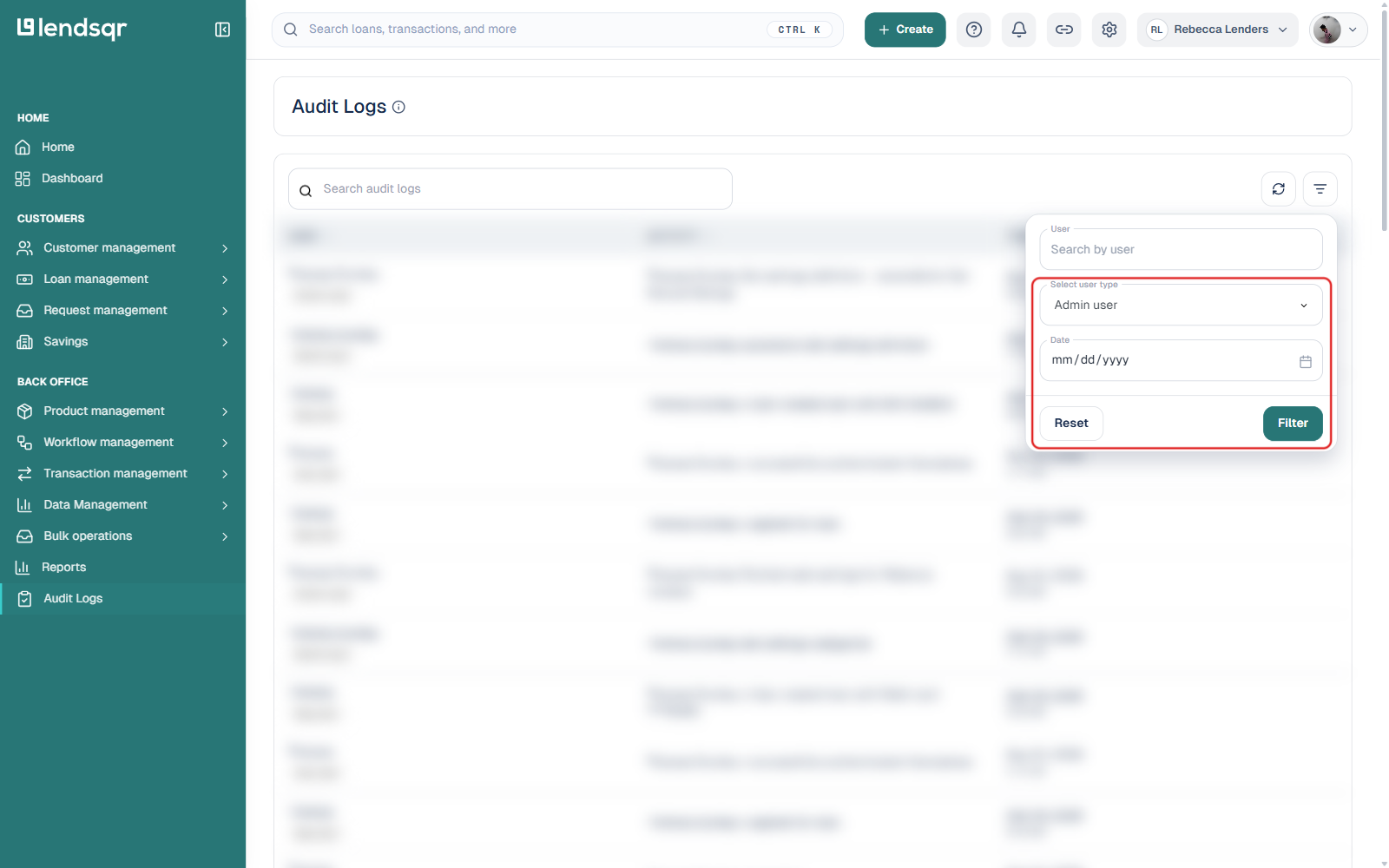
Click the filter icon in the top-right corner of the Audit Logs table. This opens a panel with three fields: User (search by user), Select user type, and Date.
Step 3: Filter by user type
Open the Select user type dropdown and choose Admin user (the other option is App user, for borrower-facing activity). This is useful when you want to isolate internal staff actions from customer activity. You can optionally narrow further with the User search field or a specific Date.
Step 4: Apply the filter
Click Filter to apply your selection, or Reset to clear it. The table refreshes to show only admin-user activity matching your criteria.
Step 5: Open an entry for full detail
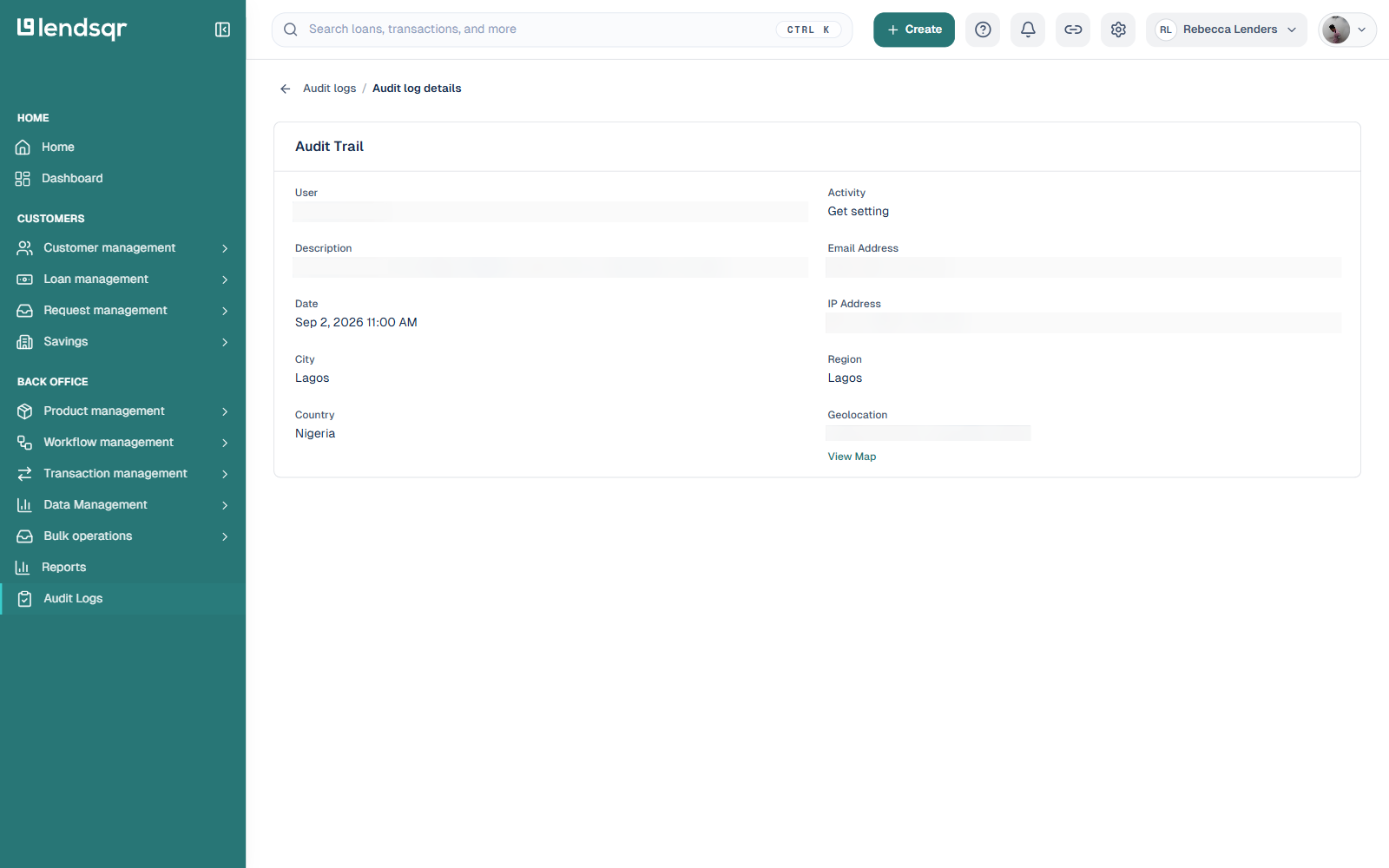
Click any row to open its Audit Trail detail page. Beyond the user, activity, and timestamp shown in the table, this view also includes a fuller description, the user’s email address, the IP address the action came from, and the city, region, country, and geolocation associated with it, with a link to view the location on a map. This extra detail is often what makes an investigation conclusive, for example, confirming an admin action came from an expected location rather than an unfamiliar one.
What you can track using audit logs
Audit logs allow you to monitor a wide range of system activities, including:
Who approved or declined a loan
Who modified a loan product
Who updated the borrower information
Who changed the system settings
Who created or deleted admin users
Who adjusted repayment schedules or configurations
This makes audit logs a powerful tool for operational oversight and incident tracking.
Audit logs are used across different parts of lending operations to improve transparency and accountability.
Loan approval investigations
Audit logs help identify the exact admin who approved or declined a loan application, which is useful for dispute resolution or quality control reviews.
Loan product changes
When loan products are modified, audit logs show who made the changes and when, helping ensure configuration integrity.
Compliance reporting
Regulatory frameworks often require lenders to maintain a full record of system activity for auditing purposes.
Fraud detection
Unusual admin activity patterns can be identified through audit logs, helping detect potential internal fraud or unauthorized actions.
Operational reviews
Managers can review audit logs to understand how workflows are being executed across teams.
Relevant permissions
To access and use audit logs, users typically require:
Access to the Settings module
Permission to view audit logs
Admin or super admin role in most configurations
If you cannot access audit logs, your organization’s super admin may need to update your role permissions.
Best practices for using audit logs
Audit logs should be reviewed consistently, not only during incidents. Regular monitoring helps detect issues early and ensures system integrity.
Use filters such as user type, date range, and action type to quickly locate relevant activities instead of scanning the full log history.
When investigating an issue, always identify the exact time the incident occurred, filter by relevant admin users, trace actions leading up to the event, and cross-check related system changes
Maintain regular audit log reviews to ensure your organization is prepared for internal or external audits.
Use audit logs to reinforce accountability across your admin team by ensuring all actions are traceable to specific users.
Frequently asked questions
What information do audit logs contain?
Audit logs contain detailed records of system activity, including who performed an action, what was changed, and when the action occurred. They may also include contextual metadata depending on the event type.
Can audit logs show deleted actions?
Yes. Even when records are deleted or modified, audit logs typically retain a record of the action, including the user responsible and the time it occurred.
Who can access audit logs?
Access is usually restricted to admins or super admins, depending on your organization’s permission settings. This ensures sensitive system activity is only visible to authorized users.
How far back can audit logs go?
The retention period for audit logs depends on your system configuration. Most setups retain logs for extended periods to support compliance and historical tracking.
Why are audit logs important for lending operations?
Audit logs are important because they provide transparency, improve accountability, and help lenders track system activity for compliance, fraud detection, and operational oversight.
What happens if I cannot find a specific action in audit logs?
If an action is missing, it may be due to filter settings, permission restrictions, or log retention limits. You should adjust filters or contact a super admin for further assistance.