Access your Back Office at your fingertips.
Download the app now on Google Play Store.
Scan the QR code
You can also scan QR code with your phone to download the app.
Status of a mandate: how to confirm from the Admin Console
Updated
On this page
When a customer reports that their loan repayment was not deducted as expected, one of the first things a lender should verify is the status of the customer’s direct debit mandate. In many situations, the issue may not be a repayment failure or technical error. Instead, the mandate may still be pending activation or may not yet be ready for repayment processing.
Rather than escalating the issue immediately to the support team, lenders can quickly confirm the status of the mandate directly from the Lendsqr Admin Console. This allows teams to investigate repayment concerns faster, provide more accurate feedback to customers, and reduce unnecessary delays in resolving complaints.
Lendsqr gives lenders visibility into all direct debit mandates linked to their operations, including mandates created manually by administrators and those automatically created by customers during loan applications. By reviewing mandate statuses regularly, lenders can better track repayment readiness, monitor authorization progress, and improve collections management across their portfolio.
Understanding direct debit mandate statuses
A direct debit mandate is an authorization that allows loan repayments to be deducted automatically from a borrower’s bank account according to agreed repayment terms.
During the loan application or repayment setup process, customers may authorize recurring deductions from their accounts. Once this authorization becomes active, repayments can be processed automatically based on the repayment schedule attached to the loan.
Direct debit mandates help lenders reduce manual repayment collection processes and improve repayment consistency. Instead of relying solely on borrowers to make transfers manually each month, lenders can automate repayment collection through authorized deductions.
However, mandates are not always activated instantly after creation. There is typically a short processing and validation period before the authorization becomes fully active and available for repayment deductions. This is why checking the mandate status is important whenever repayment concerns arise.
Why checking mandate status matters
Repayment disputes are common in lending operations, particularly when customers expect deductions to happen automatically on a scheduled date. Without verifying the status of the mandate first, lenders may incorrectly assume that there is a system malfunction or repayment processing issue.
Checking the mandate status from the Admin Console helps lenders determine whether:
The mandate is already active,
The mandate is still processing.
Or there may be an issue with the authorization process.
This visibility improves operational efficiency because customer-facing teams can respond more confidently and accurately to borrower complaints. Instead of escalating every repayment issue to technical support, teams can first confirm whether the mandate itself is ready for deductions.
For example, if a borrower reaches out only thirty minutes after mandate creation, the repayment authorization may still be within the activation window. In this case, the lender can reassure the customer that the mandate is still being processed rather than opening an unnecessary escalation ticket.
For lenders managing a large number of active borrowers, routinely checking mandate statuses can also improve repayment tracking and reduce missed collections caused by inactive or incomplete mandates.
Types of mandates visible on the Admin Console
Lendsqr allows lenders to view mandates regardless of how they were created.
This includes mandates:
created manually by the lender or operations team,
or automatically created by customers during the loan application and repayment setup.
Having visibility into both categories ensures that lenders can monitor all repayment authorizations from a centralized location within the platform.
This centralized tracking system is especially useful for operations teams handling multiple repayment channels or large loan portfolios. Instead of switching between systems or manually requesting repayment confirmation, teams can investigate mandate records directly from the dashboard.
How to check the status of a mandate
Lendsqr allows lenders to view the status of mandates created either by themselves or by customers during the loan application process.
Follow these steps to confirm the status of a direct debit mandate from your Admin Console.
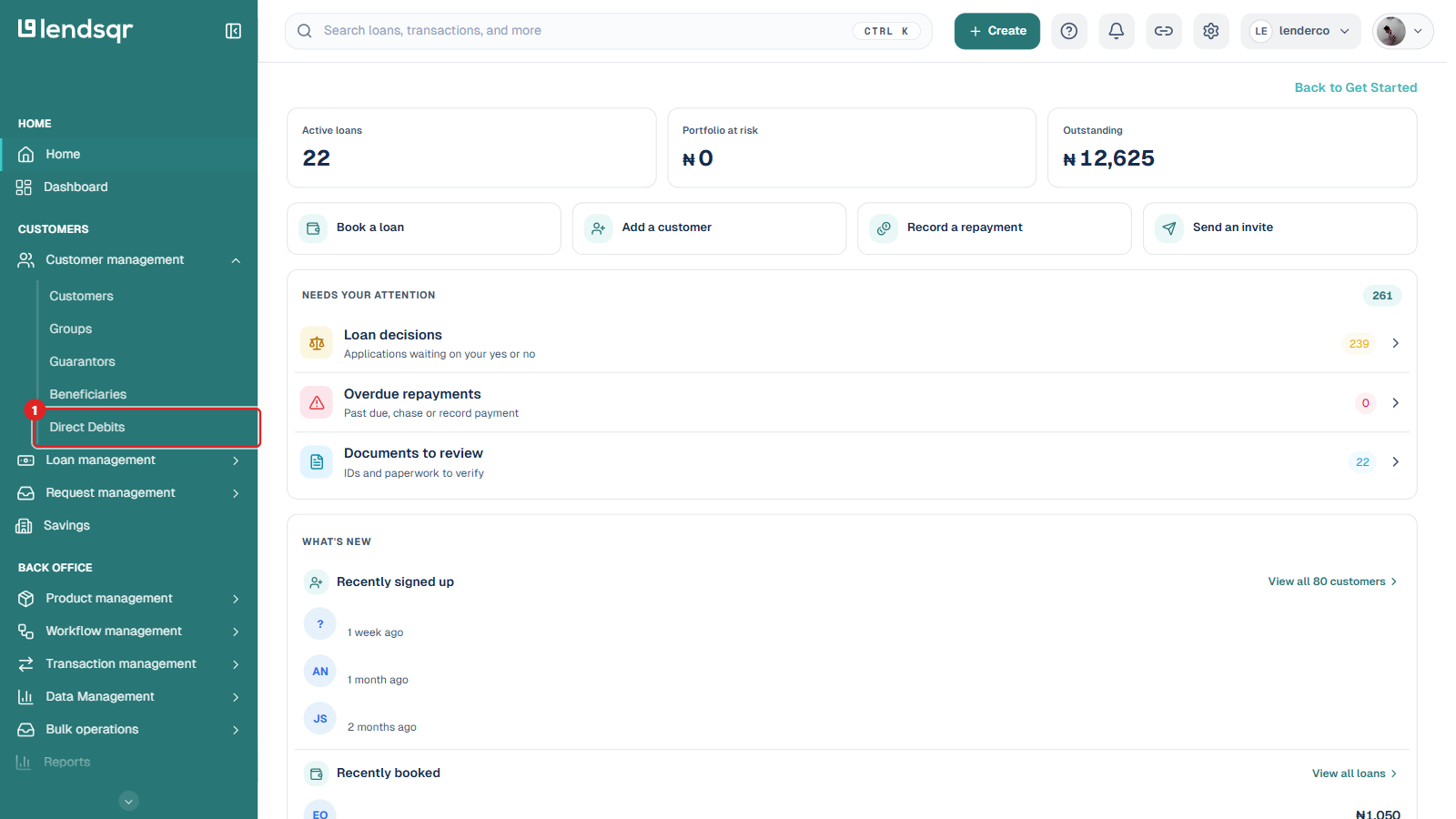
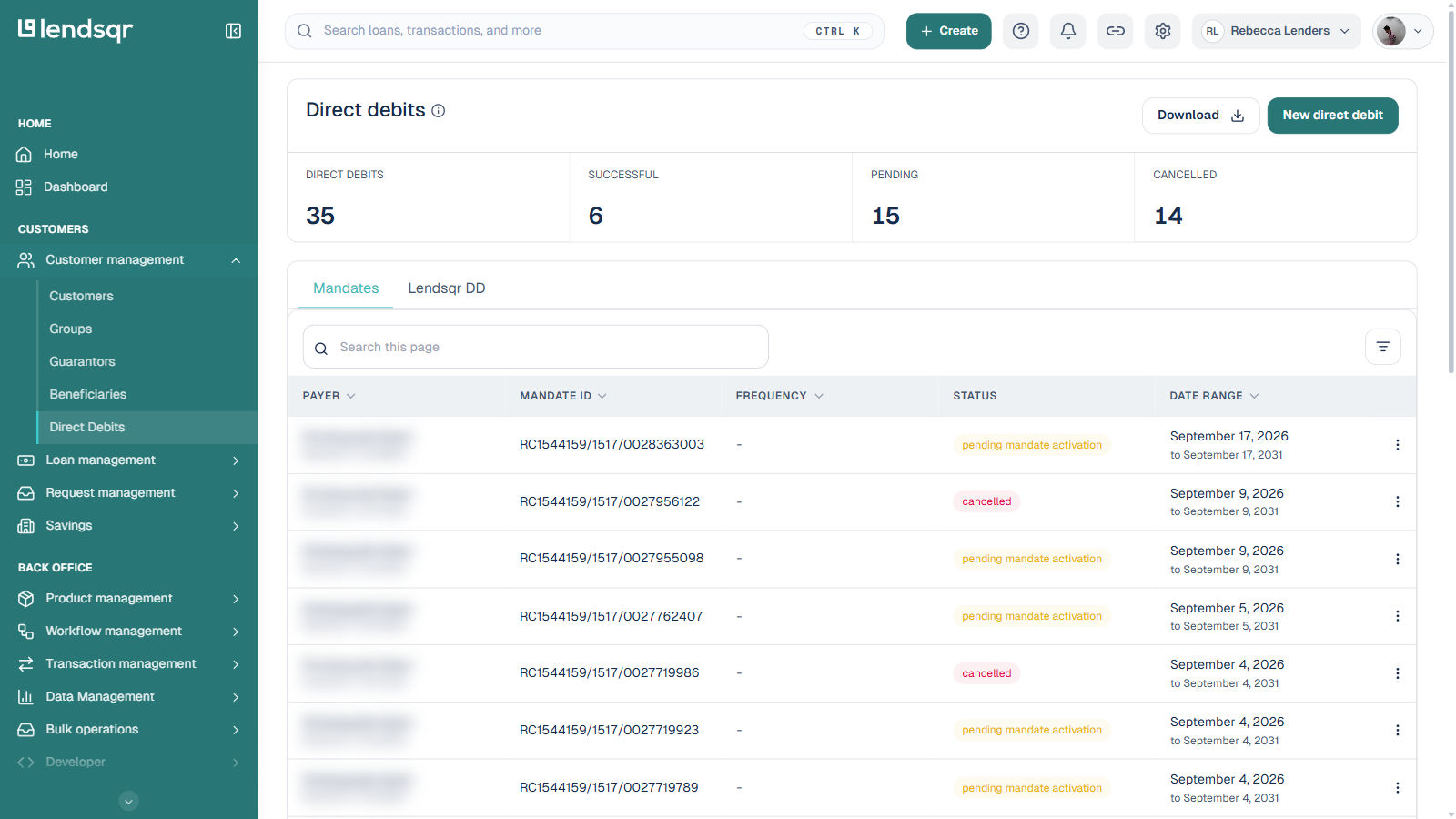
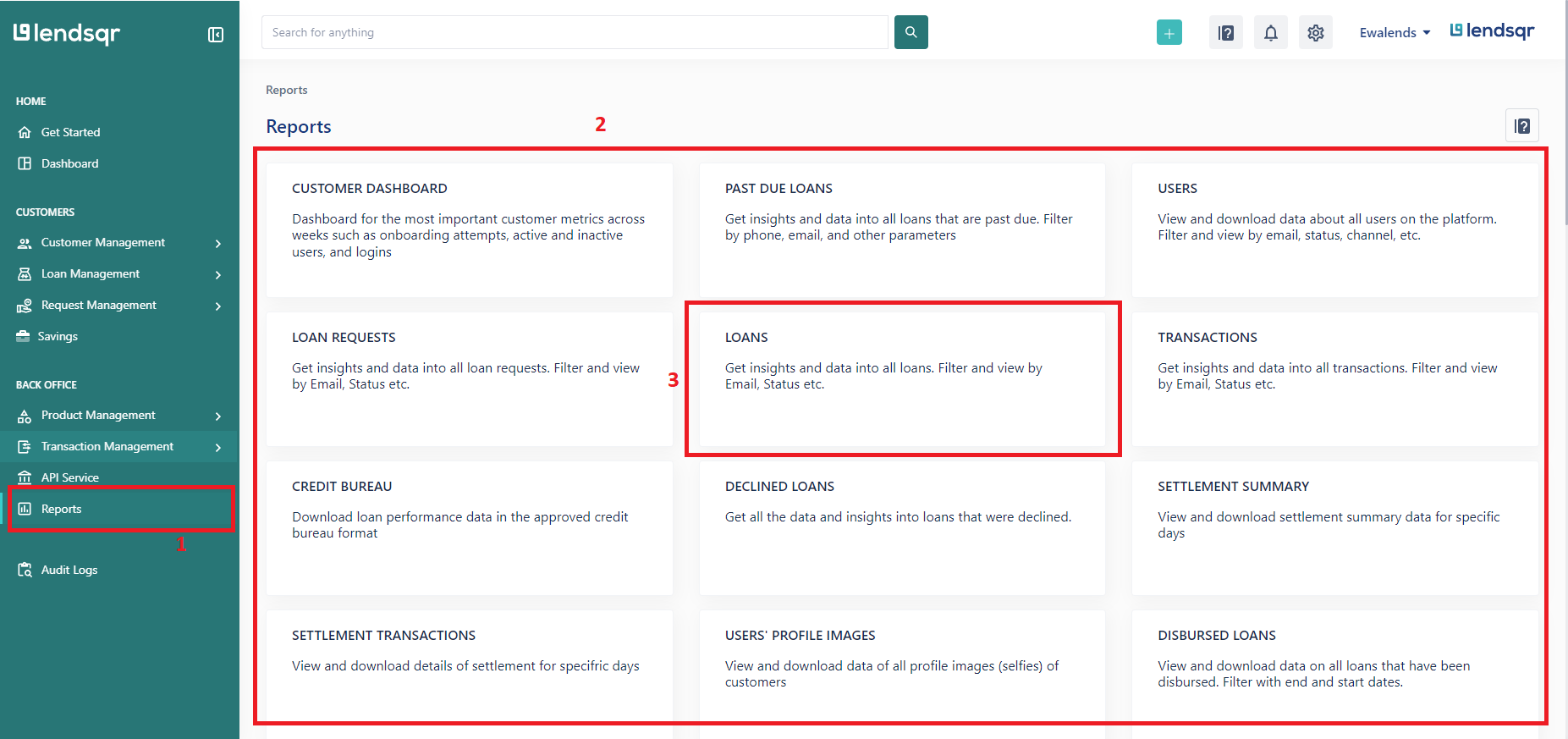
Locate the direct debit mandate connected to the customer or repayment issue being investigated.
Click on the affected mandate to open the detailed mandate information page.
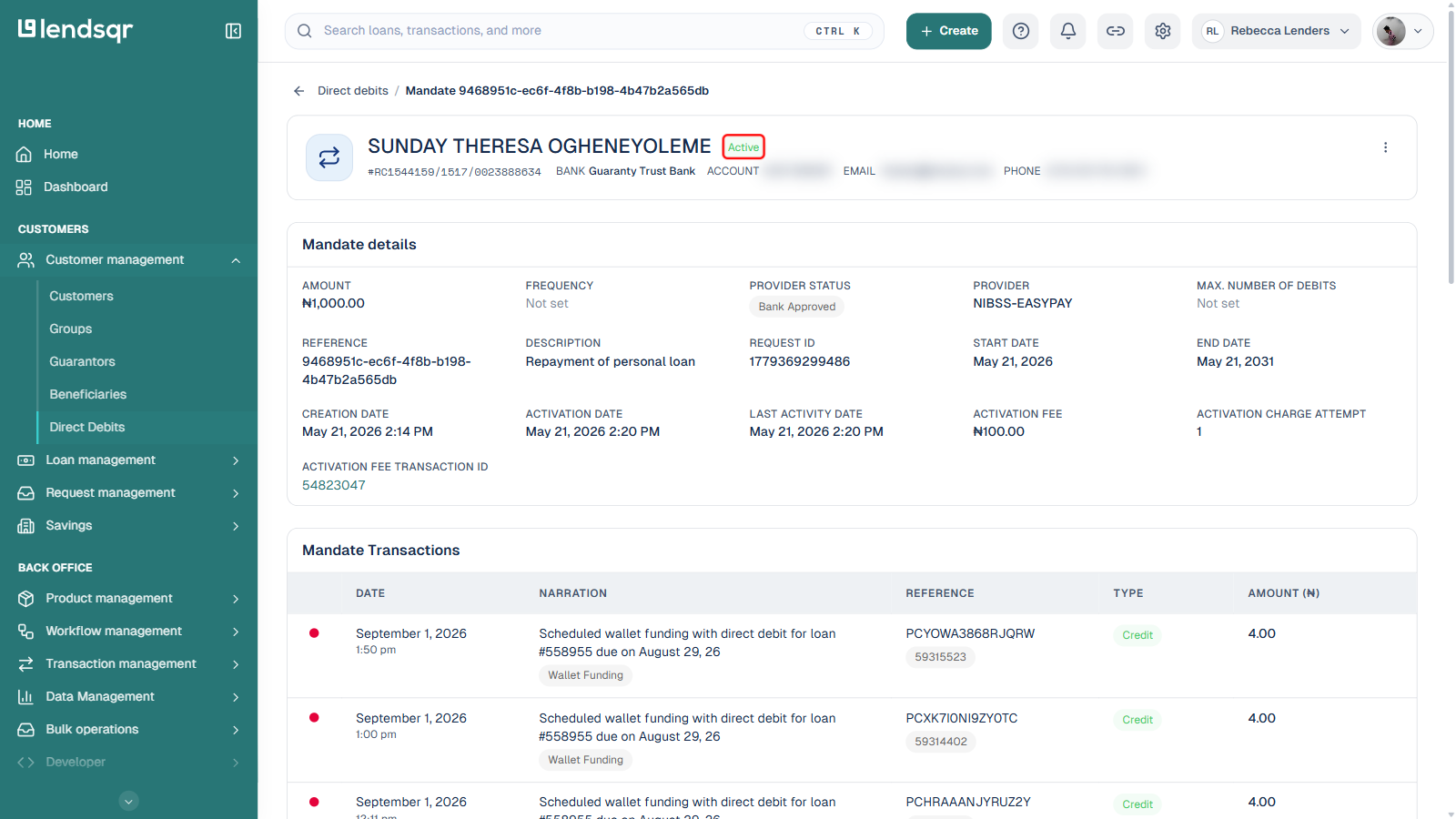
The details page provides visibility into the authorization record and repayment readiness of the mandate.
4. The mandate status is at the top of the mandate details page
At the top of the mandate details page, you will see the current status of the mandate.
This status helps determine whether the mandate is active and ready for repayment deductions or whether it is still pending activation.
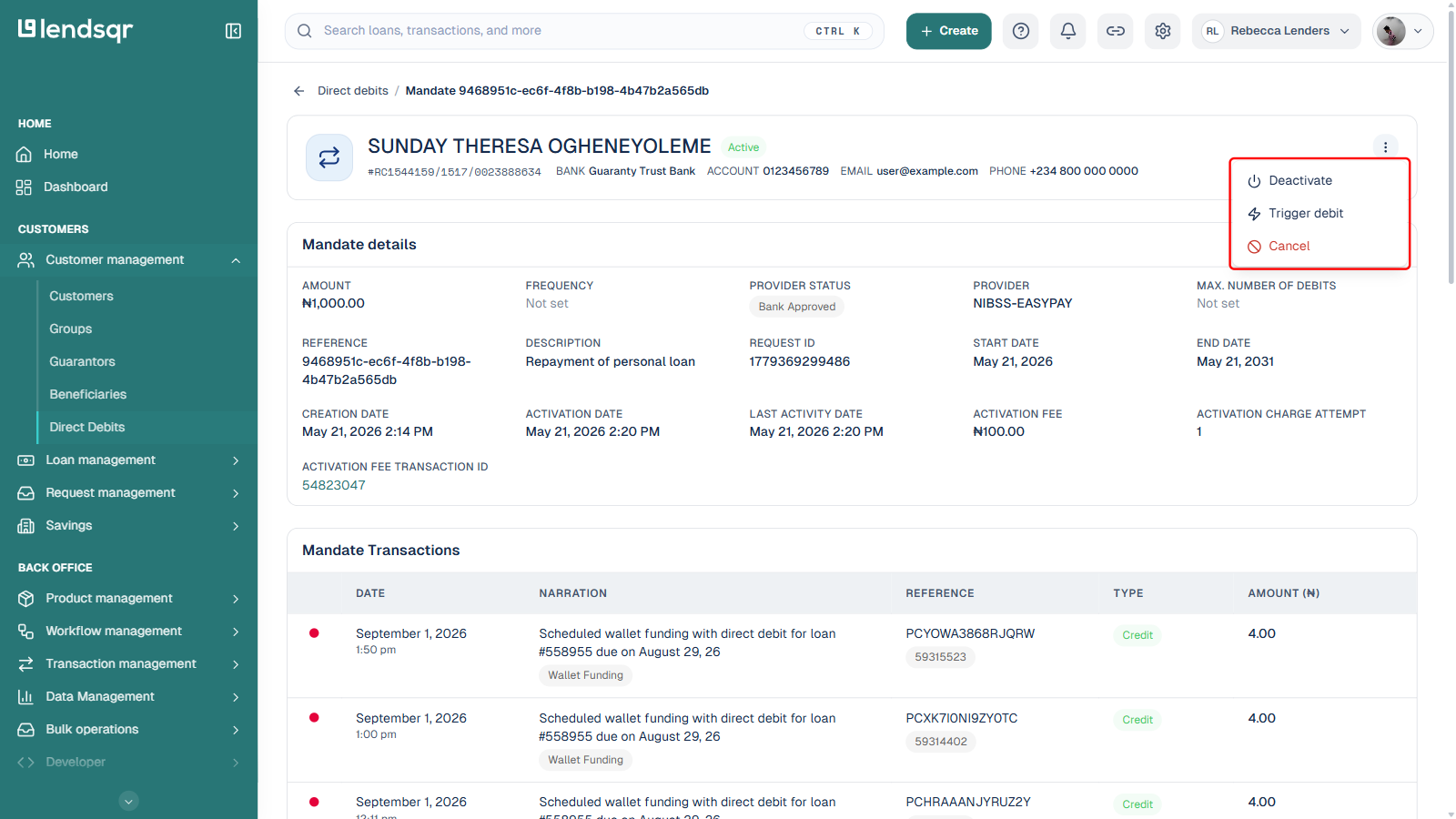
Reviewing this information allows you to communicate accurate updates to the customer and determine whether further action is necessary. The status also determines what you can do next: mandates in an active, successful state show an Actions menu (the icon at the top right) with options such as Trigger debit and Cancel; a mandate still pending activation or already cancelled will not show these options.
Understanding the mandate activation timeline
Kindly note that a direct debit mandate is expected to become active within two hours after creation.
This means there may be a short waiting period between the time a customer authorizes a mandate and the time repayment deductions can begin successfully.
For lenders, understanding this activation timeline is important because customers may sometimes expect deductions to begin immediately after setup. If a repayment complaint occurs within the activation window, the lender should first confirm whether the two-hour activation period has elapsed.
This simple verification step can prevent unnecessary escalation and improve customer communication during repayment investigations.
For example, if a borrower completes mandate setup at 10:00 a.m. and reports a failed deduction at 10:30 a.m., the authorization may still be undergoing processing. In this situation, the lender can monitor the mandate status until activation is completed before initiating further troubleshooting.
Common scenarios where mandate checks are useful
Checking mandate status is useful in several operational situations beyond customer complaints.
For instance, lenders may review mandate statuses before repayment due dates to ensure repayment authorizations are active and ready for collection processing. This proactive monitoring can help reduce failed repayment attempts.
Mandate checks are also useful during collections follow-up activities. Before contacting a borrower about a missed repayment, lenders can first verify whether the repayment mandate was successfully activated.
Additionally, operations teams may review mandate statuses during onboarding audits or repayment reconciliation exercises to identify mandates that are still pending activation.
By integrating mandate monitoring into routine operational processes, lenders can improve repayment oversight and reduce collection inefficiencies.
Best practices for monitoring mandates
Lenders should make mandate verification part of their standard repayment support process.
Whenever customers report failed deductions or repayment concerns, the first step should usually be confirming the status of the repayment mandate from the Admin Console. This helps eliminate avoidable escalations and speeds up issue resolution.
It is also advisable for lenders to educate borrowers about the expected activation timeline during repayment setup. Informing customers that mandates may require up to two hours to become active can help manage expectations and reduce confusion.
Operations teams should also routinely monitor pending mandates and follow up where necessary. Delayed or incomplete mandate activations may affect repayment collection schedules if not identified early.
Maintaining consistent repayment oversight through mandate monitoring can improve operational efficiency and create a smoother repayment experience for both lenders and borrowers.
Frequently asked questions
How long does it take for a mandate to become active?
A direct debit mandate is expected to become active within two hours after creation.
Can lenders check mandates created by customers?
Yes. Lenders can view mandates created manually by themselves as well as mandates automatically created by customers during the loan application process.
Where can mandate status be viewed?
The mandate status can be viewed at the top of the mandate details page within the Direct Debits section of the Admin Console.
Why is checking mandate status important?
Checking the mandate status helps lenders confirm whether repayment deductions are ready to be processed or whether the authorization is still pending activation.
Should repayment complaints always be escalated immediately?
Not always. Lenders are advised to first verify the mandate status from the Admin Console before escalating repayment complaints to support teams.
What section of the dashboard contains mandate records?
Mandate records can be accessed through the Direct Debits section under Customer management on the Admin Console.