Access your Back Office at your fingertips.
Download the app now on Google Play Store.
Scan the QR code
You can also scan QR code with your phone to download the app.
Settling (closing) a loan on the admin console
Updated
On this page
Settling, or closing, a loan refers to ending a loan before its scheduled maturity date after the customer has fully repaid the principal amount. This action finalises the loan immediately and removes any remaining financial obligations tied to it.
When a loan is settled:
Any unpaid interest and applicable fees are permanently written off
The loan status is updated to Settled
No further repayments are expected from the customer
This action is typically used when a customer makes an early lump-sum repayment and the lender decides to close the loan rather than continue accruing interest or enforcing the original repayment schedule.
It is important to understand that settling a loan is a final and irreversible action. Once completed, the loan cannot be reopened, edited, or restructured. Because of this, careful review and internal confirmation are required before proceeding.
When can you settle a loan
A loan can only be settled under a specific condition.
The entire principal amount must be fully repaid by the customer. This is a strict system requirement and cannot be bypassed.
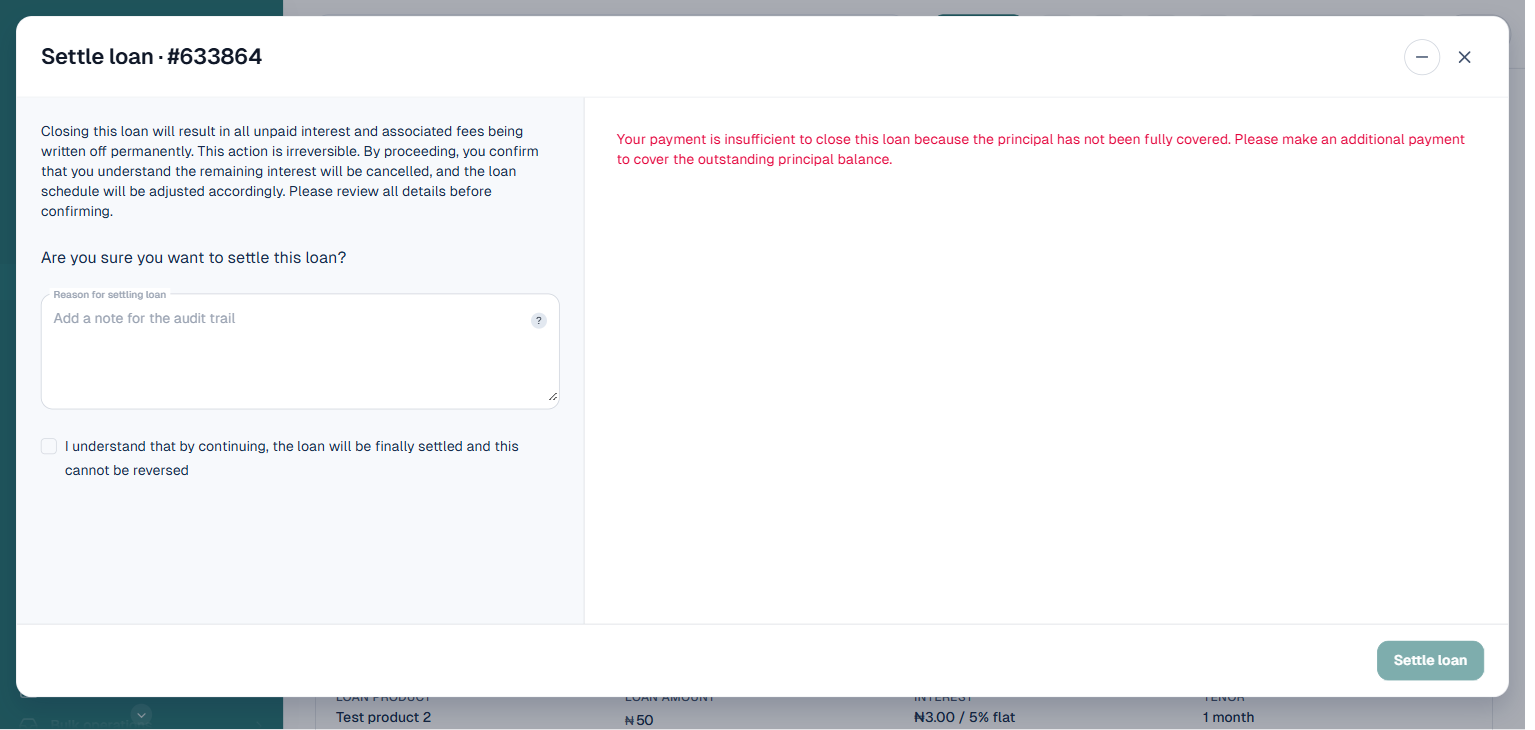
If any portion of the principal remains unpaid, the system will prevent settlement and display an error directly in the confirmation panel, similar to the example below. This ensures that loans are not prematurely closed while there is still outstanding capital.
In practice, this means that settlement is most commonly performed after a customer makes a full early repayment of the principal, either through a single transaction or through cumulative repayments.
What happens during loan settlement
Before initiating settlement, it is important to understand the system behavior and financial implications of this action.
Once a loan is settled:
The system immediately stops interest accrual on the loan
Any outstanding interest or fees that have not yet been paid are automatically waived
The loan is marked as completed and removed from active loan tracking
The customer is no longer required to make any future payments on that loan
This process ensures a clean closure of the loan while maintaining accurate records for both the lender and the borrower.
Access and permission requirements
Loan settlement is a sensitive financial action and is typically restricted to authorized users within the system.
Before attempting to settle a loan, confirm with your super admin or system administrator that your role has permission to perform this action.
Only users with the appropriate privileges should be able to:
Access loan settlement options
Approve or confirm loan closure
View settlement audit logs
All settlement actions are recorded in the system for audit and compliance purposes. This includes the user who performed the action, the time of settlement, and the reason provided.
How to settle (close) a loan
Follow these steps on your admin console:
1. Navigate to the loan you intend to settle. This can be done by searching for the customer or accessing the loan directly through the loans section of the admin console.
Ensure that you have selected the correct loan, especially if the customer has multiple active or past loans.
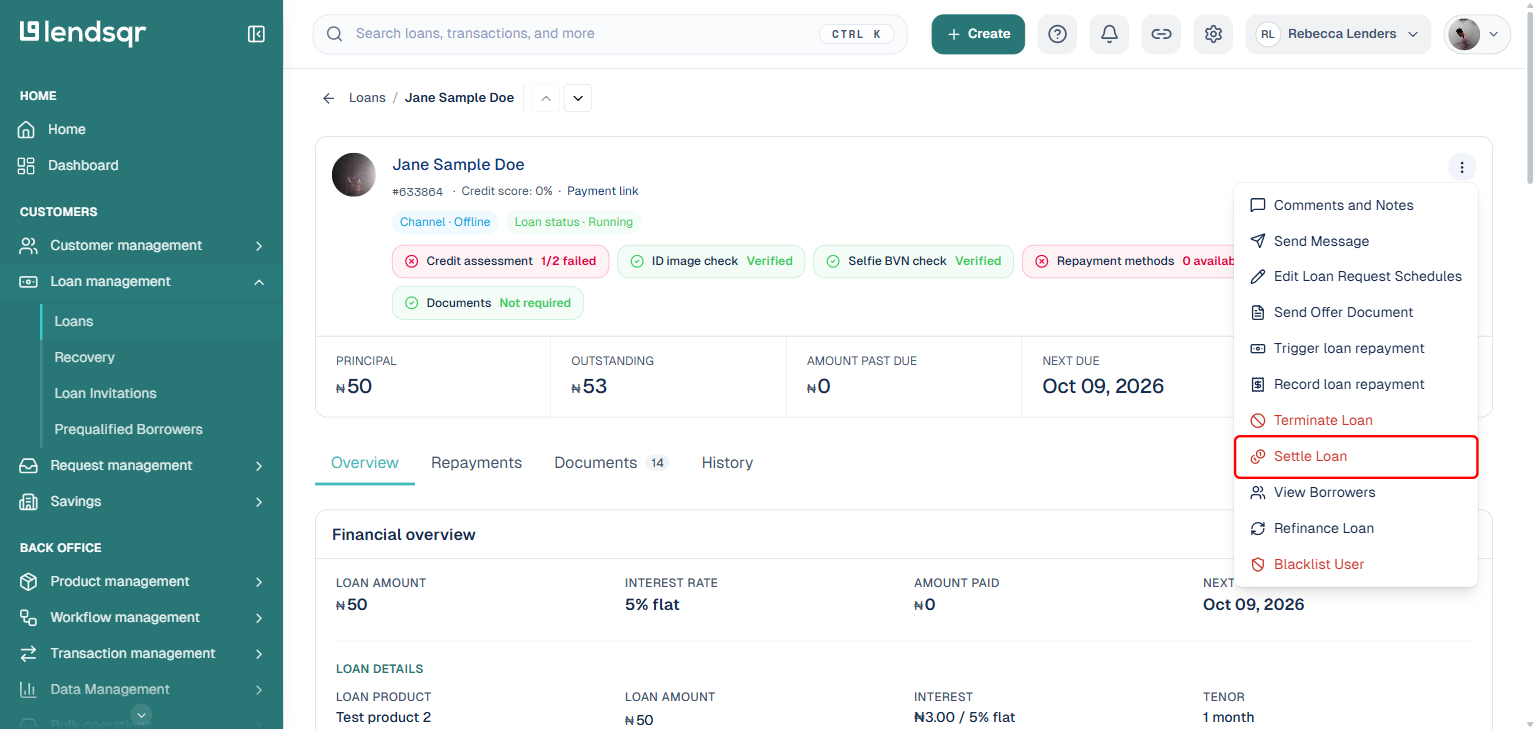
2. On the loan detail page, click the “More actions” button beside the borrower’s name.
3. From the menu, select “Settle Loan”.
This opens a confirmation panel that explains the implications of settling the loan, including the fact that the process is irreversible and that outstanding interest will be waived.
4. Provide a clear reason for settling the loan in the “Reason for settling loan” field.
Examples may include early repayment by customer, negotiated closure, or operational adjustment. This reason is stored in the system and may be referenced later for audit or reporting purposes.
5. Check the box confirming that you understand the action is final and cannot be reversed.
This serves as a safeguard to prevent accidental closure and ensures that the admin is consciously confirming the decision. The “Settle loan” button stays disabled until a reason is provided and the box is checked.
If the loan’s principal has not been fully repaid, the panel displays a validation error directly next to the confirmation and the “Settle loan” button remains disabled, as shown below. You will need to record the outstanding principal repayment before you can proceed.
6. Once the principal is fully repaid and the button is enabled, click “Settle loan” to finalise the closure.
At this point, the loan will be officially closed and its status updated to Settled.
Notifications and system updates
After a loan is successfully settled, the system automatically triggers notifications to relevant parties.
The customer receives an email confirming that their loan has been closed and that no further payments are required.
The admin who performed the action also receives an email confirmation for record-keeping and audit purposes.
Internally, the loan record is updated to reflect its settled status, and it is removed from active loan monitoring workflows.
Real life scenarios
A customer takes a loan with a six-month tenure but decides to repay the full principal amount within two months. Instead of continuing to track the loan and accrue interest, the lender settles the loan immediately, waiving the remaining interest and closing the account.
In another case, a lender and borrower agree on an early closure arrangement after partial repayments and a final lump-sum payment that clears the principal. The lender then settles the loan to reflect the agreement.
Common errors and how to fix them
One common issue is attempting to settle a loan before the principal has been fully repaid. As shown in the screenshot above, the system blocks this action with a message that the payment is insufficient to close the loan because the principal has not been fully covered. To resolve this, record the outstanding principal repayment before initiating settlement again.
Another issue is selecting the wrong loan, especially when customers have multiple loans. Always verify loan details before proceeding.
Admins may also overlook the financial implications of settlement, such as waived interest. Always review the impact before confirming.
Lack of proper permissions can also prevent access to the settlement option. In such cases, confirm your role with a super admin.
Best practices for loan settlement
Always confirm that the principal has been fully repaid before initiating settlement.
Ensure that there is a clear and documented reason for closing the loan early.
Communicate with the customer before settlement to avoid confusion, especially regarding waived interest or fees.
Restrict settlement permissions to authorized roles to maintain control and prevent misuse.
Review settlement actions periodically as part of internal audits to ensure compliance and accuracy.
Conclusion
Settling a loan in Lendsqr is a powerful feature that allows lenders to close loans early once the principal has been fully repaid.
By understanding the conditions, following the correct steps, and applying proper governance, lenders can use this feature to manage early repayments efficiently while maintaining accurate financial records.
Because the action is irreversible, it is essential to approach loan settlement with careful review and clear intent to ensure that both operational and customer outcomes are aligned.