Access your Back Office at your fingertips.
Download the app now on Google Play Store.
Scan the QR code
You can also scan QR code with your phone to download the app.
Understanding a user’s decision data
Updated
On this page
Decision data is a structured record of all the checks and scores the system ran against a borrower’s loan request to determine whether they are eligible for a loan. It is generated by Oraculi, Lendsqr’s credit decision engine, and is available on every loan request, whether approved or declined, directly from the admin console.
What is decision data?
Imagine a lender who receives a loan request from a borrower who has been on the platform for three months and is now asking for a larger amount than they have previously taken. Before approving, the loan officer opens the decision data. The borrower passed the identity and blacklist checks but scored below the threshold on the affordability module. Rather than an outright decline, the loan officer approves a smaller amount, a decision they can justify and document clearly. This is exactly what decision data is built for: informed, evidence-based lending.
Think of it like a report card for a loan application. Instead of just seeing a pass or fail, you see every subject that was tested, the score in each, and exactly where things went wrong if they did. This makes it far easier to approve confidently, decline with justification, or investigate a disputed outcome.
What decision data shows you
On a loan request’s detail page, the Decision Data section is organized into a summary card and a list of the individual checks that were run.
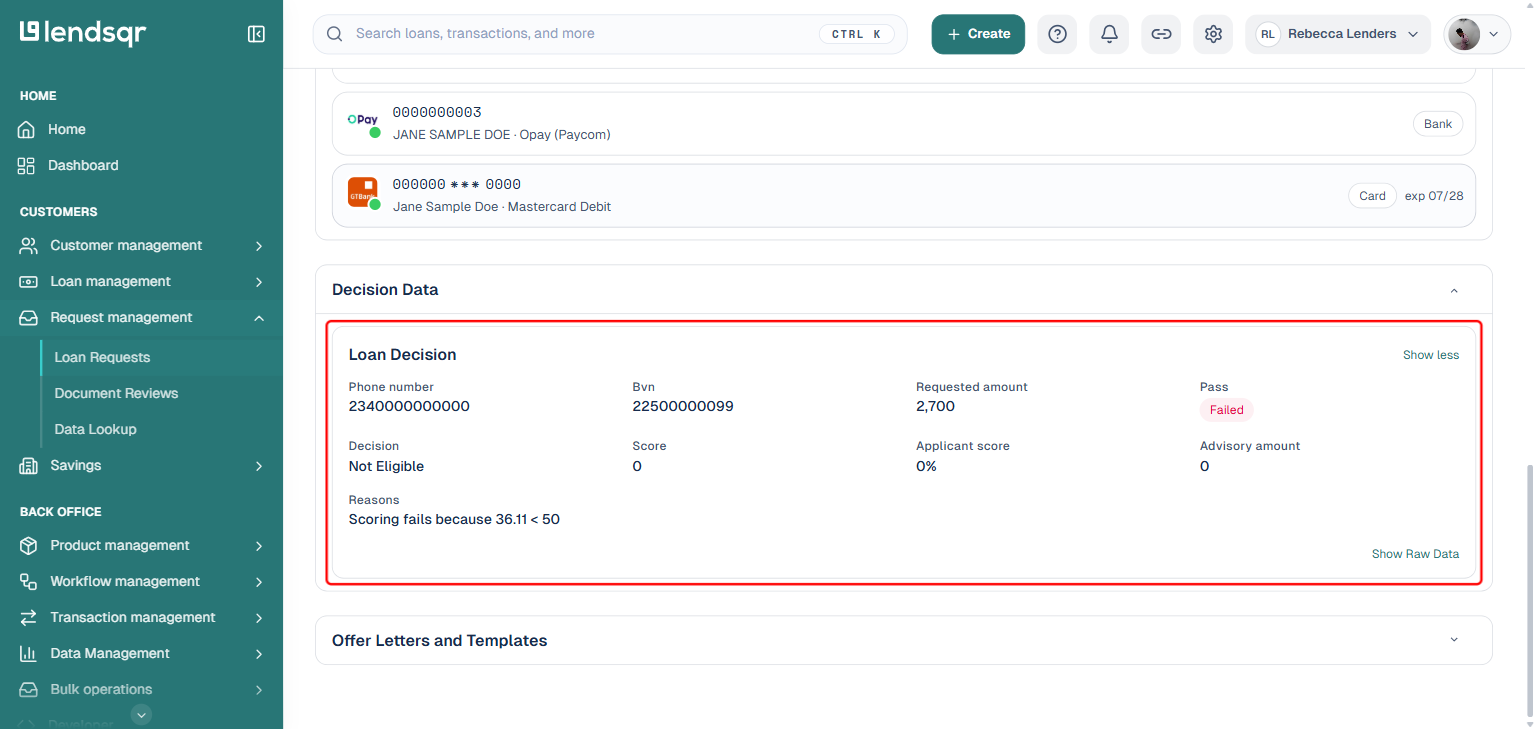
Loan Decision
This is the high-level summary of the loan evaluation, and it is where general details, the offer, and the decline reasons all live together in one card. It shows identifying details (phone number, BVN, requested amount), the pass status (Passed or Failed), the overall decision (Eligible or Not Eligible), and the borrower’s credit score as calculated by the scoring module within the credit risk rule.
If the borrower is eligible, this card also shows the offer and advisory amount the system determined the borrower qualifies for, based on their request and the offer settings configured within your credit risk rule.
If the borrower is ineligible, the card instead shows a reasons field with the specific explanation the system returned for the failed evaluation. Rather than inferring why a request failed from the individual checks below, this field surfaces the failure explanation directly, making it straightforward to communicate outcomes to borrowers or to investigate disputed decisions.
Individual checks
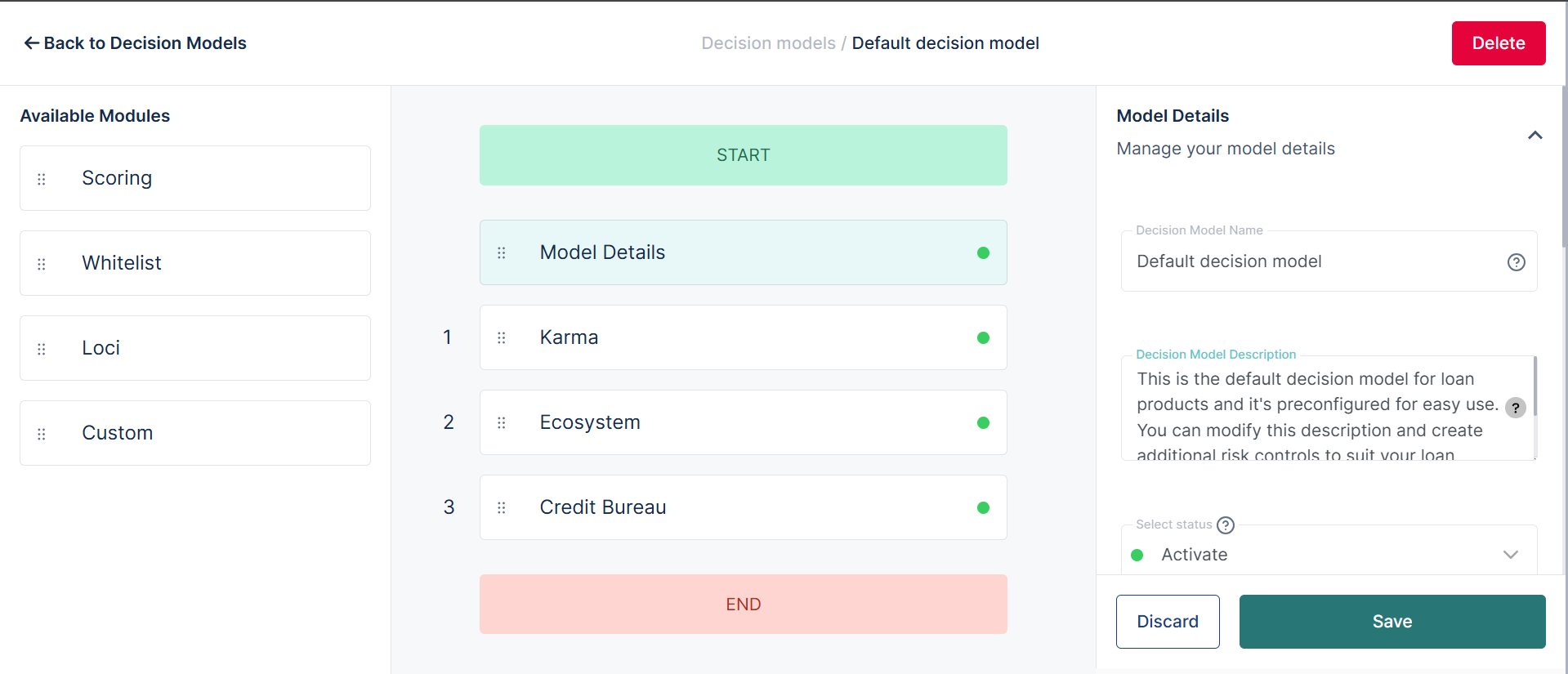
Below the Loan Decision card, each individual check the borrower went through as part of the credit risk rule evaluation is listed as its own module, run sequentially. If a borrower fails one module, the process stops there and subsequent checks are not run, so you will not always see every possible module listed.
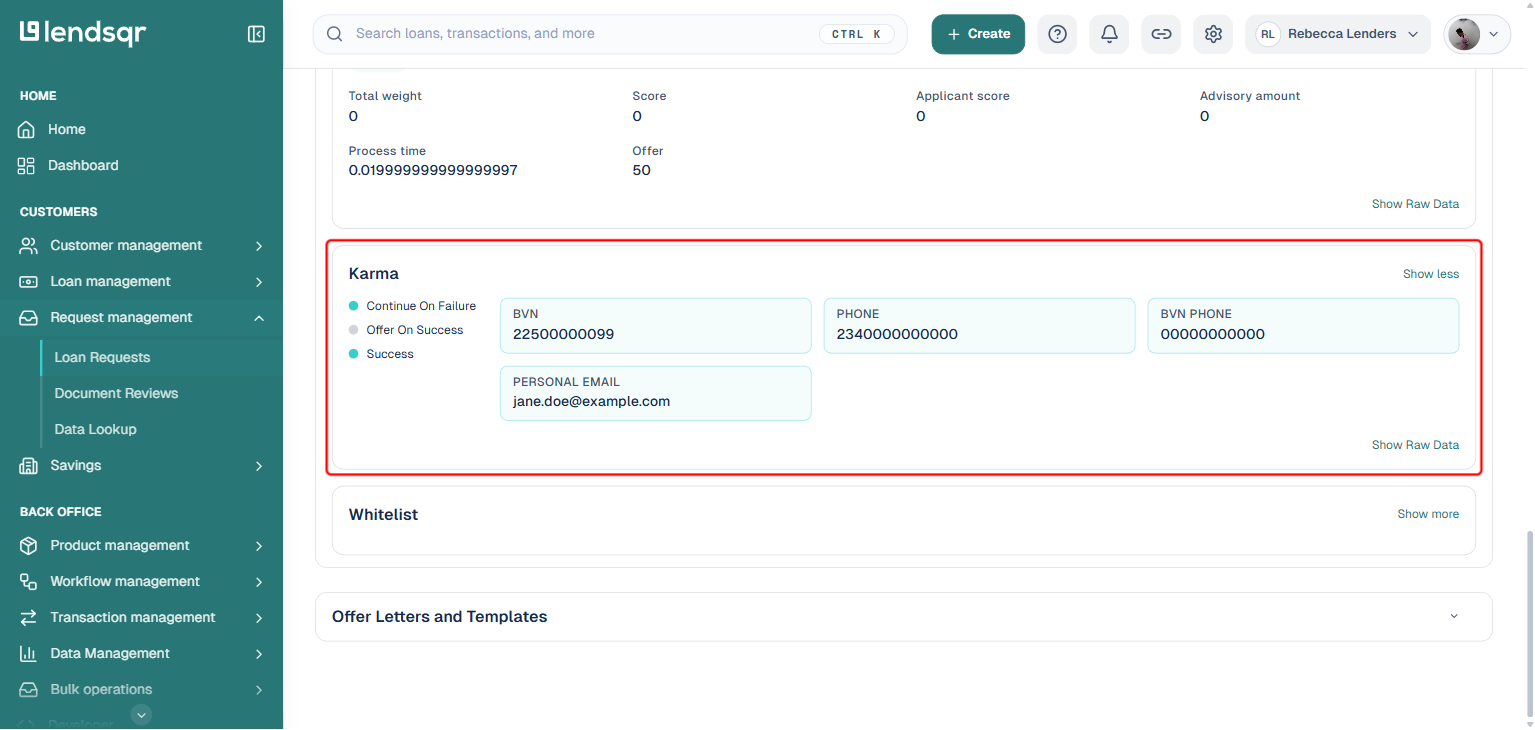
Checks you may see here include the Karma check (blacklist verification across the Lendsqr network), whitelist or ecosystem checks (historical behavior data across the platform or your specific organization), scoring modules (weighted attribute scoring based on factors like age, employment, and location), and credit bureau or bank statement checks where configured.
Each module can be expanded using its “Show more” button to see the specific attributes evaluated and their individual outcomes, along with any pass/fail flow indicators for that check. To view the complete raw output of a module, select “Show Raw Data”, which returns the full evaluation in a structured data format.
For routine approvals, a quick check of the Loan Decision card is usually sufficient. If the pass status is Passed and the card shows a valid offer amount, you have what you need to move forward.
For borderline cases, expand the individual check modules to review their results. The system may have returned an eligible result, but specific module scores may give you reason to pause. Decision data supports your judgment. You are always free to decline a request the system has marked eligible if the underlying data warrants it. The reverse can also happen: the Loan Decision card can show a Passed, Eligible result even when the request’s overall status is Declined for an unrelated reason, such as the borrower having no available repayment method, so always check the loan request’s overall status alongside the decision data rather than relying on one or the other alone.
For failed requests, start with the reasons field in the Loan Decision card to understand why the borrower was turned down, then cross-reference with the individual check modules to identify exactly where the evaluation stopped. This is especially useful when a borrower contacts you to dispute a decision.
Common errors and what they indicate
If a borrower fails at the Karma module, it means they have been flagged on the Lendsqr network for a previous default or compliance issue on another platform. This is not a system error; it is the decision engine working correctly.
If the decision data shows a failed status but the reasons field is empty, this may indicate a configuration issue with your credit risk rule. Review your model settings on the admin console to confirm all modules are correctly set up.
If the credit score is missing from the Loan Decision card, the scoring module may not have been included in your credit risk rule configuration. You can add or adjust scoring modules from the credit risk rules section of the admin console.