Access your Back Office at your fingertips.
Download the app now on Google Play Store.
Scan the QR code
You can also scan QR code with your phone to download the app.
Triggering manual loan repayment
Updated
On this page
Sometimes a loan repayment does not go through as expected. A borrower’s card may fail, a direct debit mandate may not execute, or the account may not have sufficient funds at the time of collection.
When this happens, lenders often need to recover the payment without waiting for the next scheduled cycle. This is where manual repayment collection becomes useful.
On Lendsqr, you can trigger a manual repayment to retry or recover a failed or overdue loan installment directly from the loan details page.
When to use manual repayment collection
Manual repayment is used in exceptional cases where automated repayment has failed or needs to be retried.
Common scenarios include:
Scheduled repayment failed due to insufficient funds
The card transaction was declined
The direct debit mandate did not execute
Borrower has confirmed funds are now available
The loan is overdue and requires recovery action
Example scenario
A borrower has a ₦50,000 monthly repayment scheduled. The first debit attempt fails due to a low account balance. Two days later, the borrower confirms that the salary has been credited.
Instead of waiting for the next cycle, the lender triggers a manual repayment to recover the installment immediately and reduce the risk of further delinquency.
What to know before you trigger a manual repayment
Before initiating a manual repayment, it is important to confirm:
The repayment is still due
The amount matches the repayment schedule
The payment method on file is valid
The borrower has been notified where necessary
Previous failure reasons have been reviewed
Manual repayment directly initiates a financial transaction, so incorrect usage may lead to disputes or failed retries.
How to trigger manual loan repayment
To trigger manual loan repayment:
Follow the steps highlighted in the section above to locate a loan.
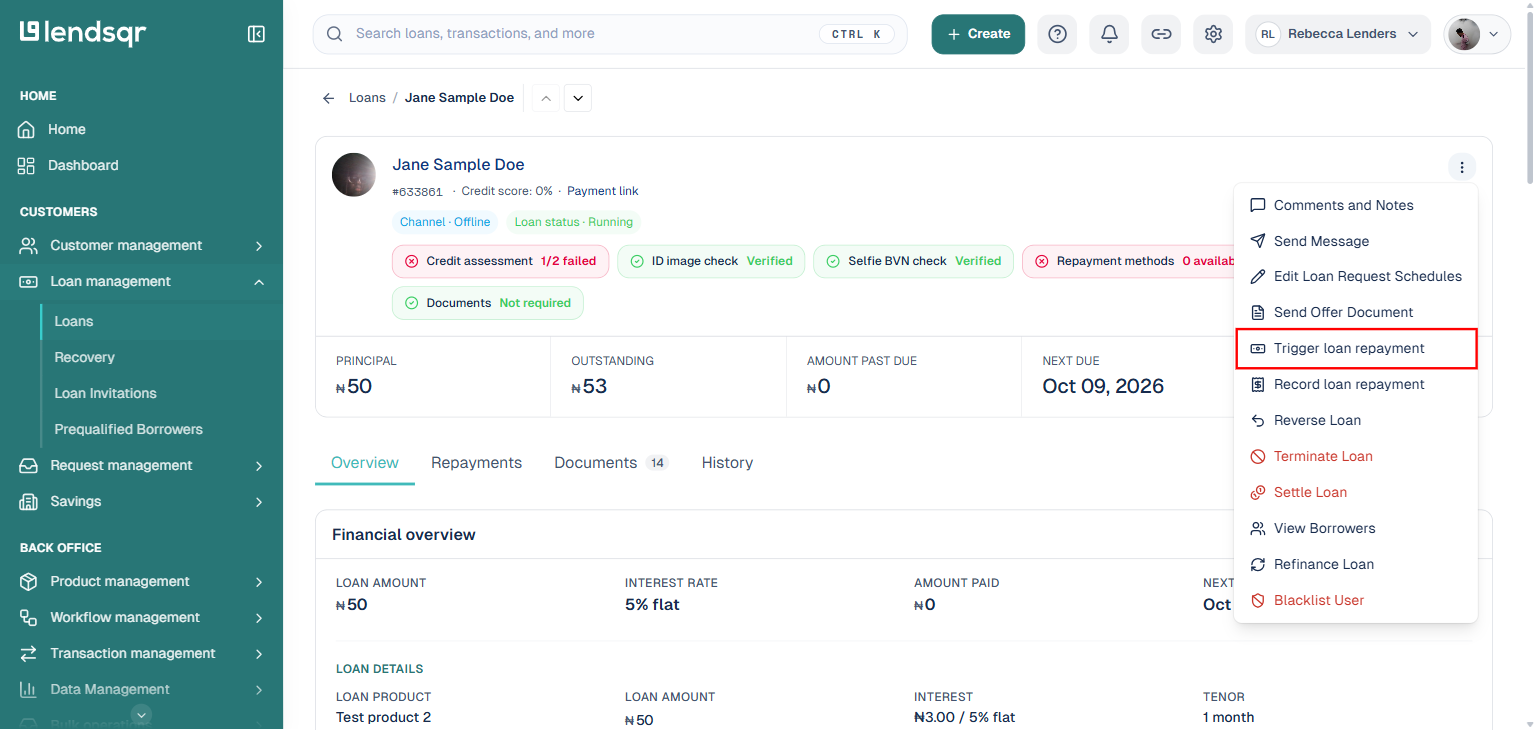
On the loan details page, click the “More actions” button beside the borrower’s name and select “Trigger loan repayment” from the menu.
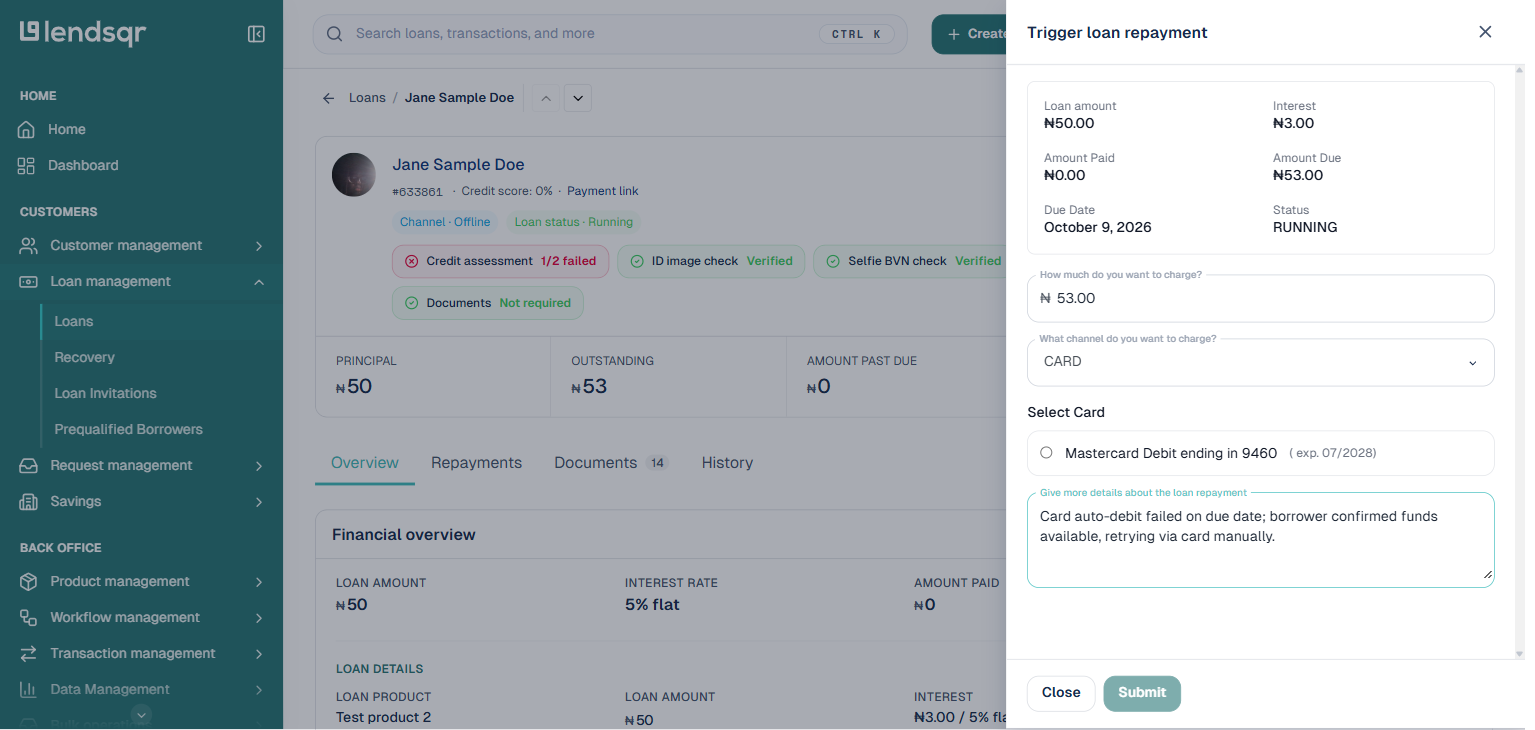
A panel titled “Trigger loan repayment” opens on the right, showing the loan’s amount, interest, amount paid, amount due, due date, and status.
Enter the amount to charge, select the channel to charge (CARD, Wallet, or DIRECT_DEBIT), and add a comment describing what happened, for example why the original repayment failed and why you are retrying it manually.
Click “Submit” to repay the loan or part of the loan.
Depending on your account’s security settings, you may be asked to enter a 2FA token to authorize the system to trigger repayment from the borrower’s wallet, card, or Direct Debit.
Once your payment is processed successfully, the loan schedule will be automatically updated.
Triggering for manual loan repayment will only work if the user has a card, wallet, or Direct Debit with funds in it. To repay a loan that was paid from external transfers or cash, read more here: Repaying a User’s Loan. Once submitted, the system immediately attempts to collect the repayment.
Manual repayment gives lenders control over recovering failed or overdue loan installments when automated collection does not succeed.
With Lendsqr, lenders can trigger repayment attempts directly from the loan details page, track outcomes in real time, and take appropriate follow-up actions based on the response.