Access your Back Office at your fingertips.
Download the app now on Google Play Store.
Scan the QR code
You can also scan QR code with your phone to download the app.
How pricing and billing works
Updated
On this page
Every Lendsqr account comes with a service wallet that pays for priced Developer API requests. This wallet is the funding source for API consumption, and usage charges are deducted automatically whenever a priced endpoint is accessed successfully.
To help new users get started, we provide an initial wallet balance when an account is created. This lets organizations test available services, explore API functionality, and evaluate integrations before funding their wallets independently.
The wallet system is designed to provide transparency and control over API spending. Instead of dealing with complex billing structures, users can monitor wallet balances, track deductions, review transaction history, and fund their accounts directly from the console.
Understanding the service wallet
The service wallet functions as a prepaid balance used for API consumption. Whenever a priced endpoint is called successfully, the associated charge is deducted automatically from the wallet balance.
This approach gives users visibility into their API usage costs and helps prevent unexpected billing surprises. Because charges are deducted directly from the wallet, organizations can monitor spending in real time and maintain better control over operational expenses.
For fintechs, lenders, and businesses that rely on API services for identity verification, credit checks, fraud detection, and customer validation, having a dedicated wallet also simplifies cost tracking across teams and projects.
Why the wallet system matters
Managing API expenses can become difficult when multiple services are being used across different workflows. Without proper visibility, businesses may struggle to understand how much they are spending on verification, credit decisioning, or customer validation activities.
The wallet system provides a centralized way to monitor usage and spending.
For example, a lender using the Developer APIs to verify borrower information before loan approval can easily track how much is being spent on verification services over a specific period. By reviewing wallet transactions regularly, the organization can understand usage patterns and plan operational budgets more effectively.
Similarly, a fintech integrating multiple Developer API endpoints can use wallet records to monitor API consumption across different products and services.
Viewing your service wallet
Users can monitor wallet balances and transaction activity directly from the Wallet section in the admin console.
To access your wallet:
Sign in to your Lendsqr admin console.
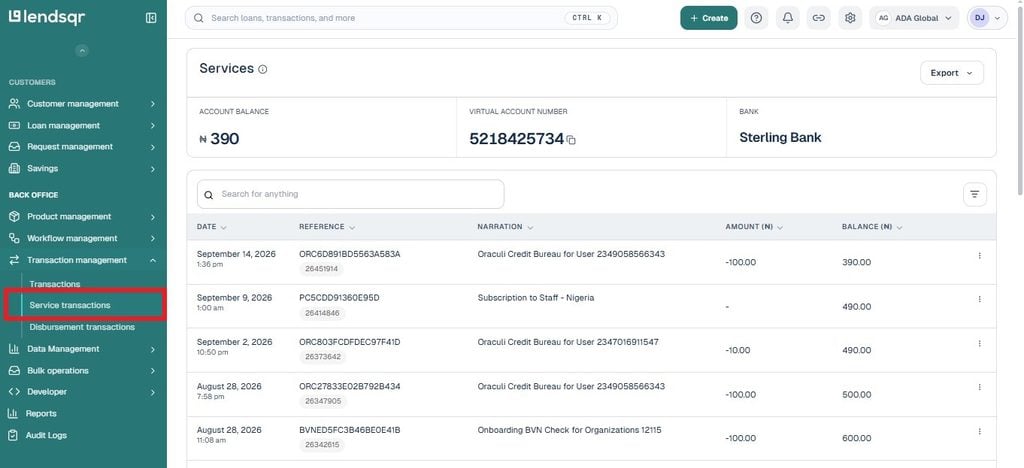
Navigate to the Service Transactions section from the side menu.
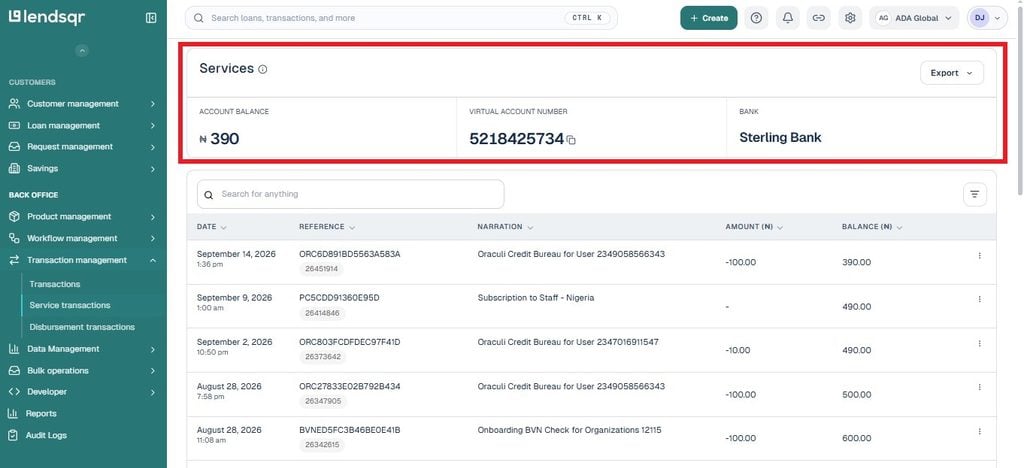
3. Review your available wallet balance.
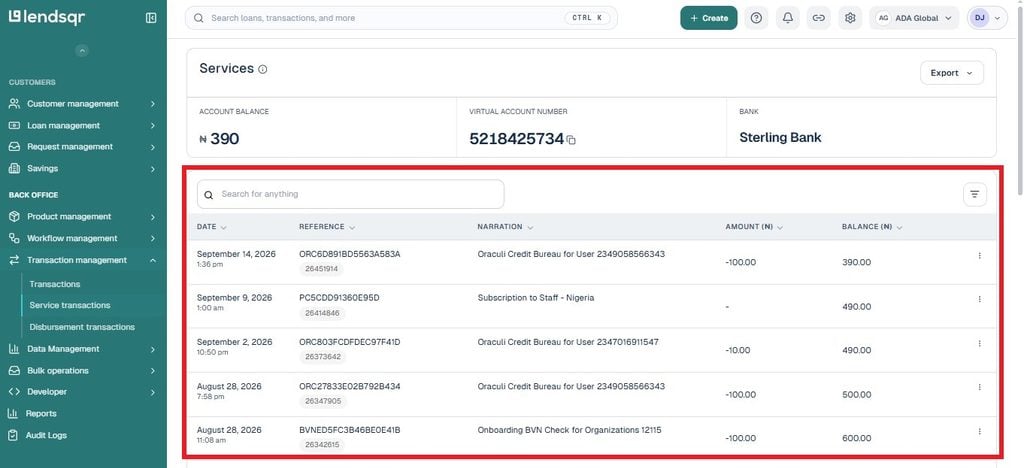
4. View recent transaction activity within the Transactions section.
The wallet dashboard displays important information, including:
current wallet balance,
billing account details,
account number for funding,
transaction history,
transaction status,
debit amounts,
and transaction narration.
This visibility helps users understand how funds are being utilized across the Developer APIs.
Understanding the wallet dashboard
The wallet page provides a summary of your available funds and billing information.
Users can view:
Wallet balance
Low wallet threshold
Billing account name
Billing account number
Funding bank details
The dashboard also contains a transaction table that shows wallet activity. Each transaction includes details such as:
transaction date,
transaction ID,
narration,
transaction status,
transaction type,
and transaction amount.
This makes it easier to reconcile API usage and monitor spending over time.
Funding your service wallet
When your initial balance is exhausted or additional API usage is required, you can fund your wallet directly from the Wallet page.
The platform provides dedicated funding details linked to your account. These details include:
account name,
account number,
and funding bank information.
To fund your wallet:
Navigate to the Service Transactions section.
Locate your billing account details.
Transfer funds using the displayed account information.
Confirm that the balance has been updated after funding is completed.
This funding process helps ensure uninterrupted access to the Developer APIs and reduces the risk of service interruptions caused by insufficient wallet balances.
How wallet charges work
Charges are automatically deducted from your service wallet whenever a priced API endpoint returns a successful response.
This means users do not need to perform separate payment actions after every request. Instead, deductions happen automatically as services are consumed.
The Transactions section provides visibility into these deductions and helps users understand:
which endpoint was used,
when the request occurred,
How much was charged?
and whether the transaction was successful.
For example, transaction narrations may indicate activities such as:
BVN verification,
credit bureau requests,
onboarding verification checks,
or other Developer API services.
This transaction history creates a clear audit trail for API consumption.
Understanding successful wallet deductions
One of the most important aspects of pricing is that users are only charged for successful responses.
Wallet charges are only deducted when an endpoint returns a successful HTTP 200 response.
This means users are not billed for failed requests or error responses.
This charging structure helps organizations manage API costs more predictably because charges are tied directly to successful service delivery.
For example, if an API request encounters an error and does not return a successful response, the wallet will not be charged for that request.
This ensures users only pay for valid and usable results.
Monitoring wallet transactions
Regularly reviewing wallet transactions can help organizations understand usage patterns and identify unusual spending activity.
The Transactions section allows users to monitor:
API usage frequency,
transaction amounts,
successful deductions,
endpoint activity,
and spending trends.
For example, if a team notices a sudden increase in wallet deductions, reviewing transaction history may help identify whether API usage has increased significantly or whether additional services are being consumed.
Monitoring wallet activity can also support internal reporting and budget planning.
Priced API endpoints
The Developer APIs include multiple priced endpoints across their services.
These endpoints may support activities such as:
identity verification,
credit decisioning,
borrower validation,
fraud detection,
direct debit services,
and other lending-related operations.
Because pricing may change over time, users should avoid relying on static documentation values when estimating costs.
Instead, a pricing endpoint is provided that returns the most current pricing information available for an account.
Getting current pricing information
To retrieve the latest pricing information, make a GET request to:
https://adjutor.lendsqr.com/v2/profile/pricing
See the Developers section for guidance on making pricing requests and understanding returned responses.
This approach helps ensure that applications always reference current pricing data rather than outdated pricing information.
Best practices for managing your wallet
Organizations should monitor wallet balances regularly to avoid service interruptions caused by insufficient funds.
It is also advisable to review transaction history periodically, especially when multiple teams or services consume the Developer APIs.
Businesses with high API usage volumes may benefit from setting internal processes for tracking wallet balances and reviewing spending trends.
Maintaining awareness of wallet activity can help improve budgeting accuracy and ensure continued access to critical API services.
Example: managing wallet usage for loan verification
Consider a lender that uses the Developer APIs during loan application reviews.
Each time a borrower submits an application, the lender performs identity verification and credit-related checks before making a lending decision. Successful verification requests trigger wallet deductions automatically.
By reviewing wallet transactions regularly, the lender can understand how verification costs contribute to operational expenses and plan funding requirements more effectively.
Frequently asked questions
What is the Adjutor service wallet?
The service wallet is a prepaid wallet used to pay for priced API requests across the Developer APIs.
Does every new account receive an initial balance?
Yes. New accounts receive an initial balance that allows users to explore and test available APIs.
Where can I view my wallet balance?
You can view your wallet balance from the Wallet section in the admin console.
How can I fund my wallet?
Navigate to the Service Transactions page to view your funding details. Then transfer funds to the displayed account number to top up your wallet balance.
When is my wallet charged for API usage?
Your wallet is automatically charged whenever you successfully access a priced API endpoint.
Am I charged for failed API requests?
No. Your wallet is only charged when an endpoint returns a successful HTTP 200 response.
How can I check current API pricing?
You can retrieve current pricing information through the pricing endpoint: