Access your Back Office at your fingertips.
Download the app now on Google Play Store.
Scan the QR code
You can also scan QR code with your phone to download the app.
Embedded loans and payments
Updated
On this page
About embedded loans and payments
Embedded loans and payments let third-party distributors offer loans and payment options to their own customers, on their own platform, powered by a lender on Lendsqr. It’s a way to give your customers a seamless borrowing or checkout experience without sending them to an external portal.
What are embedded loans?
Lendsqr’s Embedded Loan endpoints allow you to seamlessly integrate loan application forms into third-party platforms or mobile apps. These endpoints let you generate dynamic links for customers to either onboard and apply for a loan or apply directly if they’re existing users.
With embedded loans, you can power Buy-Now-Pay-Later journeys or generic loan services on your platform. Lendsqr’s lenders perform the KYC and power the loans given to your customers. For BNPL specifically, this can increase your checkout rate since customers are assured of financing for their purchase.
How embedded loan endpoints work
There are three key API endpoints involved in setting up embedded loan applications:
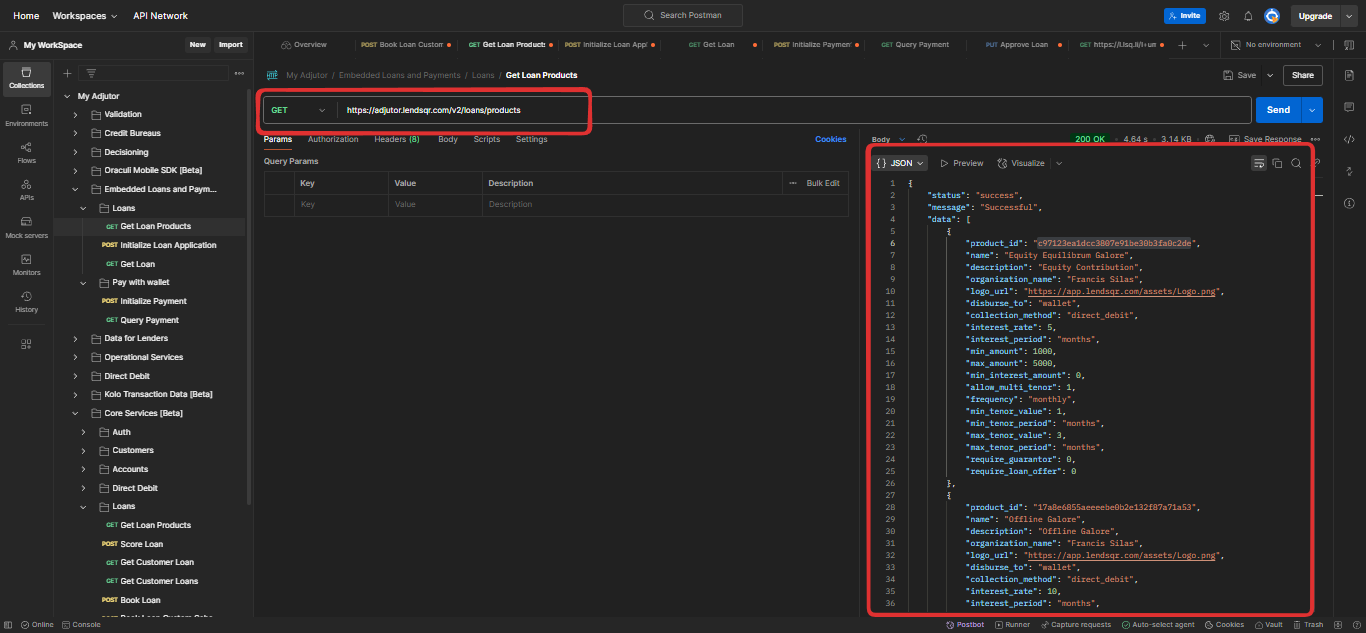
A. Get Loan Products:
Endpoint: GET https://adjutor.lendsqr.com/v2/loans/products
Purpose: Fetch all active loan products your organisation offers. Each product includes detailed metadata, settings, and a unique product ID.
What you get in the response:
A list of available loan products
Unique product IDs (product_id)
Loan settings and product details
Use this endpoint to display available loan options to your users.
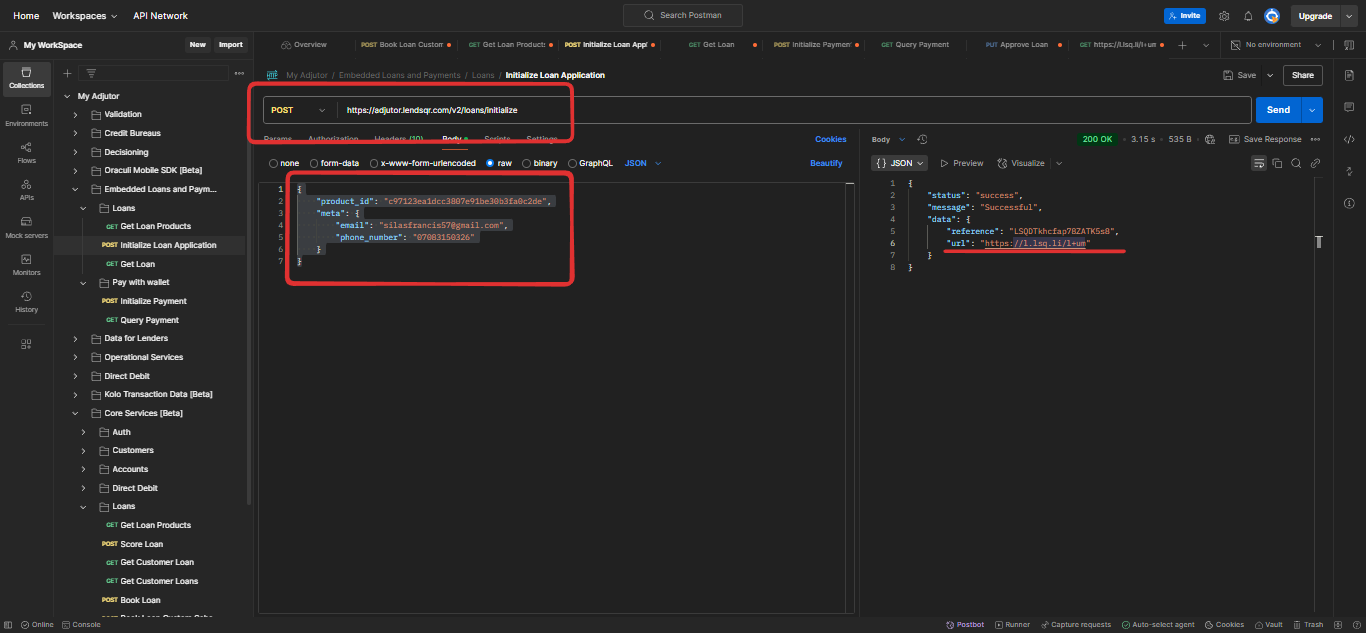
B. Initialize Loan Application:
Endpoint: POST https://adjutor.lendsqr.com/v2/loans/initialize
Purpose: Generate a short link that opens a loan application form tied to a specific loan product.
product_id: Unique ID of the selected loan product
meta: Optional metadata like the user’s email and phone number to personalise the application
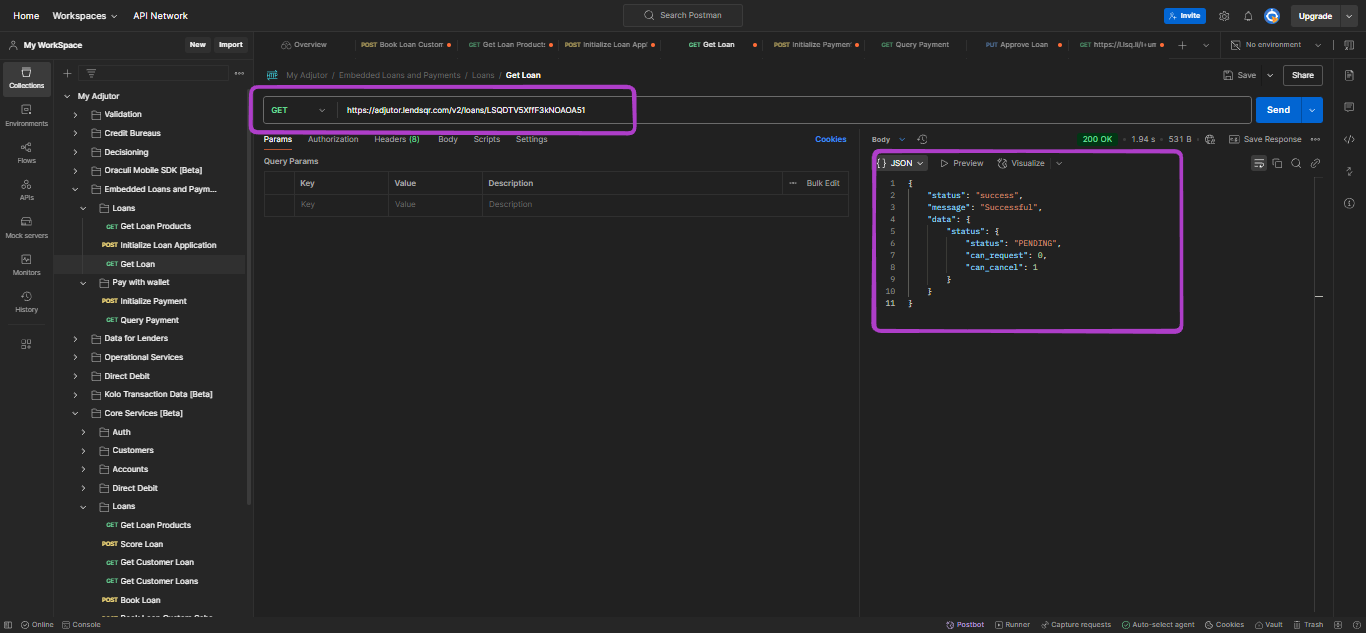
C. Get Loan:
Endpoint: GET https://adjutor.lendsqr.com/v2/loans/:reference
Replace :reference with the actual loan reference string received after initializing a loan.
Example Request:
If the loan reference is “LSQDTV5XffF3kNOAOA51”, the request URL would look like this: https://adjutor.lendsqr.com/v2/loans/LSQDTV5XffF3kNOAOA51
This will retrieve the details of the specified loan or loan request, providing comprehensive information based on the loan reference passed.
Embedded payments
With embedded payments, your customers don’t need to take out a loan with a Lendsqr lender. Provided you’ve established a relationship with one of our lenders, customers can pay for purchases directly using the funds in their account with your partnered lender, making checkout on your platform seamless. Embedded payments serve checkout use cases only.
Getting started
Sign up at pecunia.lendsqr.com and contact [email protected] once done. Provide a valid business account during sign-up, as this is the account payments will be made to.
After you contact us, your profile is set up as a distributor with Lendsqr.
You’ll be given a test API key to carry out your integration.
Once your implementation is confirmed, your production API key is sent to you over a secure channel.
Concepts to understand
Third-party distributor: an external platform, not a Lendsqr lender itself, that wants to offer its customers loans or payment options powered by a Lendsqr lender. This could be an e-commerce platform offering BNPL with embedded loans, or multiple checkout options with embedded payments.
Lender: a business that gives out loans via the Lendsqr platform.
Customers: the end users on the distributor’s platform.
Why use embedded loans?
Seamless integration into your app or platform
Personalised loan application experience
No need to redirect users to external portals
Supports new customer onboarding and existing customer login flows
FAQs
Q: Can I customise the loan application form UI? A: No, the form UI is hosted and maintained by Lendsqr, ensuring compliance and consistency. You only embed the link.
Q: What happens if a user already has a loan with the organisation? A: They’ll be prompted to log in and will see their active or pending applications.