Access your Back Office at your fingertips.
Download the app now on Google Play Store.
Scan the QR code
You can also scan QR code with your phone to download the app.
How do I change my subscription plan?
Updated
On this page
Understanding subscription plan changes
As a lender, you can upgrade or downgrade your subscription plan. You may need to upgrade your plan when you require access to more advanced features, or downgrade if your lending activities reduce significantly and you no longer need premium functionalities, opting instead for a more cost-effective plan that covers your basic operational needs.
Why lenders change subscription plans
Subscription plan changes are a natural part of business growth and evolution. Understanding the common scenarios that drive plan changes helps you recognize when it might be time to evaluate your current subscription tier and consider whether it still matches your needs.
Reasons to upgrade your subscription plan
Business growth represents the most common driver of subscription upgrades. When you first start lending operations, you might begin with a basic plan that covers essential features for a small portfolio. As your business expands, you process more loans, serve more customers, and require more sophisticated tools. Your initial plan becomes limiting, creating bottlenecks that slow your operations.
Feature requirements often drive upgrades as well. As you become more sophisticated in your lending practices, you might need advanced analytics to understand portfolio performance, custom reporting to satisfy investors or regulators, API access to integrate with other systems, or white-label capabilities to brand the borrower experience. These premium features typically exist only in higher-tier plans, necessitating an upgrade to access them.
Team expansion also triggers subscription changes. Basic plans often limit the number of users who can access your admin console. When you hire additional loan officers, managers, or support staff, you need a plan that accommodates more concurrent users. Upgrading to a plan with higher user limits prevents your team from being locked out of critical systems.
Transaction volume caps in lower-tier plans can force upgrades as your business scales. If your current plan allows 100 loan disbursements per month and you are now processing 150, you must either upgrade to a plan with higher limits or face restrictions on your ability to serve customers.
Compliance and security requirements sometimes mandate upgrades. As your lending operation matures or enters regulated markets, you might need enhanced security features, detailed audit logs, or compliance reporting tools that only exist in enterprise-grade plans.
Reasons to downgrade your subscription plan
While upgrades reflect growth, downgrades are not necessarily negative. Several legitimate business reasons justify moving to a lower-tier plan.
Seasonal business fluctuations might make a high-tier plan wasteful during slow periods. If your lending activity varies significantly across the year, you might upgrade during peak seasons when you need maximum capacity and downgrade during slow periods to control costs.
Strategic business pivots can reduce feature requirements. Perhaps you initially offered multiple loan products requiring complex configuration but have since simplified to focus on a single product type. Your feature needs decrease, making a lower-tier plan adequate.
Economic pressures and cost-optimization efforts can sometimes drive downgrades. During challenging economic periods, every expense comes under scrutiny. If analysis reveals you are paying for premium features you rarely use, downgrading to a plan that covers your actual needs without unnecessary extras makes financial sense.
Portfolio contraction, while not ideal, does occur. If your active loan portfolio decreases significantly due to market conditions, regulatory changes, or strategic decisions, maintaining an enterprise plan designed for high volumes becomes inefficient.
Testing and evaluation periods might involve temporary downgrades. After trying a premium plan to evaluate its features, you might determine the additional capabilities do not justify the cost for your specific use case and downgrade to a tier that better balances features and price.
Upgrading your subscription plan
When you decide to upgrade your subscription plan, you must have sufficient funds in your services wallet to cover the upgrade fee. You are charged immediately and your new plan features will be instantly updated. For a successful upgrade, you are expected to have at least one card linked to your service’s wallet.
The immediate nature of upgrade activation reflects the business logic that when you need more features, you need them now. Lendsqr does not make you wait until your next billing cycle to access capabilities you are ready to pay for today. The moment your upgrade payment processes, your account gains access to all features included in your new plan tier.
This instant activation provides significant operational benefits. If you are upgrading because you hit a transaction limit or need a specific feature for an urgent business requirement, you can address that need immediately rather than facing delays while waiting for a billing cycle to complete.
However, the immediate charge means you must ensure adequate funds exist in your prepaid services wallet before attempting an upgrade. The system checks your available balance when you initiate the upgrade. If insufficient funds exist to cover the cost difference between your current plan and your desired plan, the upgrade fails.
The requirement to have a linked payment card provides a backup funding source and enables future automatic billing. Even though the initial upgrade charge comes from your prepaid balance, having a card on file ensures continuity of service if your prepaid balance runs low in the future.
If you choose to downgrade your plan, you are required to have enough funds in your services wallet and a card attached to your wallet. The features in the new plan would only take effect at the end of the current subscription and be updated at the next billing cycle.
The delayed activation of downgrades differs markedly from the instant activation of upgrades. This timing difference exists for sound business and technical reasons. When you downgrade, you have already paid for your current plan through the end of your billing cycle. It would be unfair to lose access to features you have paid for simply because you decided to change plans for the next period.
The delayed activation also prevents situations where customers repeatedly upgrade and downgrade to game the billing system. If downgrades took effect immediately with partial refunds, customers could upgrade for brief periods to access premium features and then immediately downgrade, essentially renting expensive features for short periods at reduced cost.
From a practical standpoint, the delayed downgrade activation gives you time to prepare for the feature loss. If your current plan includes advanced reporting that your new plan does not, you have until the end of your billing cycle to extract important reports, adjust your workflows to compensate for the missing feature, or reconsider whether the downgrade is truly appropriate.
The requirement for adequate funds in your services wallet even for a downgrade might seem counterintuitive since downgrades typically cost less than your current plan. However, this requirement exists because the system must process the plan change transaction and potentially apply prorated charges or credits. Additionally, you will need adequate funds for your next billing cycle at the new plan level.
Changing your plan
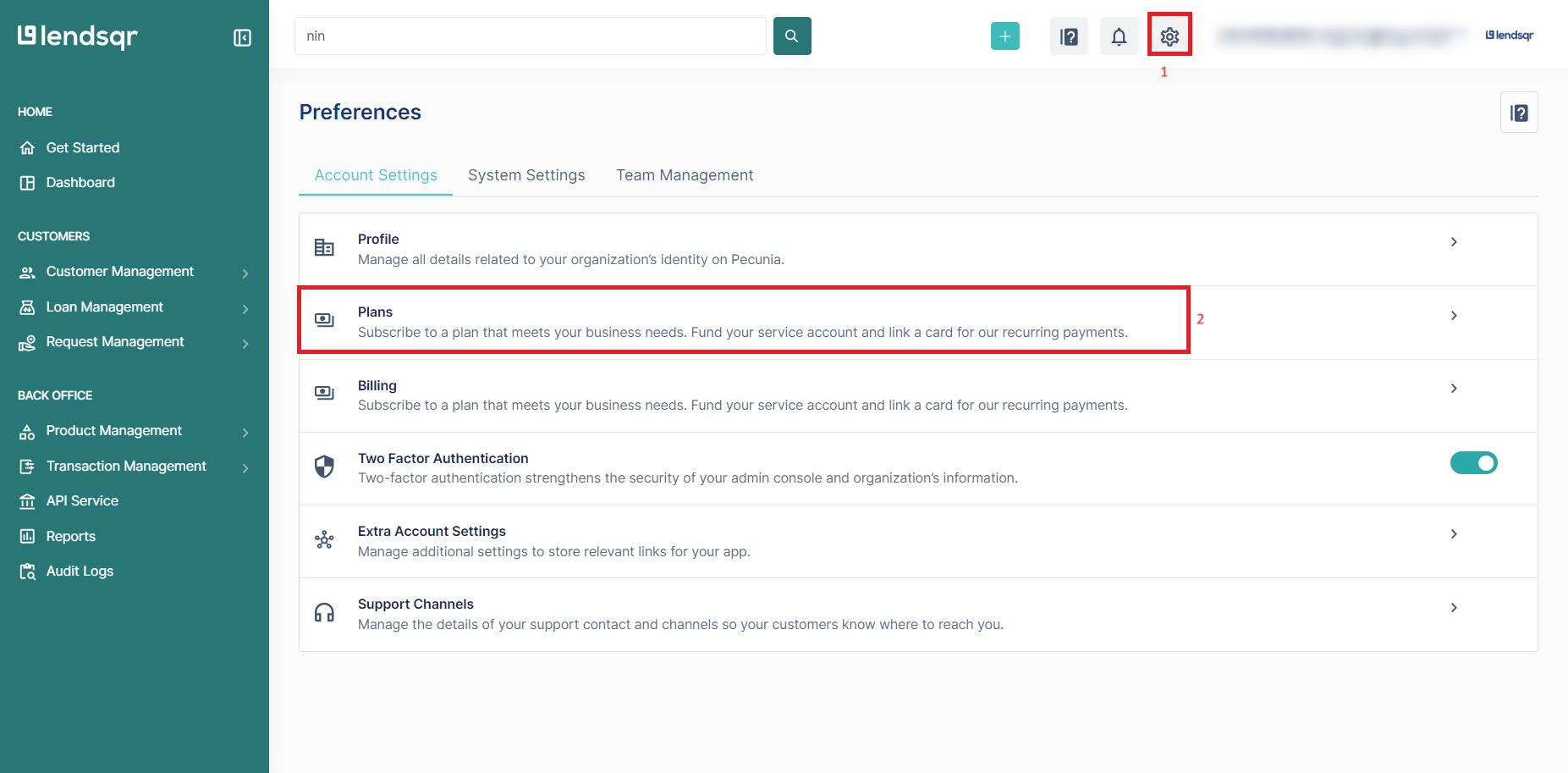
You can migrate from your current plan to any other preferred plan by following steps outlined below.
Step 1: Click the “Settings” icon
Locate and click the “Settings” icon in your Lendsqr admin console. This icon typically appears in the top navigation bar or main menu and provides access to all account configuration options. Clicking it opens the settings interface where you can manage various aspects of your account including billing, user permissions, integrations, and subscription plans.
Step 2: Click on “Plans”
Within the settings menu, look for the “Plans” option. This section specifically handles your subscription plan management including viewing your current plan details, comparing available plan tiers, and initiating plan changes. Click on “Plans” to access the subscription management interface where you will see your current plan highlighted along with other available plan options.
Step 3: Click on “Upgrade” to select your preferred subscription
Review the available subscription plans displayed on the screen. Each plan shows its features, pricing, and limits. Compare these against your current plan to understand what you will gain by upgrading or what you will lose by downgrading. When you have identified the plan you want to switch to, click on “Upgrade” next to that plan. The system will display a confirmation screen showing the cost of your new plan, when it will take effect, and what features will change. Review this information carefully before confirming the plan change.
To successfully upgrade or downgrade your subscription plan, your wallet balance must have sufficient funds to cover the cost of the selected plan. In addition to the plan fee, you are also required to maintain a minimum balance of 10,000 naira.
This minimum balance requirement ensures you have adequate funds to cover not just the subscription fee but also other operational charges that might occur. Credit bureau checks, SMS notifications, and other usage-based services continue regardless of your subscription tier, and the platform needs assurance that your account can cover these charges.
The minimum balance also serves as a buffer against billing failures. If your subscription fee is 25,000 naira but your balance sits at exactly 25,000 naira, any small charge that processes before the subscription renewal could drop your balance below the subscription cost, causing renewal failure. The 10,000 naira minimum prevents this scenario.
Also note that you will not be able to switch to a different plan if you have any outstanding bills on your current subscription. All previous dues must be fully settled before a new subscription can be activated.
This requirement maintains the integrity of the billing system and ensures lenders remain current on their financial obligations. Outstanding bills indicate payment issues that must be resolved before new financial commitments are accepted.
If you attempt a plan change with outstanding bills, the system will display an error message identifying what amounts remain unpaid. You must clear these outstanding charges by topping up your prepaid services wallet and allowing the pending bills to process. Once your account is current with no outstanding balances, you can retry your plan change.
Best practices for managing subscription plan changes
Successfully navigating subscription changes requires planning and awareness of how changes impact your operations.
Timing your plan changes strategically
Consider the timing of your plan changes relative to your billing cycle and business needs. If you know you will need premium features starting next month, initiate an upgrade a few days before you actually need the features. This provides a buffer for any unexpected issues and ensures the features are available when you need them.
For downgrades, carefully evaluate whether you can operate without the features you will lose. Consider implementing the downgrade a billing cycle before you absolutely must reduce costs. This gives you time to adjust workflows and identify any unexpected dependencies on features you thought you did not need.
Evaluating your actual feature usage
Before changing plans, audit your actual usage of current features. Many lenders pay for premium features they rarely or never use. Review your usage statistics for analytics tools, API calls, advanced reporting, and other premium capabilities. If usage is minimal, a downgrade might be appropriate even if your business has grown in other ways.
Conversely, before upgrading, confirm that premium features will actually address your needs. Request demos, review documentation, or ask support to confirm that the features you are paying extra for will solve your specific problems.
Preparing for feature changes
When downgrading, prepare for feature loss before the change takes effect. If you currently use advanced reporting that will disappear, extract and save important reports. If you use API integrations that will be restricted, develop alternative workflows. Proactive preparation prevents disruption when the downgrade activates.
When upgrading, plan how you will leverage new features. Simply having access to premium capabilities does not automatically improve your operations. Develop implementation plans for how you will use new features to drive business value and justify the increased cost.
Communicating plan changes to your team
If plan changes affect feature availability or user access, communicate these changes to your team in advance. Users who suddenly lose access to tools they depend on will be frustrated and unproductive. Advance notice allows them to prepare, identify alternative approaches, or raise concerns about critical feature losses before the change finalizes.
Monitoring costs after plan changes
After upgrading, monitor your costs closely to ensure the increased subscription fee delivers corresponding value. Track metrics like loans processed per month, time saved through premium features, revenue increases enabled by new capabilities, and other indicators that justify the higher cost.
After downgrading, monitor for operational impacts that might indicate the downgrade was premature. If you find yourself frequently hitting limits or lacking critical capabilities, you may need to upgrade again despite cost pressures.
Subscription plan flexibility is a valuable feature that allows your platform costs to scale with your business. By understanding how plan changes work, planning them strategically, and managing the transition carefully, you can optimize your Lendsqr investment while ensuring your team has the tools needed to operate effectively.