Access your Back Office at your fingertips.
Download the app now on Google Play Store.
Scan the QR code
You can also scan QR code with your phone to download the app.
Saving loan application drafts on the web app
One of the most important financial decisions people can make is making a loan application. But between gathering the right documents, double-checking figures, or simply stepping away mid-process because of work, family, or a dropped internet connection, completing loan applications in one sitting isn’t always realistic. That’s why we added the ‘Save & Continue Later‘ button to loan application modals to put borrowers back in control.
What is the ‘Save & Continue Later’ button for?
The ‘Save & Continue Later’ button is a user-friendly feature now available across all web apps powered by Lendsqr. It allows loan applicants to save their progress at any point during the loan application process. They can return to complete it at a more convenient time, without losing any details they’ve already filled in.
No more starting from scratch. No more frustration from interrupted sessions. Just a seamless, stress-free experience that respects the reality of your users’ lives.
How does it work during loan applications?
At Lendsqr, we have designed the experience to be as simple and intuitive as possible for borrowers using Lendsqr’s infrastructure.
Step 1: The borrower begins an application
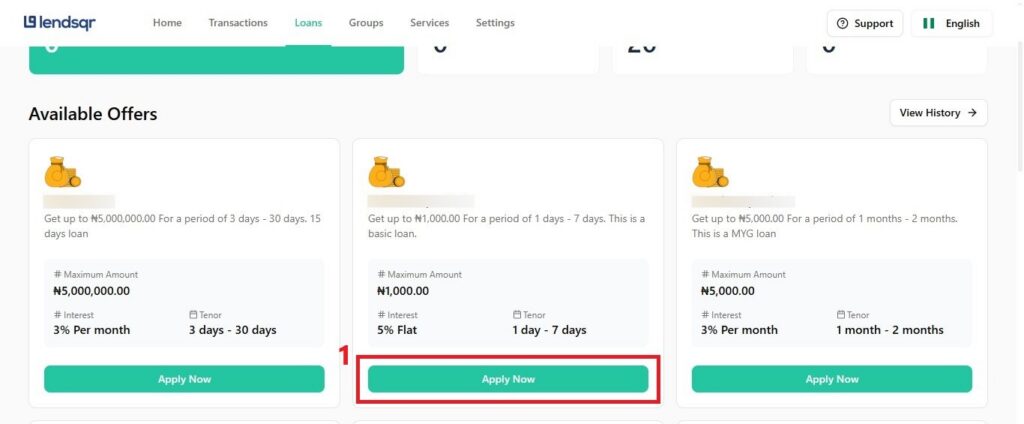
A user visits the web app, selects a loan product that suits their needs, and begins filling out their application by clicking on ‘Apply now’.
Step 2: Clicking “Save & Continue Later”
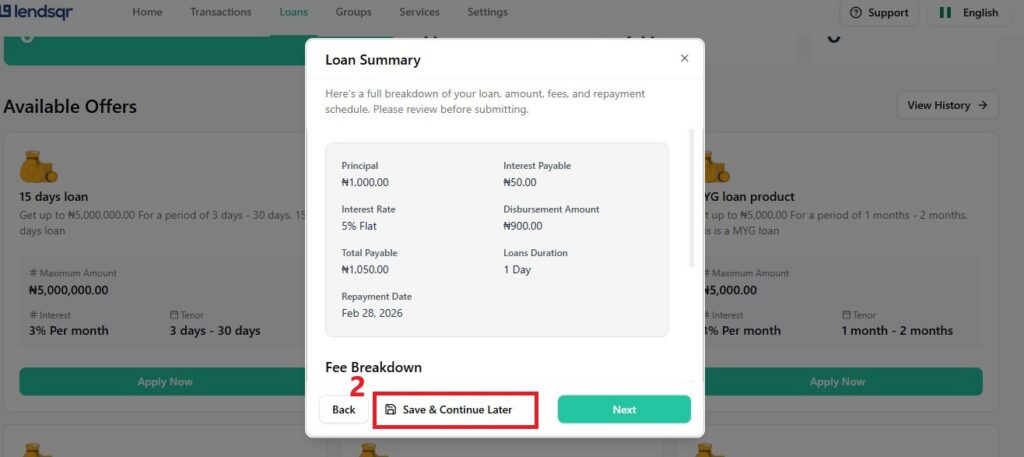
If, for any reason, a user needs to pause their loan application, the borrower will find a “Save & Continue Later” button at the bottom of the application modal. A single click saves the entire application as a draft. The system captures everything in this draft: the loan product the borrower selected, the amounts, the repayment schedule, and every field completed so far.
Step 3: Returning to the application
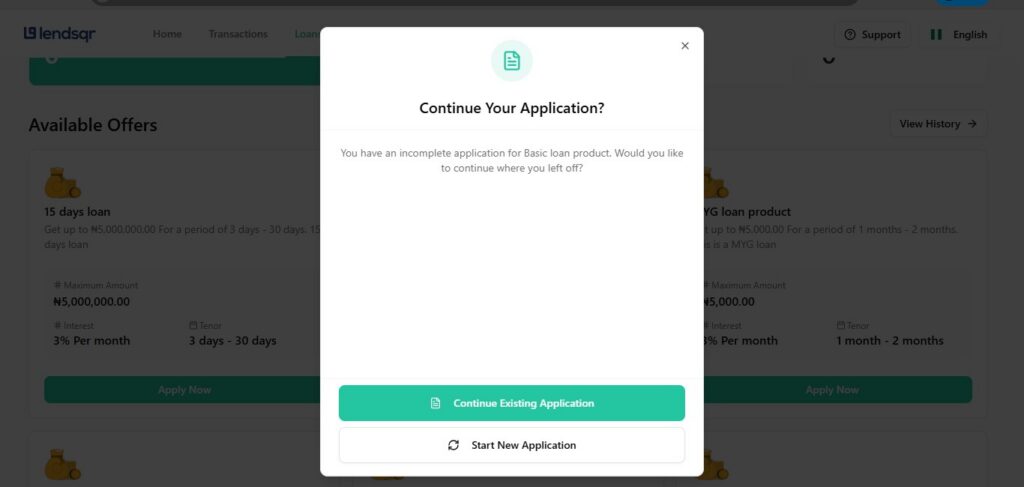
Borrowers who are ready to continue their application can simply return to the platform and click “Apply Now” on the same loan product. At this point, a modal dialogue appears with two clear options:
Continue existing application — The user can pick up exactly where they left off, resuming the loan application seamlessly.
Start new application — The user can start a fresh application from scratch. This is useful if the borrower’s financial situation or desired loan terms have changed since they saved the draft.
There are several reasons why this feature would supercharge your business as a lender. But the most important one is that financial needs evolve. A borrower who saved their application a week ago may have since received a salary, changed their repayment preference, or found a different loan product that better fits their needs. Giving them the choice to continue or start fresh ensures they’re never locked into a decision they’ve outgrown.
Lendsqr understands that the loan application journey rarely follows a straight line. Borrowers, especially in markets where mobile internet can be unreliable or where people juggle multiple responsibilities, often need to step away before they finish an application.
Without a save mechanism, users restart from scratch every time. That frustrates borrowers, kills conversion for lenders, and leaves real financial needs unmet. This feature eliminates that friction directly.
Lenders on the Lendsqr platform gain the following tangible benefits from this:
Higher completion rates: There are fewer drop-offs in loan applications. This could translate directly to more loan disbursements for you as a lender.
Better borrower trust: You could keep customers coming back with a smoother loan application flow.
Cleaner data: Borrowers who aren’t rushing and know they can return to their application would tend to submit more accurate, complete information.
Can all lenders powered by Lendsqr access this feature?
With this feature, users can now save loan applications on every web application powered by Lendsqr. Fintech startups, cooperative societies, microfinance institutions, and enterprise lenders on Lendsqr all get this feature for their borrowers immediately on their web apps. There are no extra configurations or additional costs attached to this feature.
We created this feature to move the needle on something that matters: borrower confidence during loan applications. When a user steps away because their baby is crying, their boss calls, or data runs out, they should not have to face the ordeal of returning to any of our web apps to start from scratch. They can now return, pick up exactly where they stopped, and complete the application on their own terms.
That reliability signals respect. Respect is what would build the kind of trust that turns first-time borrowers into long-term customers.
To understand how this feature works better, you can refer to this video guide: