Access your Back Office at your fingertips.
Download the app now on Google Play Store.
Scan the QR code
You can also scan QR code with your phone to download the app.
How to view users general details
Introduction
When managing customers on Lendsqr, it’s important to review their background and identity information before making lending decisions. To view users’ general details, a section exists on a user’s profile which provides a quick snapshot of their personal, financial, and guarantor-related information.
Step-by-step guide
Navigate to the Customer Management section on the admin console.
Click on a customer profile to open the details page.
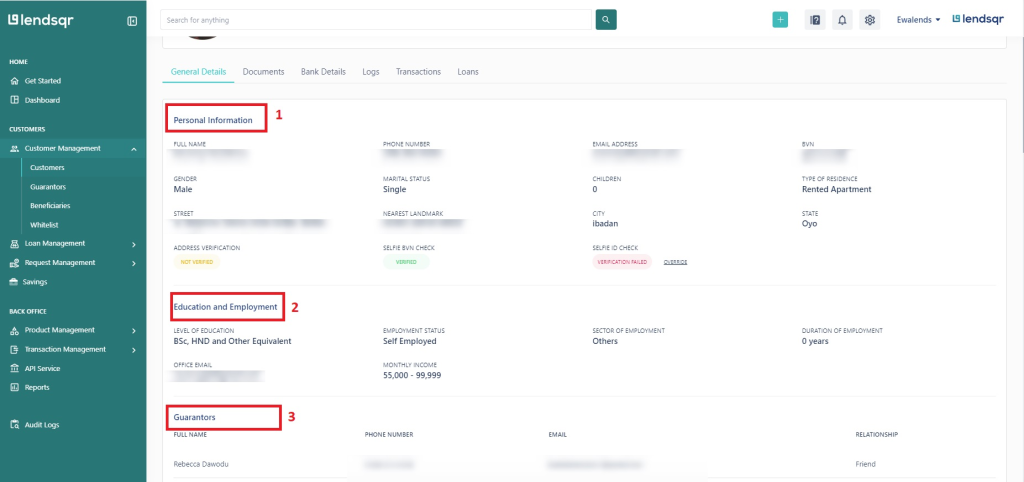
Select the General Details tab. Here, you’ll find three subsections:
1. Personal Information
This includes:
Phone number
Email address
Gender
Marital status
Number of children
2. Education and Employment
This section provides:
Highest level of education
Employment status
Office email
Monthly income
3. Guarantors
This contains a list of loan guarantors tied to the user. It’s especially useful for risk assessment and understanding fallback repayment options.
By reviewing the General Details tab, you can better understand your customer’s background, earning potential, and risk profile, all in one place.
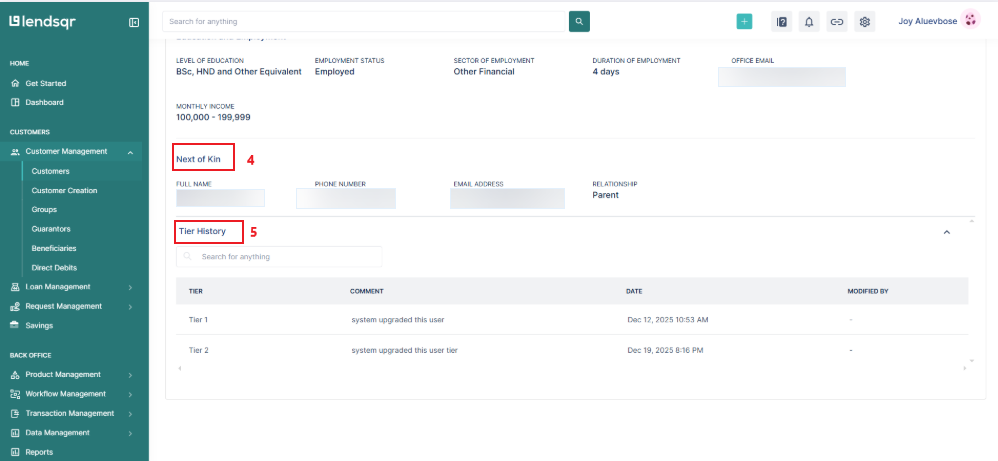
4. Next of kin
This contains details about a user’s next of kin. They help confirm a customer’s identity and assist if we need urgent communication. It includes:
Full name
Phone Number
Email Address
Relationship
5. Tier history
This contains information about a customer’s different tier levels at various points in time. It also indicates who upgraded the user’s tier level and when the upgrade occurred.Learn how to activate required documents here.