Access your Back Office at your fingertips.
Download the app now on Google Play Store.
Scan the QR code
You can also scan QR code with your phone to download the app.
How to use the Bulk collections feature on Lendsqr
Bulk collections give you a fast and efficient way to recover multiple loan or savings repayments at once. Instead of initiating collections one customer at a time, you can upload a single file containing all the entities that are due for repayment. The system automatically processes each collection, reducing manual effort, improving accuracy, and helping your team stay on top of repayment schedules. This feature is especially useful for lenders or organizations that manage high transaction volumes and want a seamless, automated way to collect from their users.
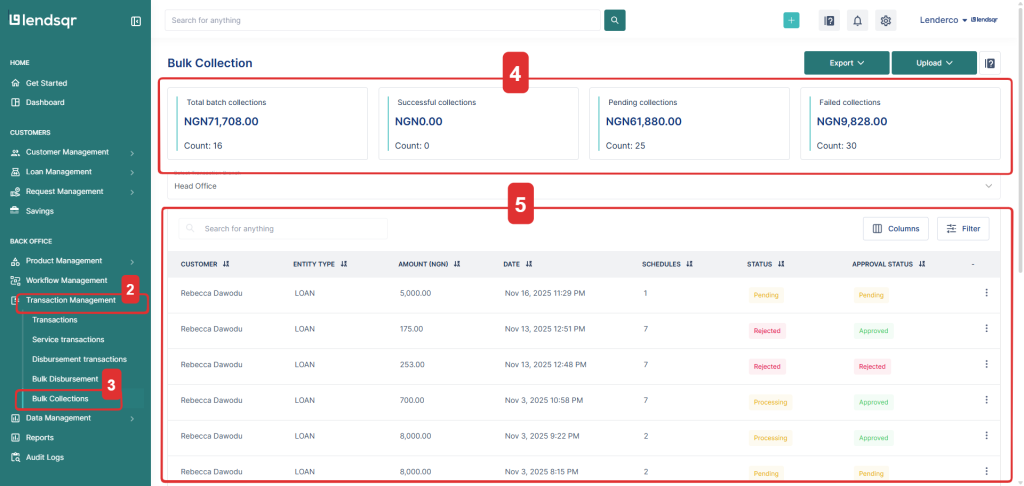
Navigate to Transaction management on the sidebar.
Click Bulk Collections.
You’ll see a summary section showing:
Total batch collections
Successful collections
Pending collections
Failed collections
Below the summary, you’ll find a list of all your uploaded entities along with their amounts, schedules and statuses.
How to upload entities for collection
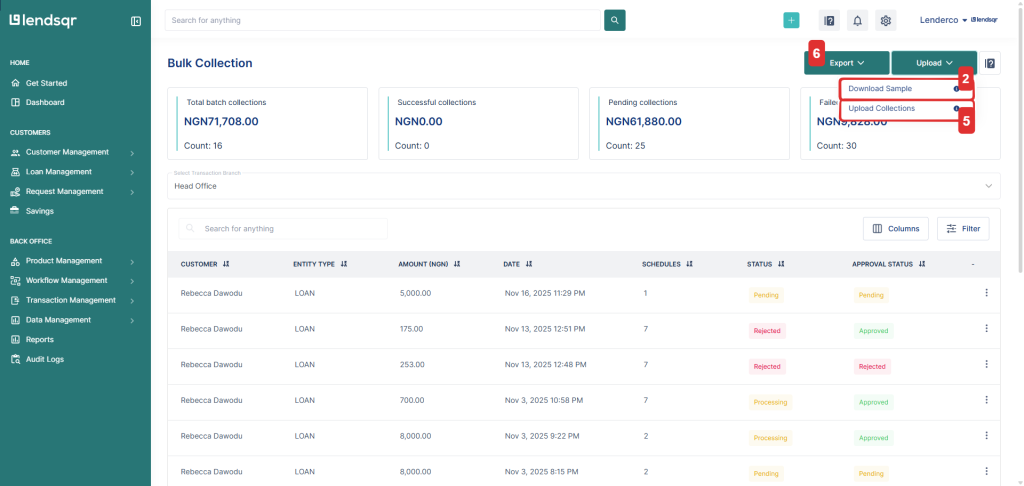
Click the upload button on the top right.
Download the sample template to view the required column structure.
Fill in your collection records following the template format.
Save the file as an Excel (.xlsx) format.
Upload the completed file.
You can also export bulk collections data at any time for record-keeping, reconciliation, or audit purposes.
If your organization uses an approval workflow, the collections will go through every approval step required before the collection is initiated.
If your organization does not use an approval workflow, the collection is initiated immediately from the user’s saved payment methods once the file is uploaded.
Bulk collections template fields
Your file must contain the following columns:
Field name
Description
external_entity_id
The ID of the specific savings or loan entity you want to collect from.
due_date
The due date for the collection.
external_entity_collection_id
A unique reference ID for the collection batch.
entity_type
The type of entity you are collecting from, for example: loan or savings.
user_id
The platform user ID associated with the customer.
amount
The amount to collect from the user.
description
A short note describing the collection.
Tips for a successful bulk collection upload
Make sure all required columns are included and properly filled.
Use unique collection IDs to avoid duplication errors.
Confirm that user IDs and entity IDs exist in your system before upload.
If a collection is rejected, review the error message, correct the data, and re-upload.
Always upload in xlsx (Excel) format to avoid formatting issues.